Best AI App Design Tools in 2026, Ranked by Coverage
The best AI app design tools in 2026: Mowgli for whole apps, UX Pilot for one journey, Google Stitch for free screens, and Figma Make for Figma teams.
Best AI app design tools in 2026: quick answer
Choose Mowgli for a whole multi-screen app from an idea or spec, UX Pilot for one complete journey with Figma handoff, Google Stitch for free screen-by-screen exploration, and Figma Make when your design system already lives in Figma. If you need running software with hosting, choose v0, Lovable or Bolt instead of a design tool.
The key distinction is the unit of output: a whole product, one journey, a batch, one screen or a running application. For a wider selection, see the best AI tools for product design.
This ranking includes tools that produce editable app screens. It excludes image generators that produce pictures instead of editable interfaces. It also separates design and prototyping tools from builders that generate hosted software.
We make Mowgli.
| Best for | Tool | The number that matters |
|---|---|---|
| Full-app design from a single idea | Mowgli | Spec first, then every screen and state (30+ screens and states) |
| One complete user journey, Figma handoff | UX Pilot | Autoflow generates every screen in a journey |
| Free, fast exploration of a look | Google Stitch | Free daily credits; 1 to 5 variations per screen |
| Your Figma design system in the output | Figma Make | Make kits sync libraries, npm packages and guidelines |
| A batch of screens a coding agent can drive | Flowstep | Up to 6 screens per prompt |
| Many visual directions, then a full flow from a PRD | Banani | Up to 5 variations per prompt; Agent mode for all screens |
| Drag-and-drop editing as a non-designer | Visily | 300 free AI credits a month |
| Prototyping on Miro boards | Uizard | Autodesigner now powers Miro Prototypes |
| A clickable prototype that is real code | Magic Patterns | Multi-page designs with real routes |
| A working app, not a design | v0, Lovable or Bolt | Hosting and deploys included |
How to choose: test coverage before features
Start with five measurable criteria.
First, count screens per generation. A tool may generate one screen, a batch, a complete journey or the whole product. Visual variants of the same screen do not count as distinct screens.
Second, inspect flows and states. Look beyond the default view for empty, loading, error, permission, limit and confirmation states. Check whether transitions connect the intended journey.
Third, identify the consistency mechanism. Depending on the tool, that may be a product spec, DESIGN.md, a theme or an imported design system.
Fourth, test editability. Ask how you will change the result: chat, direct canvas editing, code or a combination.
Fifth, verify the handoff. Confirm that the work can reach Figma, reusable components, GitHub, or Claude Code, Codex, Cursor or another coding agent through code export or MCP.
Submit the same brief to two tools:
A habit tracker mobile app for busy people who want to build small daily habits without the guilt. You pick a few habits (drink water, read 10 pages, stretch), check them off each day, and see your streaks and a calendar heatmap of your progress. Gentle reminders, a weekly review, and a small friends circle where you can share streaks and cheer each other on. Onboarding should help you pick your first 3 habits. It should feel calm, warm and motivating, not overly gamified.
Count distinct destinations such as sign-in, onboarding, home and settings. Inspect missing states and edge cases. Compare the first and last screens for consistent fonts, colors, spacing and navigation. Then request one global design change and see whether it reaches every applicable screen.
Finally, test the export route rather than trusting a feature label. Open the Figma file, inspect the components or connect the supported coding agent. Use the empty, error and loading state checklist and the guide to turning an app idea into user flows and a screen list during the comparison.
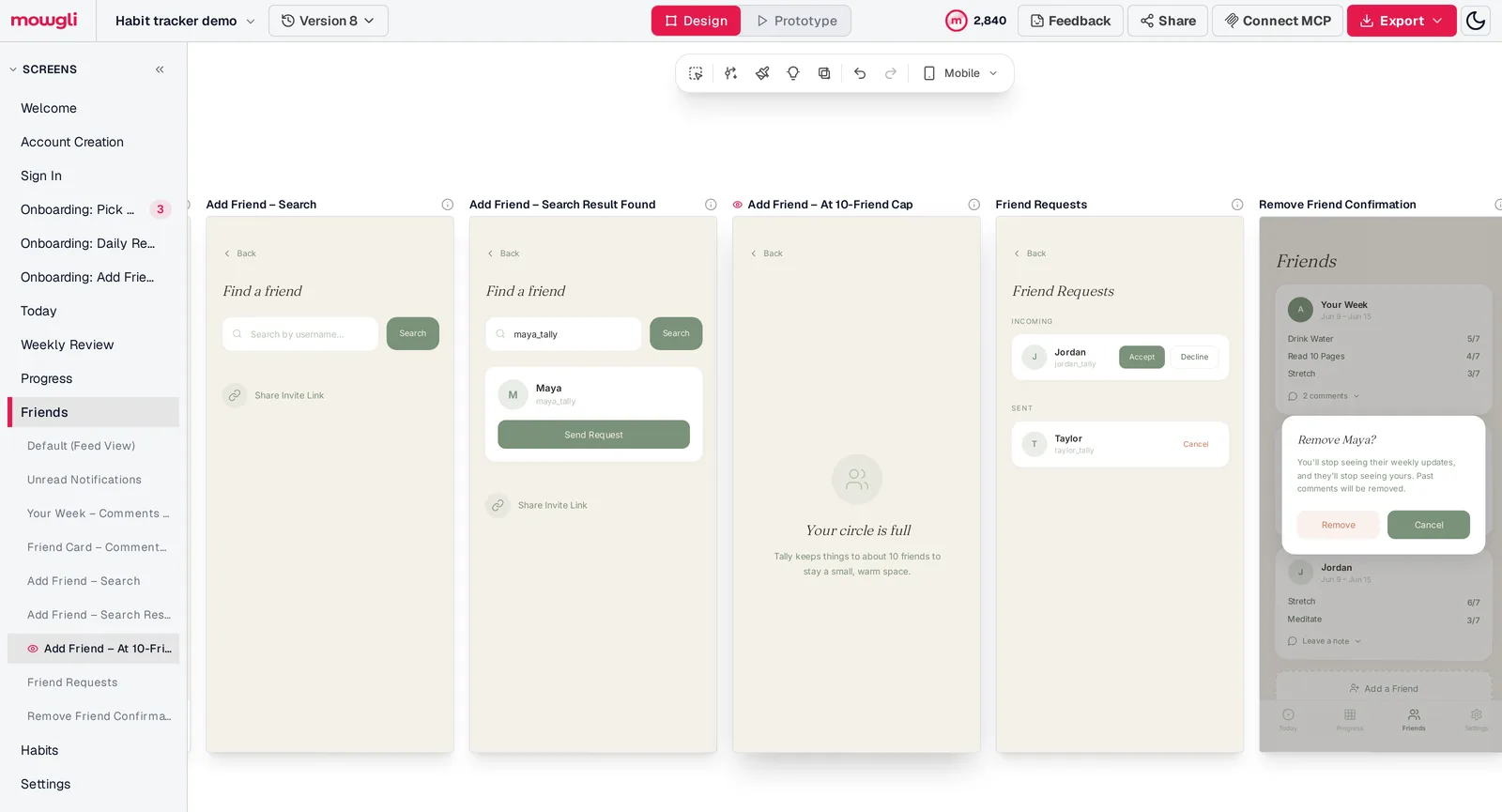
Caption: What "states" means in practice: five of the nine states Mowgli designed for one screen of the habit tracker, including a 10-friend limit and a confirmation dialog. Captured October 2026.
Ranking by how much of an app one generation designs
Tools that accept similar prompts can produce very different amounts of work. Rank them by their documented output, then choose the smallest unit that still covers your job.
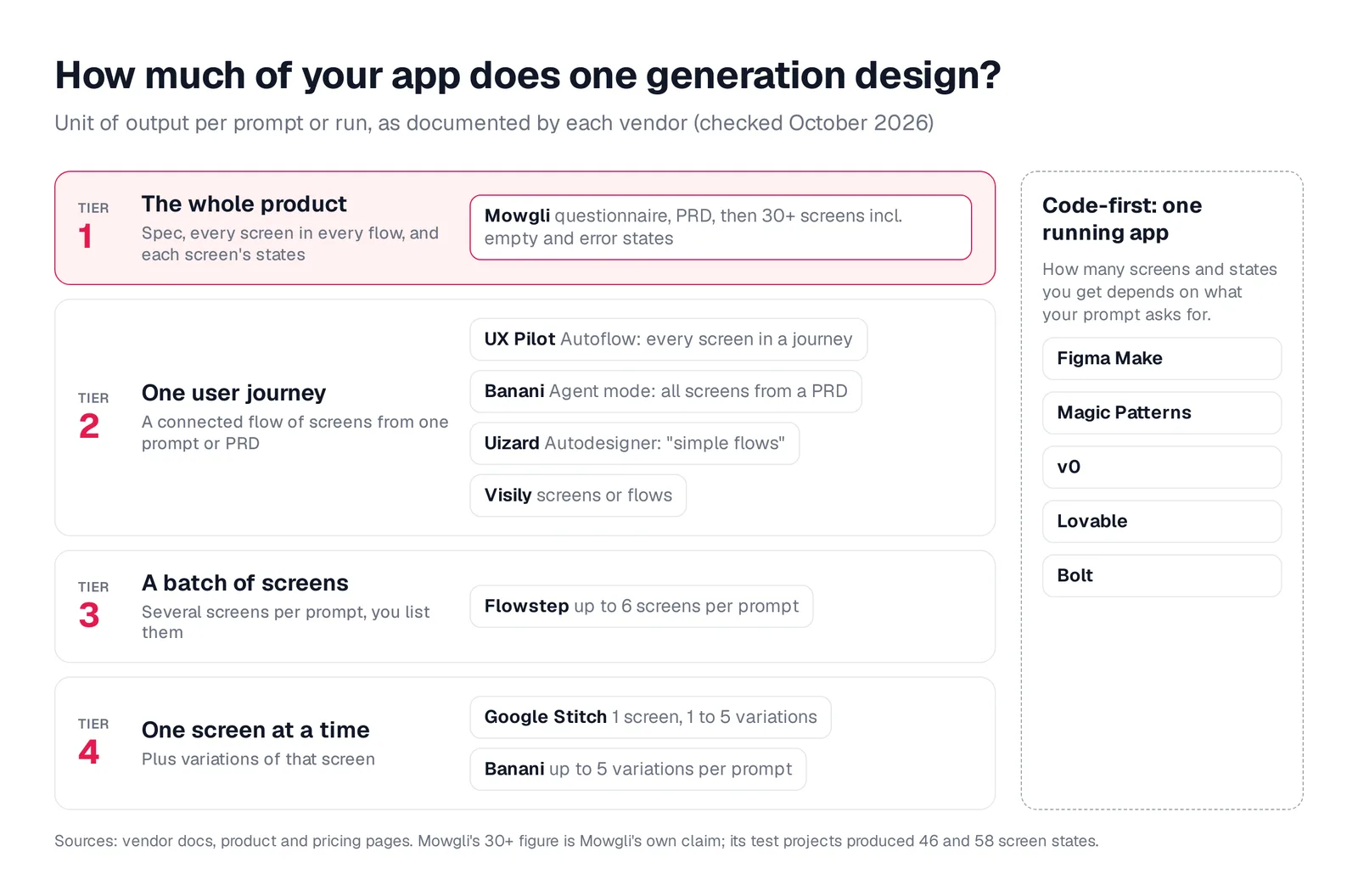
Caption: How much of your app one generation designs, by each vendor's documented unit of output. Original graphic based on vendor documentation.
| Tier | Tool | One generation designs | Flows and states | Consistency mechanism | Editing | Exports |
|---|---|---|---|---|---|---|
| 1 | Mowgli | Whole app from a spec (30+ screens and states) | Every flow; empty, loading, error states | Spec plus chosen theme | Chat | Figma, React + Tailwind, MCP |
| 2 | UX Pilot | Every screen in one journey (Autoflow) | Max Web Design adds states, edge cases | Figma component import | Section edit | Figma, code (paid) |
| 2 | Banani | All screens from a PRD (Agent mode, paid) | Multi-screen prototypes | Shared components | Chat, manual | Figma, HTML/CSS (paid), MCP |
| 2 | Uizard | Multi-screen project per prompt | "Simple flows" | Brand kit, themes | Drag-and-drop, chat | Images, PDF, per-component code |
| 2 | Visily | "UI screens or flows" | Auto-prototypes journeys | Themes, design instructions | Drag-and-drop, AI | Figma, code, MCP (paid) |
| 3 | Flowstep | Up to 6 screens per prompt | Auto-linked prototype | DESIGN.md guidelines | Chat, canvas | React + Tailwind, Figma, MCP |
| 4 | Google Stitch | One screen, plus 1 to 5 variations | Screens linked by hotspots | DESIGN.md | Chat, theme editor | Figma, HTML/CSS, MCP |
| Code | Figma Make | One prototype or web app | What you prompt for | Make kits | Prompt, point and edit | Publish, copy to Figma |
| Code | Magic Patterns | One multi-page design | What you prompt for | Your design system | Prompt, canvas | Figma, code, GitHub, MCP |
| Code | v0, Lovable, Bolt | One running app | What you prompt for | Your code | Prompt, code | Deploy, GitHub |
Best for designing a whole multi-screen app - Mowgli
Mowgli fits founders, PMs and developers who need an entire product designed from an idea or PRD. Its workflow starts with the product specification instead of asking you to plan each screen separately. It then designs every screen and state, covering 30+ screens and states.
You can describe an idea, import a Figma file or import an existing codebase through the agent skill or MCP. A guided questionnaire covers the audience, key flows and edge cases. The resulting PRD includes user journeys, constraints and a data model, and it stays synchronized with the design.
A moodboard presents 16+ styles and supports style steering. The selected direction applies across an infinite canvas containing every screen, including empty, error and loading states. You can revise the work through chat and image references, inspect version history and use an interactive click-through prototype.
The handoff options are native Figma, React + Tailwind or an AI-ready package. MCP, CLI and an agent skill connect the project to Claude Code, Codex, Cursor or another coding agent. Each screen is a React + Tailwind component with lucide-react icons and one state prop. The agent-visible files include SPEC.md, frontend.xml and one <ScreenId>.tsx file per screen.
A desktop cloud cost dashboard produced 13 screens in 58 states. Its output included loading, three empty states, partial data, role-based views and a connection error. A mobile habit tracker produced 12 screens in 46 states, including four errors such as "Username already taken" and four confirmation dialogs.
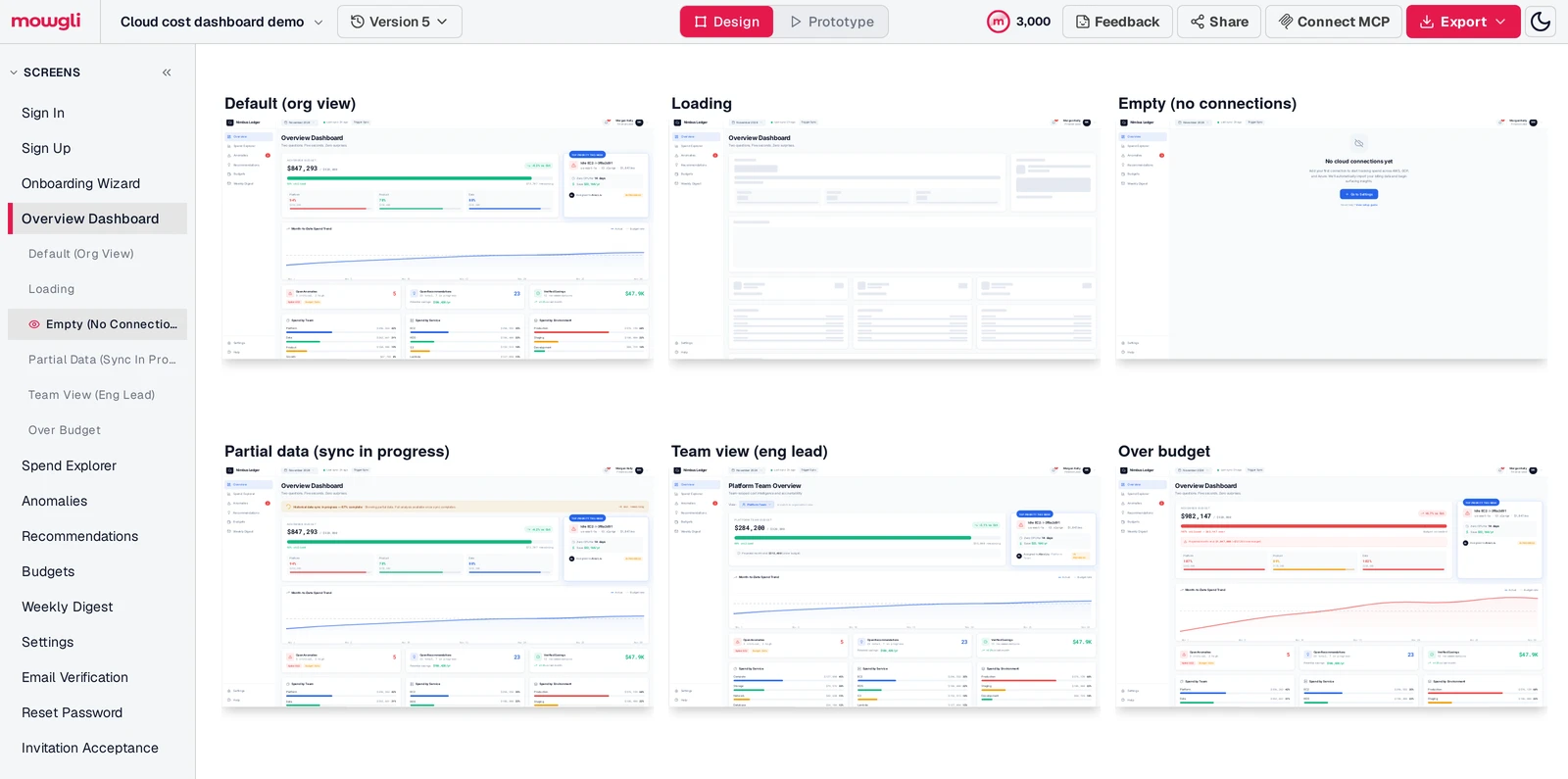
Caption: Composite from Mowgli's canvas: a cloud cost dashboard generated from one prompt and an 11-question questionnaire, with the six states of one screen. Captured October 2026.
Mowgli designs and prototypes; to host and ship, you hand off to a builder or coding agent (Claude Code, Codex, Cursor, Lovable).
Free to start (300 credits); credit packs from $12; plans from $15/mo. The free credits can produce a full wireframe app when you skip the moodboard and design-proposal step. Free access also covers the questionnaire, PRD, Figma import, version history and pushing an existing codebase through the agent skill or MCP.
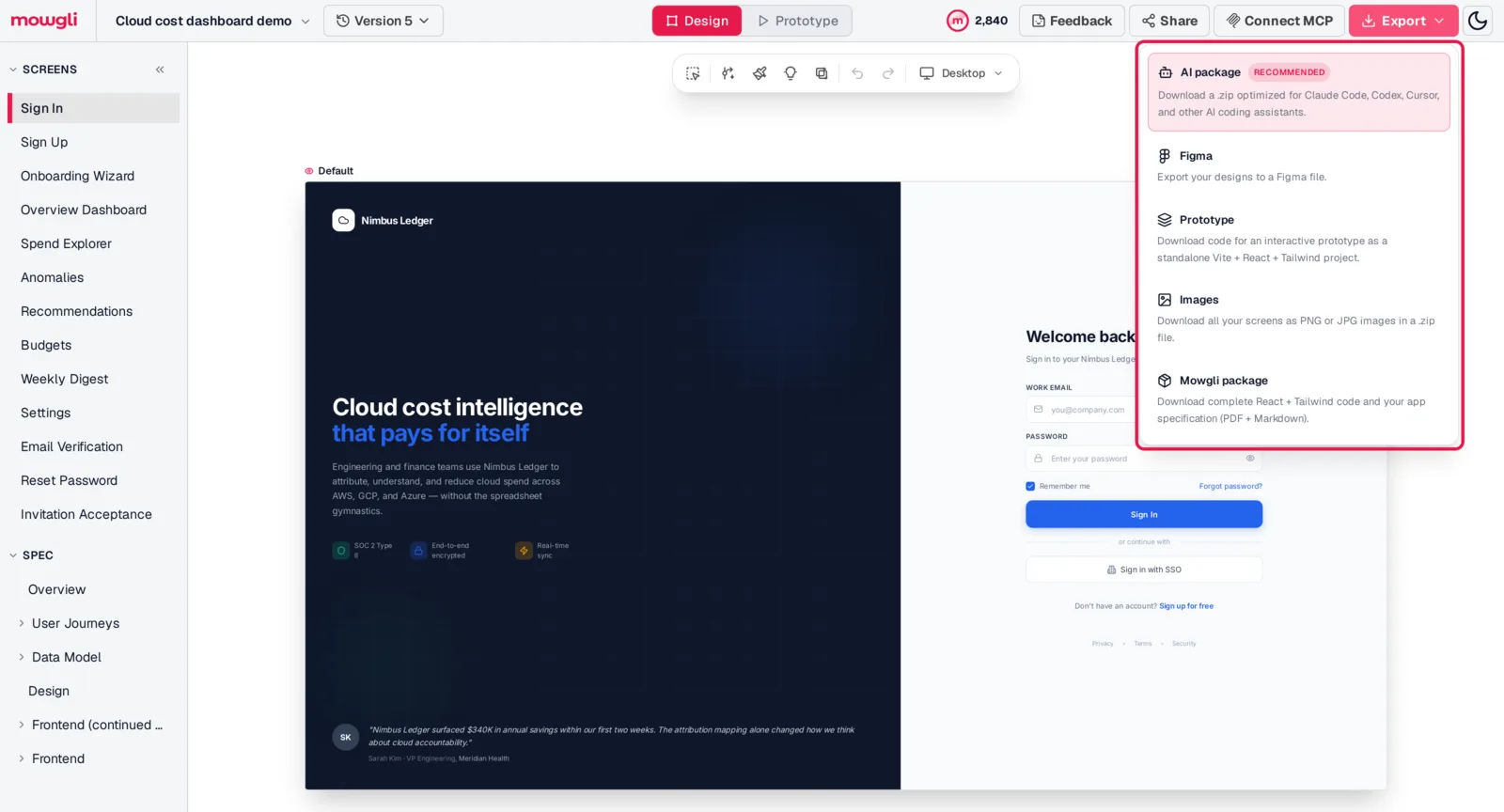
Caption: Mowgli's export options, highlighted. Captured October 2026.
Read more about AI design generation, Mowgli MCP and exporting designs to code.
Best for one complete user journey - UX Pilot
UX Pilot fits designers and PMs who want to generate a journey inside a Figma workflow. It accepts a prompt, sketch or imported PRD and offers a two-way Figma connection.
Autoflow can "Generate every screen in the UX journey." Max Web Design adds "depth, states, and product edge cases automatically." Figma component import is available on every plan, including Free.
The free plan provides up to 13 screens a day and 80 credits, but it allows one project and excludes Figma and code export. Pro supports up to 125 screens and 750 credits a month.
UX Pilot is free to try. Pro costs $19/mo billed yearly or $29 monthly. Teams costs $31/user/mo billed yearly. See the detailed UX Pilot and Mowgli comparison.
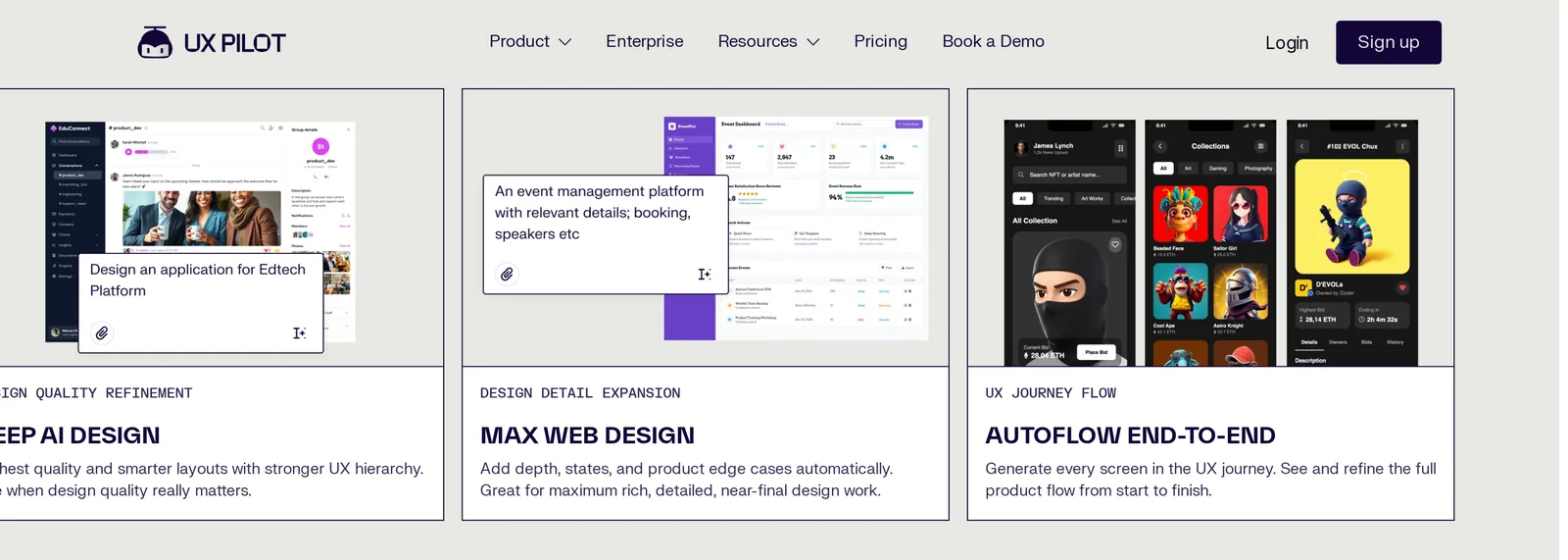
Caption: UX Pilot's Autoflow and Max Web Design modes. Source: UX Pilot website, captured October 2026.
Best prompt-to-screens tools
Banani - visual variations and PRD-driven flows
Banani fits early visual exploration followed by a complete flow. It accepts prompts, screenshots and PRDs, and can produce up to five screen variations per prompt.
Its paid Agent mode breaks a PRD into screens and uses shared components. You can edit through chat or manually, then connect screens into a multi-screen prototype. MCP for Claude Code, Cursor and Codex is available on all plans.
The free plan includes 12 monthly credits plus three daily credits, and a generation typically costs more than one credit. Agent mode requires Plus or Pro. Figma and HTML/CSS exports are paid, while design-system import is an Enterprise feature.
Plus costs $12/mo yearly or $20 monthly. Pro costs $30/mo yearly or $50 monthly and includes unlimited credits. See more Banani alternatives.
Uizard - multi-screen mockups on Miro boards
Uizard is part of Miro, and uizard.io directs new users to Miro Prototypes, "powered by Uizard." It suits existing Uizard users and teams making product decisions on Miro boards.
Autodesigner creates editable, multi-screen prototypes from one prompt. You can adjust them with a drag-and-drop editor and conversational component edits.
Uizard's guidance says Autodesigner does not reliably follow a requested number of screens or flows. It is designed for "simple flows." Project exports are images and PDF. React/CSS export works one component at a time, with no full-project export.
The free plan includes three AI generations a month. Pro costs $12/mo billed yearly, and Business costs $39/mo billed yearly. Read the Uizard 2026 overview or compare Uizard with Mowgli.
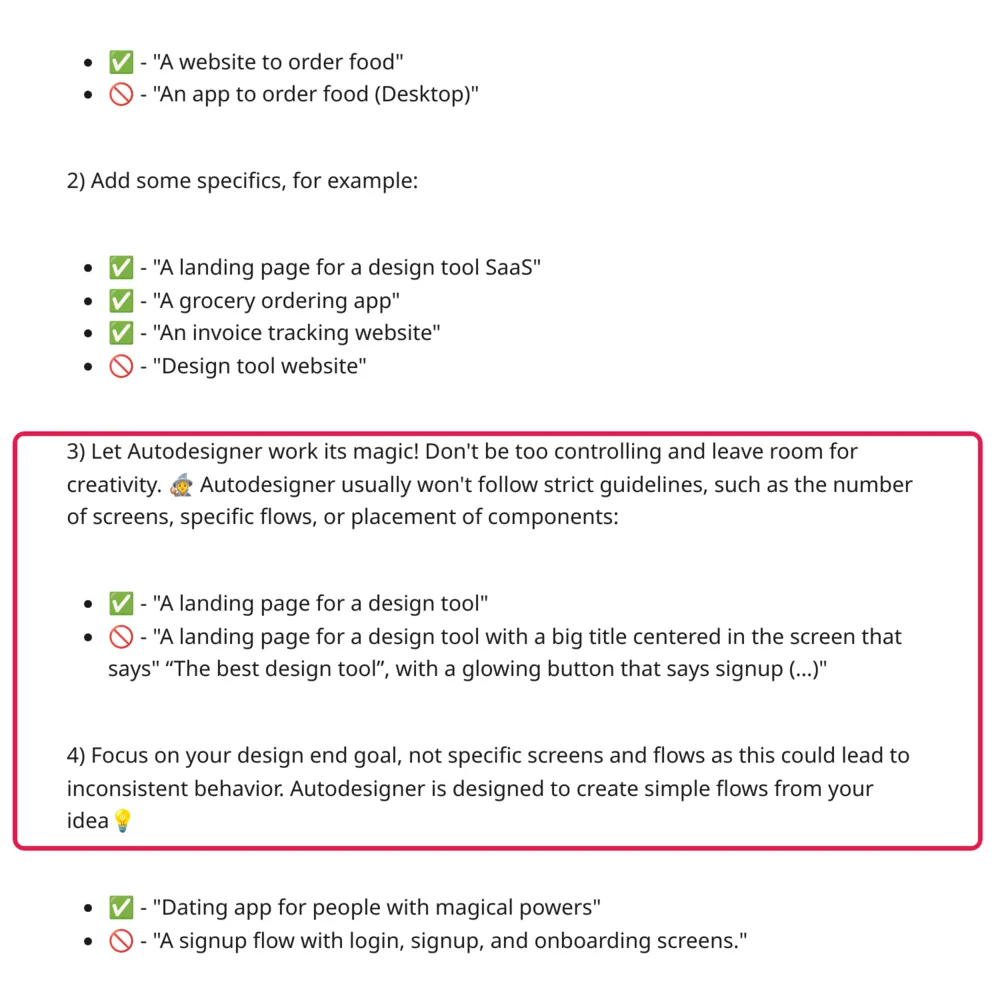
Caption: Uizard's own prompt guidance for Autodesigner, highlighted. Source: Uizard help center, captured October 2026.
Visily - AI drafts with drag-and-drop editing
Visily fits non-designers who want initial "UI screens or flows" followed by manual adjustment. It accepts text, screenshots or diagrams. AI can "automatically prototype full user journeys," while the editor supports drag-and-drop changes.
The free Starter plan includes 300 AI credits a month and two editable boards. Pro adds Figma import and export, code export and an MCP server. Vendor pages do not specify how many screens one generation creates.
Starter is free. Pro costs $14 per editor/month, and Business costs $29 per editor/month billed yearly.
Flowstep - up to six screens per prompt
Flowstep fits developers and design engineers who want a batch of screens that coding agents can inspect and build. It supports Cursor, Claude Code and Windsurf through MCP.
You can generate up to six screens from one prompt when you request them explicitly. DESIGN.md guidelines apply across generations and edits. Editing combines chat with a manual canvas. Flowstep can create an auto-linked prototype and export React + Tailwind with navigation wired between screens.
One screen is the default. Its documentation says "vague prompts typically return a single screen." Starter includes 80 messages a month.
Flowstep has a free plan with limited messages. Starter costs $15/month.
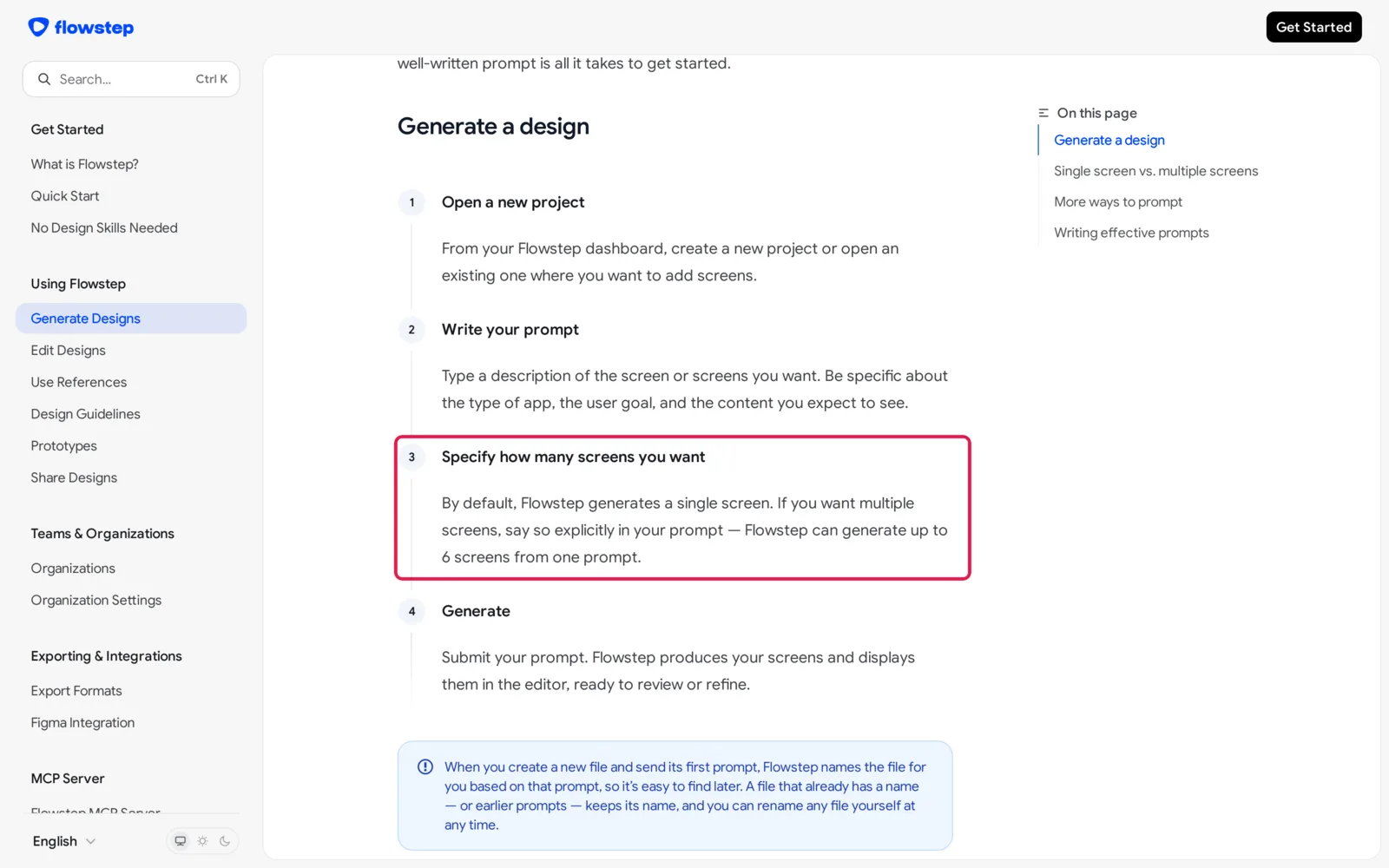
Caption: Flowstep's docs on screens per prompt, highlighted. Source: Flowstep docs, captured October 2026.
Google Stitch - free screen-by-screen exploration
Google Stitch is the best fit for testing visual directions for a small number of screens at no charge. The Google Labs AI design canvas accepts prompts, sketches and screenshots for mobile and web screens.
It provides free daily credits that reset at midnight UTC. You can generate one to five variations per screen, control the creative range and use a theme editor. DESIGN.md records the design system. Stitch also supports Figma export, HTML/CSS with Tailwind, MCP and hotspot-linked screens.
The prompting guide recommends screen-by-screen iteration with "one or two adjustments per prompt." Stitch is in beta, and its code output is HTML/CSS rather than components. It is free.
Read how to use Google Stitch for multi-screen apps or compare Google Stitch with Mowgli.
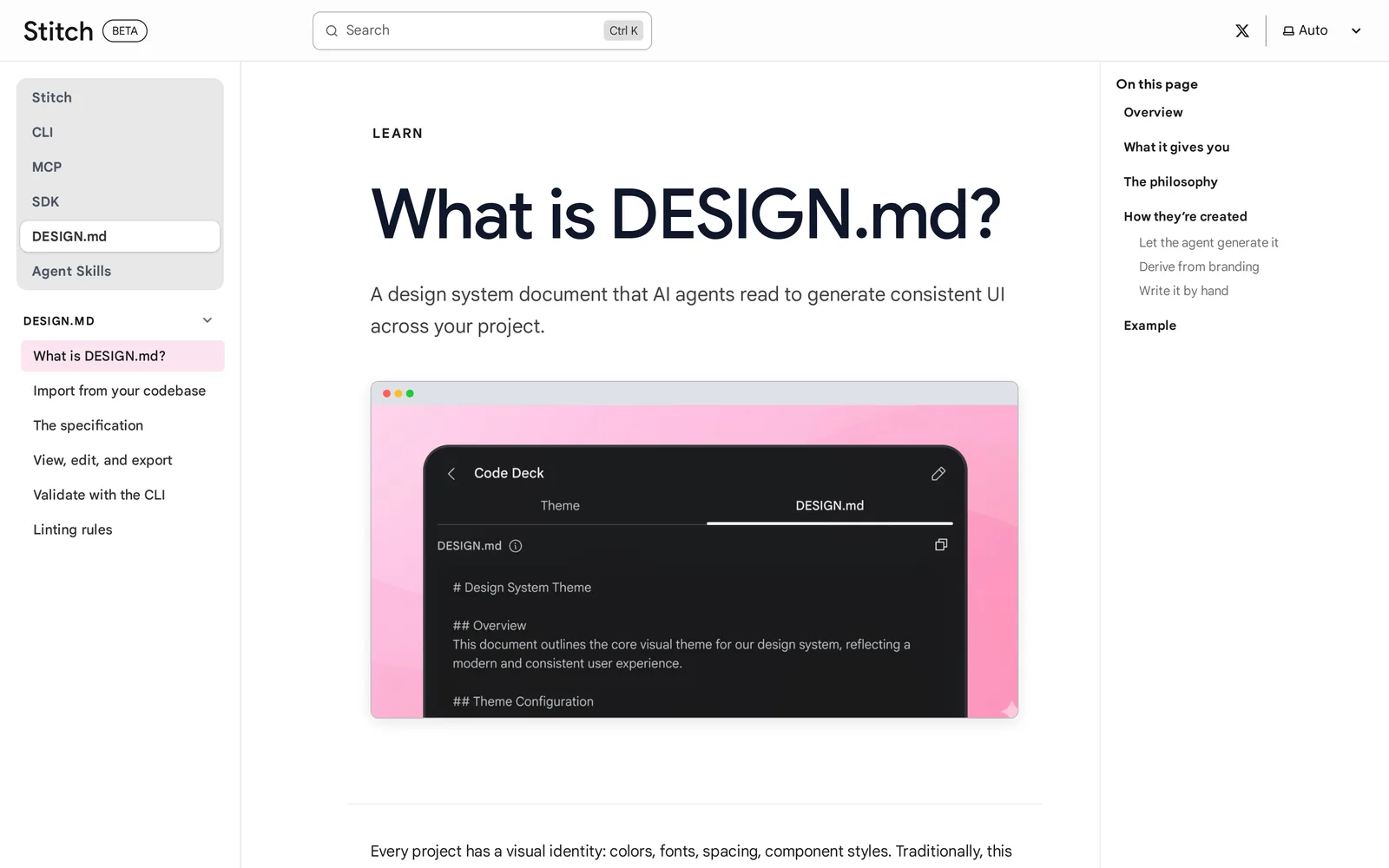
Caption: Stitch's DESIGN.md docs, its mechanism for keeping screens consistent. Source: Google Stitch docs, captured October 2026.
Best when the design system already lives in Figma - Figma Make
Figma Make fits teams with established Figma files, libraries and review workflows. It creates an interactive prototype or web app from a prompt plus design context.
Make kits synchronize npm packages, library styles and guidelines. Plan mode creates an editable plan before generation. You can publish the result to a URL and copy previews into Figma Design as layers.
Figma's help center says interfaces are copied from Make to the design canvas one at a time. AI usage is metered. Starter includes 150 AI credits a day, up to 500 a month. A Professional Full seat costs $16/mo yearly or $20 monthly and includes 3,000 AI credits a month.
See the full Figma Make and Mowgli comparison.
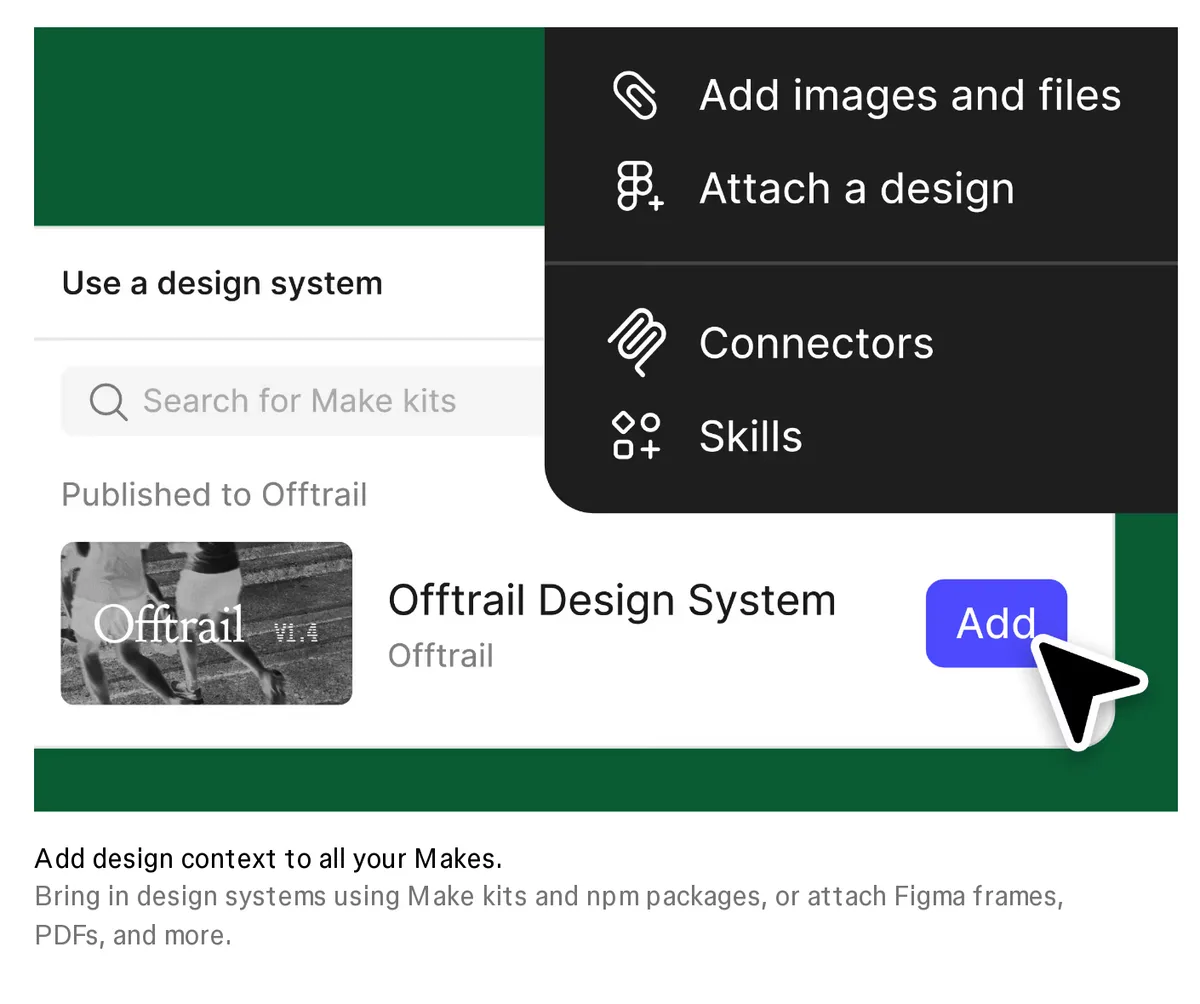
Caption: Figma Make's design-context options. Source: Figma website, captured October 2026.
Code-based prototypes and app builders
Magic Patterns - multi-page prototypes on a design system
Magic Patterns fits product teams testing features before engineering begins. It generates interactive, code-based prototypes with real routes and supports "as many pages as you want."
You can import a design system from Figma, GitHub, npm or a local folder. Handoff options include Figma export, code download, two-way GitHub sync and MCP. The resulting pages and routes depend on the supplied prompt.
The free plan includes monthly credits. Starter costs $17/seat/mo yearly or $20 monthly and includes 1,000 credits. Business costs $85/seat/mo yearly. Extra credits cost $0.02 each.
v0, Lovable and Bolt - choose these for running software
v0, Lovable and Bolt generate working apps rather than design canvases. Hosting and deployment are included, and screen coverage follows what you request in the prompt. Choose this category when your immediate goal is shipping a running application.
| Builder | Free plan | Paid from |
|---|---|---|
| v0 | 7 messages a day, $5 one-time credits | Plus $30/user/month |
| Lovable | 5 daily credits, up to 30 a month | Pro $25/month (100 credits) |
| Bolt | 1M tokens a month (300K a day) | Pro $25/month (10M tokens) |
For a design-led workflow, decide every screen and state before implementation. Then transfer the result to a builder or to Claude Code, Codex or Cursor through code export or MCP. Mowgli, Flowstep, Magic Patterns and Stitch provide relevant handoff routes.
See the detailed comparison of Lovable, Bolt and v0 for app design.
Pricing and export comparison
Prices are from each vendor's pricing page, October 2026.
| Tool | Free plan | Paid from | Figma | Code export |
|---|---|---|---|---|
| Mowgli | 300 credits | Packs from $12; plans $15/mo | Import and export | React + Tailwind, MCP |
| UX Pilot | 80 credits a day | $19/mo yearly | Plugin; export paid | Paid |
| Banani | 12 credits/mo + 3/day | $12/mo yearly | Export paid | HTML/CSS (paid), MCP |
| Uizard | 3 AI generations/mo | $12/mo yearly | - | React/CSS per component |
| Visily | 300 AI credits/mo | $14/editor/mo | Import and export (paid) | Paid |
| Flowstep | Limited messages | $15/mo | Copy to Figma | React + Tailwind (paid) |
| Google Stitch | Free, daily credits | Free | Export | HTML/CSS |
| Figma Make | 500 AI credits/mo | $16/mo yearly | Native | Code in Make |
| Magic Patterns | Monthly credits | $17/seat/mo yearly | Import and export | Download, GitHub, MCP |
"-" means the vendor's pages do not list the feature.
For more detail, compare AI design tool pricing and limits and AI design tools that export React and Tailwind.
Verdict by job
Choose based on the artifact you need.
For a whole product from an idea or PRD, choose Mowgli. It starts with the spec, designs every flow, screen and state, and hands off to Figma, React + Tailwind, Claude Code, Codex or Cursor.
For one complete journey in a Figma workflow, choose UX Pilot Autoflow. For free visual exploration, use Google Stitch. For output grounded in an existing Figma design system, choose Figma Make.
Choose Banani when you want several visual directions followed by a PRD-based flow. Choose Flowstep for a batch of up to six screens in a coding-agent workflow. Choose v0, Lovable or Bolt when the required output is a running, hosted application.
You can also turn a PRD into a full set of screens.
FAQ
What is the best AI app design tool in 2026?
Mowgli is the best fit for designing a complete multi-screen app from one idea or PRD. Choose UX Pilot for one journey, Google Stitch for free screens and Figma Make for Figma-centered teams. Use v0, Lovable or Bolt when you need a running app.
Can AI design a whole app instead of one screen?
Yes, AI can design a whole app instead of one screen. Mowgli writes a spec and generates every screen and state, covering 30+ screens and states. UX Pilot Autoflow covers every screen in one journey, while Banani Agent mode generates all screens from a PRD.
Which AI tool turns an app idea into a full UI design?
Mowgli turns an app idea into a full UI design through a questionnaire, PRD, theme selection and whole-product generation on one canvas. Example outputs include 12 screens in 46 states for a habit tracker and 13 screens in 58 states for a cloud cost dashboard. You can also generate app mockups from a description.
Is there a free AI app design tool?
Yes, several AI app design tools have free access. Google Stitch is free with a daily credit limit. Visily provides 300 free AI credits a month, UX Pilot provides 80 credits a day, and Mowgli is free to start with 300 credits.
Which AI design tools generate empty, error and loading states?
Mowgli includes empty, loading and error states in its full-app generation. UX Pilot Max Web Design adds states and edge cases. With other prompt-to-screen tools, include each required state explicitly in the prompt.
Should I use an AI design tool or Lovable, Bolt or v0?
Use an AI design tool when you need to define screens, flows, states and visual rules. Use Lovable, Bolt or v0 when your goal is working, hosted software. A combined workflow designs the product first, then hands it off through code, Figma or MCP.
Sources
- Mowgli
- Mowgli app
- Mowgli pricing
- AI design generation
- Export to code
- Mowgli MCP
- PRD to designs
- App mockups
- UX Pilot comparison
- Uizard comparison
- Google Stitch comparison
- Figma Make comparison
- Best AI tools for product design
- Banani alternatives
- Uizard in 2026
- Google Stitch multi-screen consistency
- Lovable vs Bolt vs v0
- AI design tool pricing and limits
- AI design tools that export React and Tailwind
- Empty, error and loading states
- App idea to user flows and screens
- UX Pilot
- UX Pilot plans
- Banani pricing
- Banani AI UI Agent
- Banani text-to-UI generator
- Uizard Autodesigner
- Uizard pricing
- Uizard Autodesigner guide
- Uizard project exports
- Miro Prototypes
- Visily AI UI design generator
- Visily pricing
- Flowstep design generation
- Flowstep design guidelines
- Flowstep export formats
- Flowstep pricing
- Google Stitch
- Google Stitch variants
- Google Stitch prompting
- Google Stitch DESIGN.md
- Figma Make
- Explore Figma Make
- Figma pricing
- Magic Patterns pages
- Magic Patterns exports
- Magic Patterns pricing
- v0 pricing
- Lovable subscription plans
- Bolt pricing