Best MCP Servers for UI Design (2026): Read, Make, Verify
Use Figma MCP to read designs, shadcn MCP for components, Mowgli or Stitch to generate screens, and Playwright MCP to verify the build.
Best MCP servers for UI design: quick answer
Choose MCP servers by job, not as one universal winner. Use Figma MCP, Framelink or Penpot to read an existing design. Use shadcn MCP or 21st MCP to supply real components. Use Mowgli for a whole multi-screen product, or Google Stitch MCP and Flowstep MCP for individual screens. Finish with Playwright MCP for visual verification or Chrome DevTools MCP for console, network and performance checks.
Your default stack needs one design source or reader, one component source where useful, and one verification tool. A reader cannot supply screens that nobody has designed.
We make Mowgli.
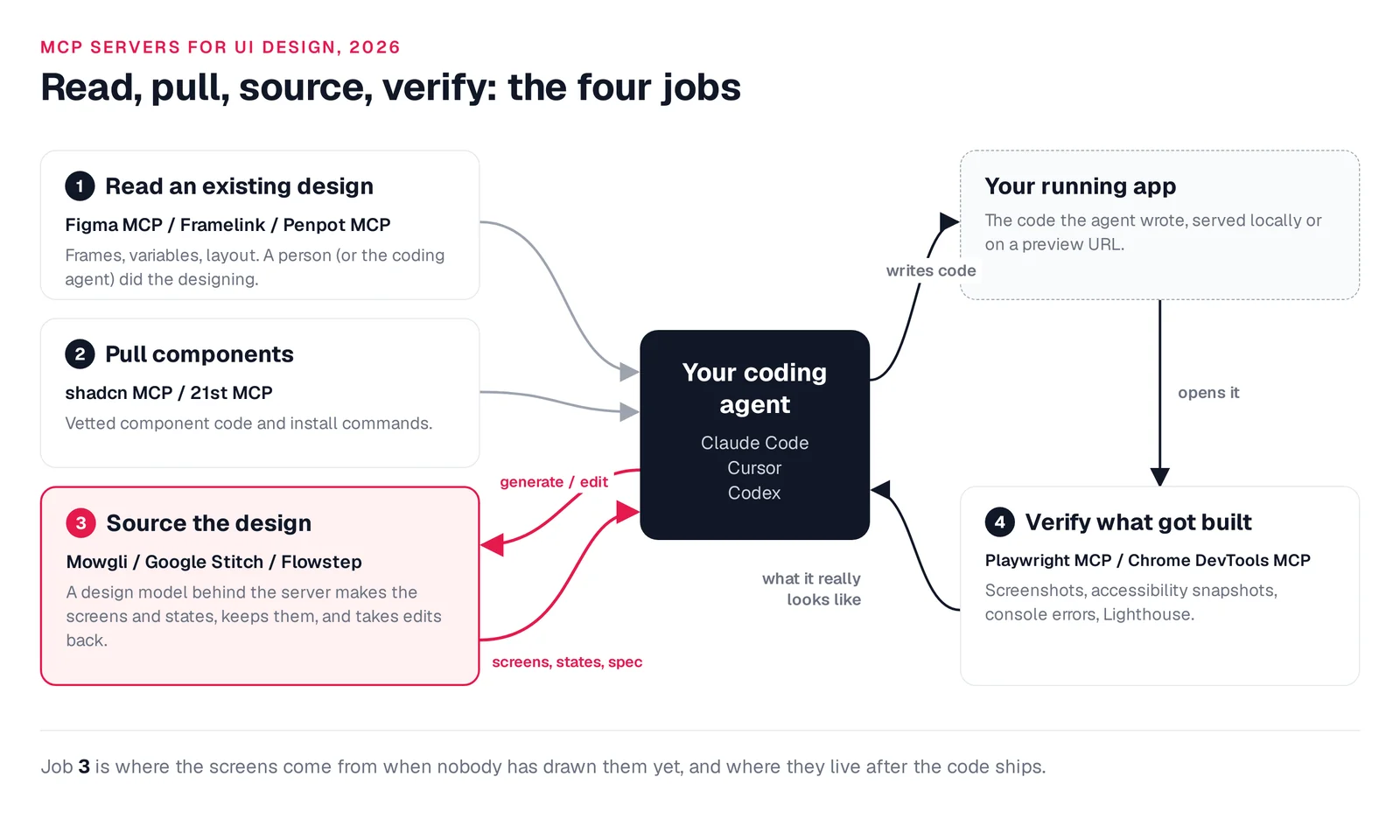
Caption: The four MCP jobs; design-source servers handle projects with no existing screens.
Quick picks
| If you need... | Pick | Runner-up | Why |
|---|---|---|---|
| A whole app, every screen and state | Mowgli | Google Stitch MCP | Spec, screens and states, synced with code |
| Turn Figma frames into code | Figma MCP server | Framelink | Official; reads variables and Code Connect |
| Read an open-source design file | Penpot MCP | - | Hosted server for Penpot files |
| Real components, not invented JSX | shadcn MCP | 21st MCP | Installs from your project's registries |
| Free screen generation in your IDE | Google Stitch MCP | Flowstep | Free with a daily credit limit |
| See the UI a coding agent built | Playwright MCP | Chrome DevTools MCP | Screenshots and accessibility snapshots |
| Console and performance checks | Chrome DevTools MCP | Playwright MCP | Lighthouse, traces, console messages |
What is a design MCP server?
A design MCP server gives Claude Code, Codex, Cursor or another coding agent structured access to design work. Depending on the server, that can include frames, tokens, components, generated screens, browser renders and verification data. This is more structured than pasting screenshots into a chat.
The important split is reader versus maker. Figma's remote server reads existing work, although use_figma can also write to its canvas. Penpot lets an agent operate through its Plugin API. Mowgli, Stitch and Flowstep put a design model behind the tool call and retain the result in a design project.
Ask two questions before installing anything:
- Who performs the design work?
- Where does the design live afterward?
As Flowstep puts it, "the difference is where the output lives."
Servers that read an existing design
Readers fit teams whose screens already exist. Pair one with a component source and a verification server when the implementation needs both reusable UI and visual checks.
Figma MCP server: best when your design lives in Figma
Figma's official server provides frame context as React and Tailwind by default. It exposes variables, screenshots and Code Connect mappings, creates frames and auto layout, and can capture a running web app through generate_figma_design.
It fits front-end implementation from designer-created frames and teams with established design systems. Variables and Code Connect help the coding agent reuse mapped components. Write-to-canvas works from Claude Code, Codex, Cursor and eight other clients.
The limits matter. View and Collab seats, plus Starter, receive up to 20 tool calls per month. Dev and Full seats receive 200 calls per day. Professional permits 10 calls per minute, while Organization permits 15. Enterprise receives 600 calls per day.
Writing requires a Full seat. Write responses are limited to 20 KB and do not yet support image assets or custom fonts. Remote connections require a frame link instead of the current selection, and clients must appear in Figma's MCP Catalog. Access is included with Figma plans.
# Claude Code (or: claude plugin install figma@claude-plugins-official)
claude mcp add --transport http figma https://mcp.figma.com/mcp
# Codex
codex mcp add figma --url https://mcp.figma.com/mcp
# Cursor: type /add-plugin figma in agent chat
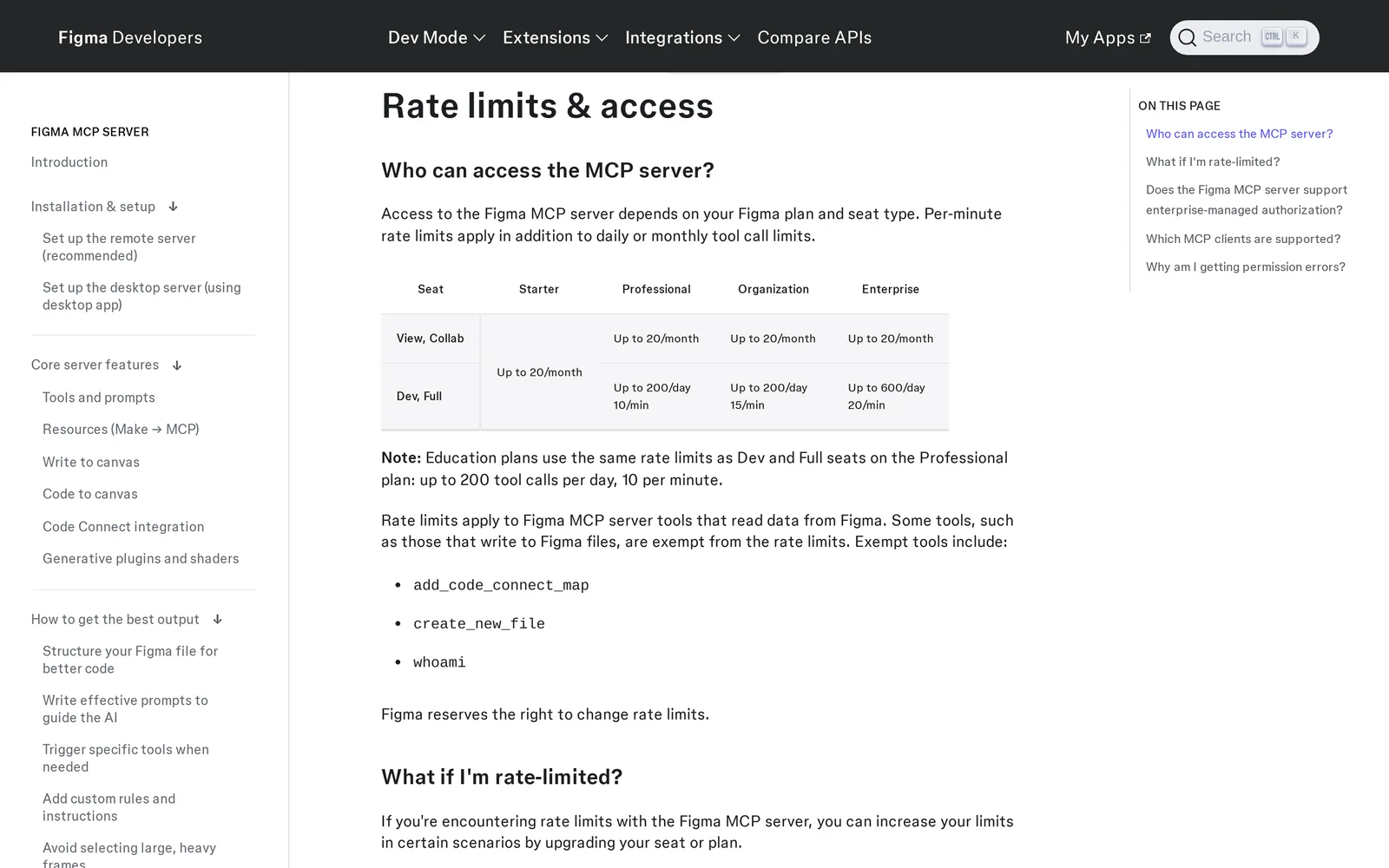
Caption: Figma MCP limits by seat and plan; source captured October 2026.
See Getting designs into Cursor or the Figma to Claude Code workflow.
Framelink MCP for Figma: best for lean Figma context
Framelink is an open-source, read-only Figma server. Give it a Figma link and it uses the REST API while reducing the response to relevant layout and styling information. This makes it useful when you want compact Figma context in Cursor.
It requires a Figma personal access token and remains subject to Figma REST limits: monthly limits for View and Collab seats, and per-minute limits for Dev and Full seats. It is free and MIT-licensed.
{
  "mcpServers": {
    "Framelink MCP for Figma": {
      "command": "npx",
      "args": ["-y", "figma-developer-mcp", "--figma-api-key=YOUR-KEY", "--stdio"]
    }
  }
}
Penpot MCP: best for open-source design teams
Penpot's official server has five tools, including execute_code and export_shape. An agent can create, move, restyle and delete elements on the focused page.
Enable it through Your account -> Integrations -> MCP Server. The Penpot tab and plugin must remain open, and the connection works with one focused page, one tab and one MCP key per user. Penpot is open source, and its documentation lists no MCP plan requirement.
npx -y add-mcp -g -n penpot "https://design.penpot.app/mcp/stream?userToken=YOUR_MCP_KEY"
Servers that supply real components
Component servers prevent improvised component markup. They supplement an existing-design reader or design source; they do not replace complete screen design.
shadcn MCP: best for React projects using shadcn/ui
shadcn MCP can browse, search and install components from the shadcn registry, third-party registries and private company registries declared in components.json. It fits React and Tailwind projects already using shadcn/ui.
It requires a valid components.json and supplies components rather than screens. It is free and MIT-licensed.
# Claude Code
pnpm dlx shadcn@latest mcp init --client claude
# Codex: ~/.codex/config.toml
[mcp_servers.shadcn]
command = "npx"
args = ["shadcn@latest", "mcp"]
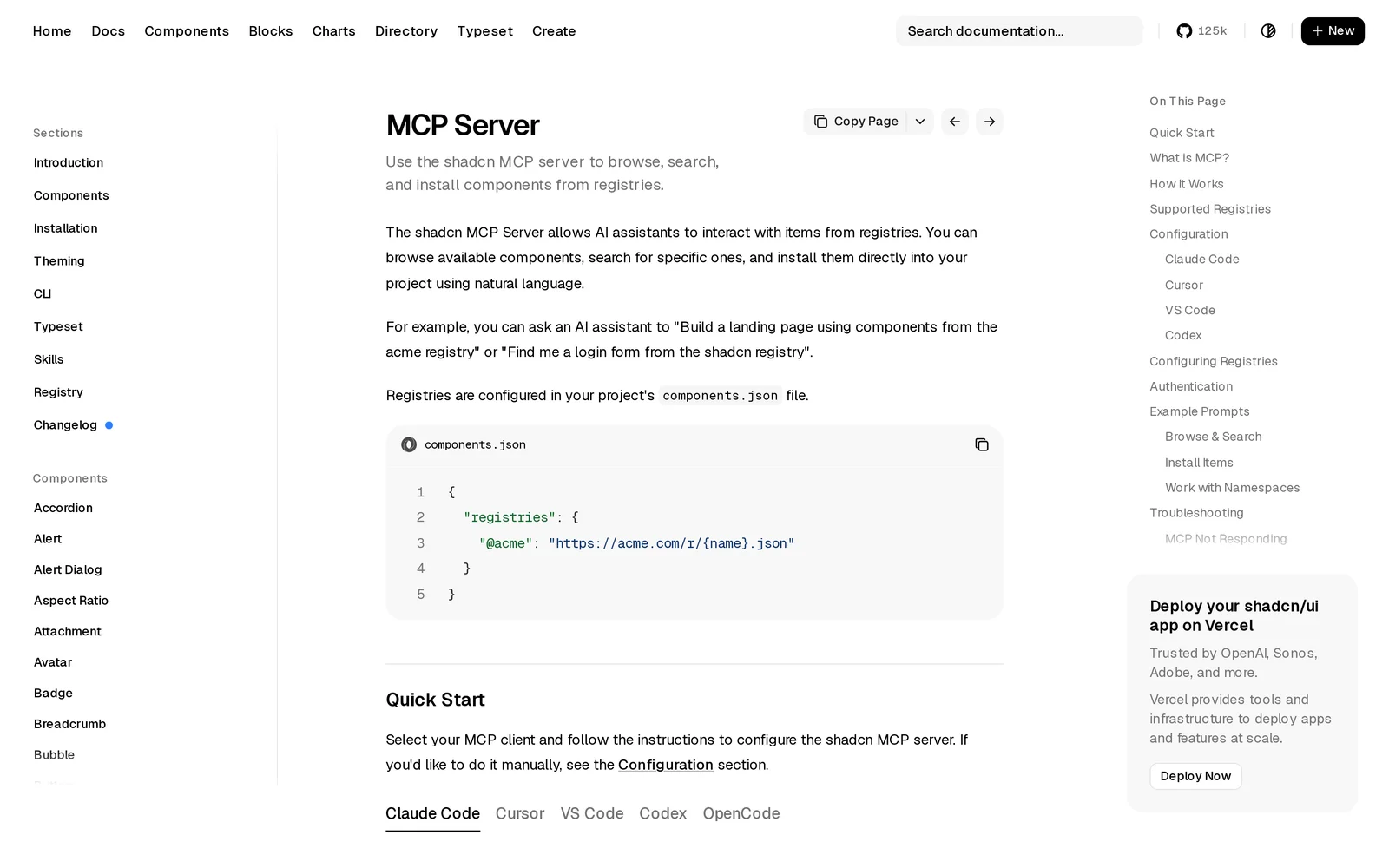
Caption: shadcn MCP quick-start options; source captured October 2026.
21st MCP: best for a large component catalog
21st MCP replaced Magic MCP, and old Magic API keys were reset. Its tools cover search, get_component and AI-backed generate. Choose it when you want component options beyond shadcn defaults.
Search is free, but unplanned accounts are limited to two installs per day. Generation consumes AI credits. Builder starts at $6/mo billed yearly, while Builder + AI starts at $15/mo billed yearly.
npx @21st-dev/cli@latest init --client claude # or cursor, codex, vscode, windsurf
Servers that generate and hold the design
Use a design-source server when no complete design exists. It should generate screens, retain them as a project, and let the coding agent retrieve and update them. This addresses the source problem behind why AI-built apps look the same.
Mowgli: best for a whole multi-screen app
Mowgli turns a product idea into a full multi-screen app design: it writes the spec first, then designs every screen.
It fits founders, PMs and developers designing a whole product before or alongside implementation. It covers every screen and state, including coordinated redesigns across an existing codebase.
You can start from a description, Figma import or codebase import through the agent skill or MCP. A guided questionnaire covers users, flows and edge cases. Mowgli then maintains a synced PRD with journeys, constraints and a data model. You can choose among 16+ moodboard styles, steer the direction, and work across 30+ screens and states on an infinite canvas.
Chat edits, image references, version history and an interactive prototype support iteration. Export options include Figma, React + Tailwind and an AI-ready package. The two-way connection works with Claude Code, Codex, Cursor or another coding agent.
The project exposes SPEC.md, frontend.xml and one <ScreenId>.tsx file per screen. Each screen uses React, Tailwind, lucide-react icons and one state prop. Nine MCP tools cover projects, metadata, versions, files, reads, diffs and edits. The edit tool accepts a natural-language change request and returns a new version. Versions can record the matching git commit.
# Any skills-aware agent (recommended)
npx skills add mowgli-ai/skills
# Claude Code, MCP
claude mcp add --transport http mowgli https://app.mowgli.ai/mcp
# Codex, MCP (starts OAuth; re-auth later with: codex mcp login mowgli)
codex mcp add mowgli --url https://app.mowgli.ai/mcp
For Cursor, place "mowgli": { "url": "https://app.mowgli.ai/mcp" } under mcpServers in .cursor/mcp.json. Browser approval links your account. The registry name is io.github.mowgli-ai/mowgli, and the CLI is mowgli-cli.
Read SPEC.md, frontend.xml and the Today screen from my habit tracker project in Mowgli, and implement it with all of its states.
Mowgli designs and prototypes; to host and ship, you hand off to a builder or coding agent (Claude Code, Codex, Cursor, Lovable).
Free to start (300 credits); credit packs from $12; plans from $15/mo. Connecting a coding agent is included on the free plan.
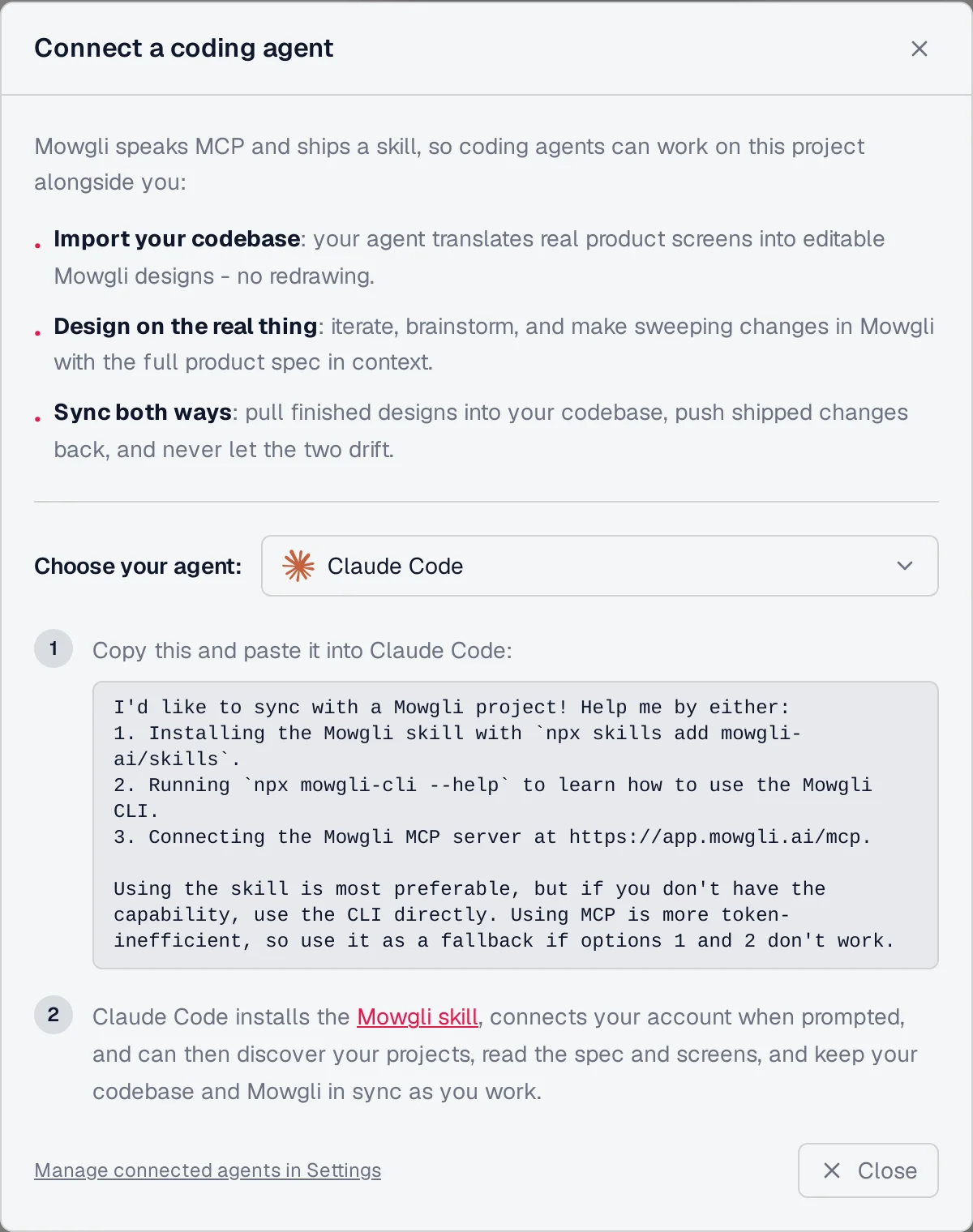
Caption: Coding-agent connection options in a Mowgli demo project, October 2026.
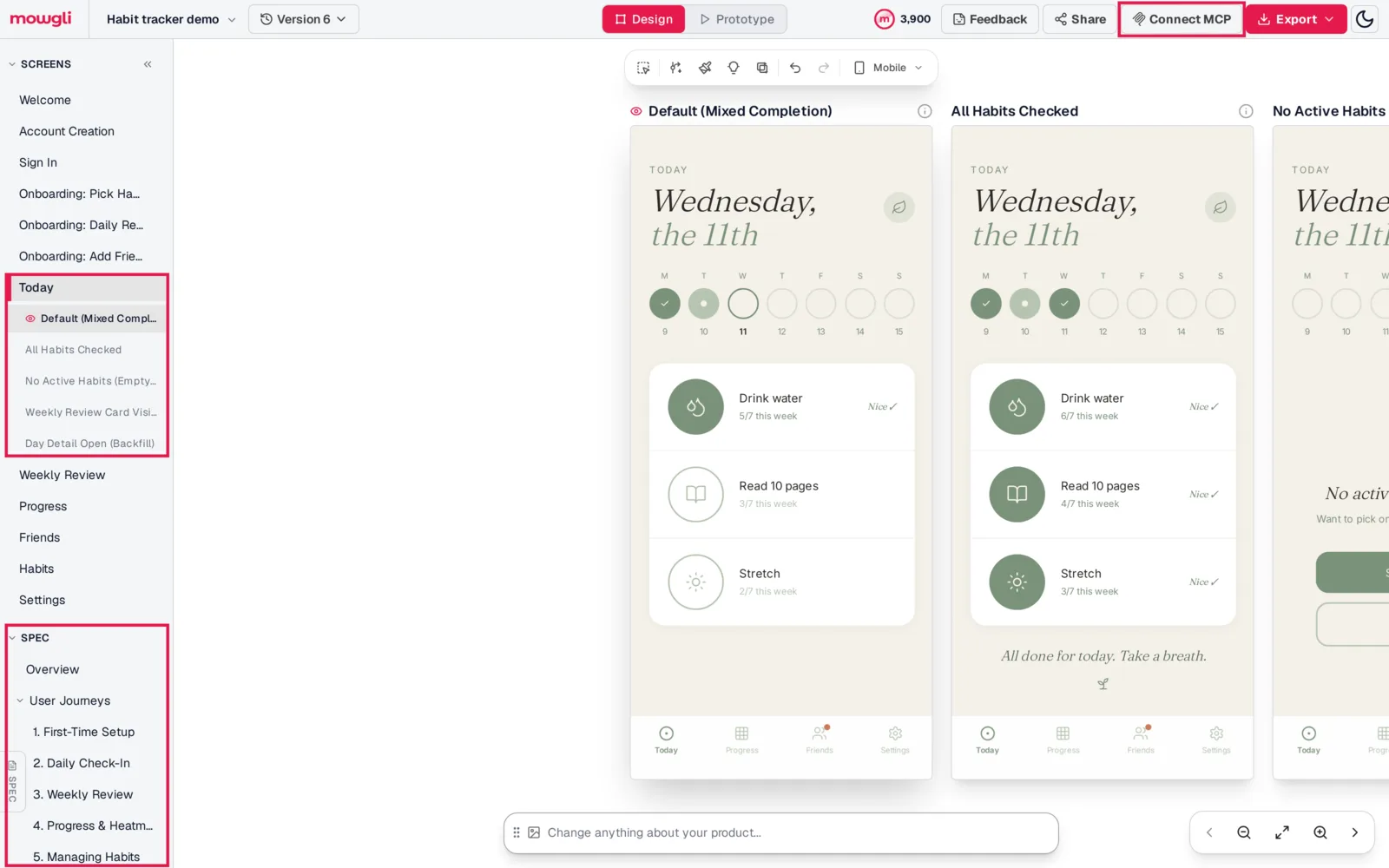
Caption: The spec, screen definitions and five Today-screen states available to the coding agent, October 2026.
Read about the Mowgli MCP and Mowgli agent skill.
Google Stitch MCP: best for free individual screen generation
Google Stitch is a Google Labs beta with project, screen, design-system and AI-generation tools. Its generation tools include generate_screen_from_text, edit_screens and generate_variants, using Gemini 3 Flash or Gemini 3.1 Pro.
It fits individual screens and variants from Claude Code or Cursor at no cost. Output arrives as HTML with Tailwind, which the coding agent converts to React. It has no shared spec or state list tying screens together. OAuth tokens last about an hour and require manual refresh. The free daily credit limit resets at midnight UTC.
# Claude Code
claude mcp add stitch --transport http https://stitch.googleapis.com/mcp \
  --header "X-Goog-Api-Key: YOUR-API-KEY" -s user
// Cursor: .cursor/mcp.json
{ "mcpServers": { "stitch": {
    "url": "https://stitch.googleapis.com/mcp",
    "headers": { "X-Goog-Api-Key": "YOUR-API-KEY" } } } }
# Codex: ~/.codex/config.toml (key read from an env var)
[mcp_servers.stitch]
url = "https://stitch.googleapis.com/mcp"
env_http_headers = { "X-Goog-Api-Key" = "STITCH_API_KEY" }
Stitch does not document Codex. This configuration uses Codex's documented url and env_http_headers.
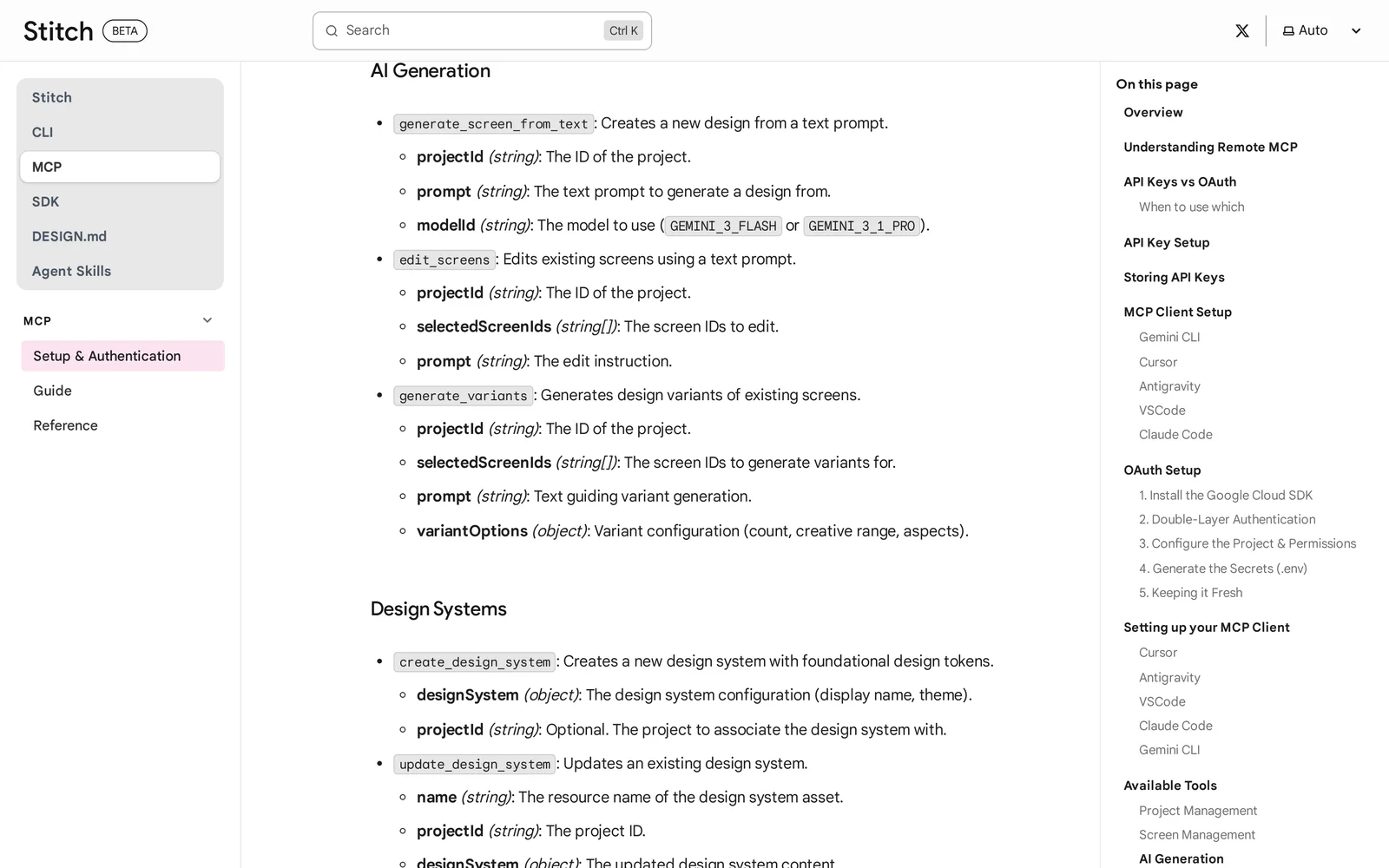
Caption: Stitch MCP generation tools; source captured October 2026.
For larger sets, plan for Stitch multi-screen consistency.
Flowstep MCP: best when the agent needs rendered screen images
Flowstep exposes 23 tools through remote OAuth. It can generate and edit screens, add error or empty variants, read and write screen JSX, import Figma frames, and return a PNG through get-screen-image.
Use it for terminal-generated screens, variants and visual inspection before canvas refinement. It exports React, TypeScript and Tailwind. The free plan includes the server. MCP generation uses the product's message allowance; Starter costs $15/mo and includes 80 messages a month.
claude mcp add --transport http flowstep https://api.flowstep.ai/mcp
codex mcp add flowstep --url https://api.flowstep.ai/mcp
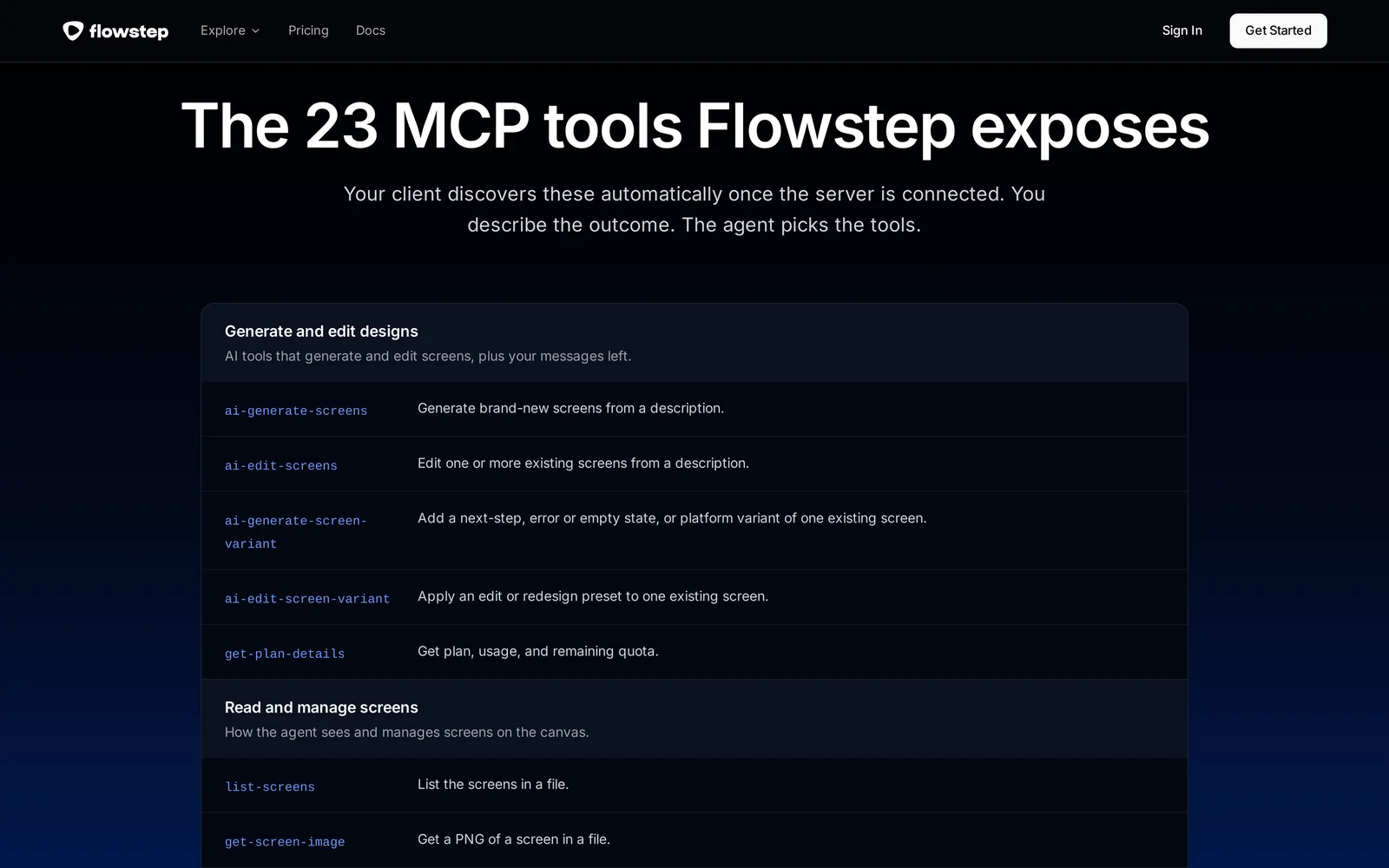
Caption: Flowstep's 23-tool MCP surface; source captured October 2026.
Servers that verify what got built
A coding agent must render the app to inspect its implementation across states and viewport sizes. Keep visual comparisons separate from console, network and performance checks.
Playwright MCP: best for screenshot-and-compare loops
Microsoft's Playwright MCP controls a browser through accessibility snapshots. browser_take_screenshot and browser_resize let you capture each state at mobile and desktop widths and compare it with the source design.
Microsoft recommends Playwright CLI with skills for coding agents because MCP schemas and accessibility trees consume context. The MCP server remains useful for clients that need tool calls. It is free and Apache-2.0 licensed.
claude mcp add playwright npx @playwright/mcp@latest
codex mcp add playwright -- npx @playwright/mcp@latest
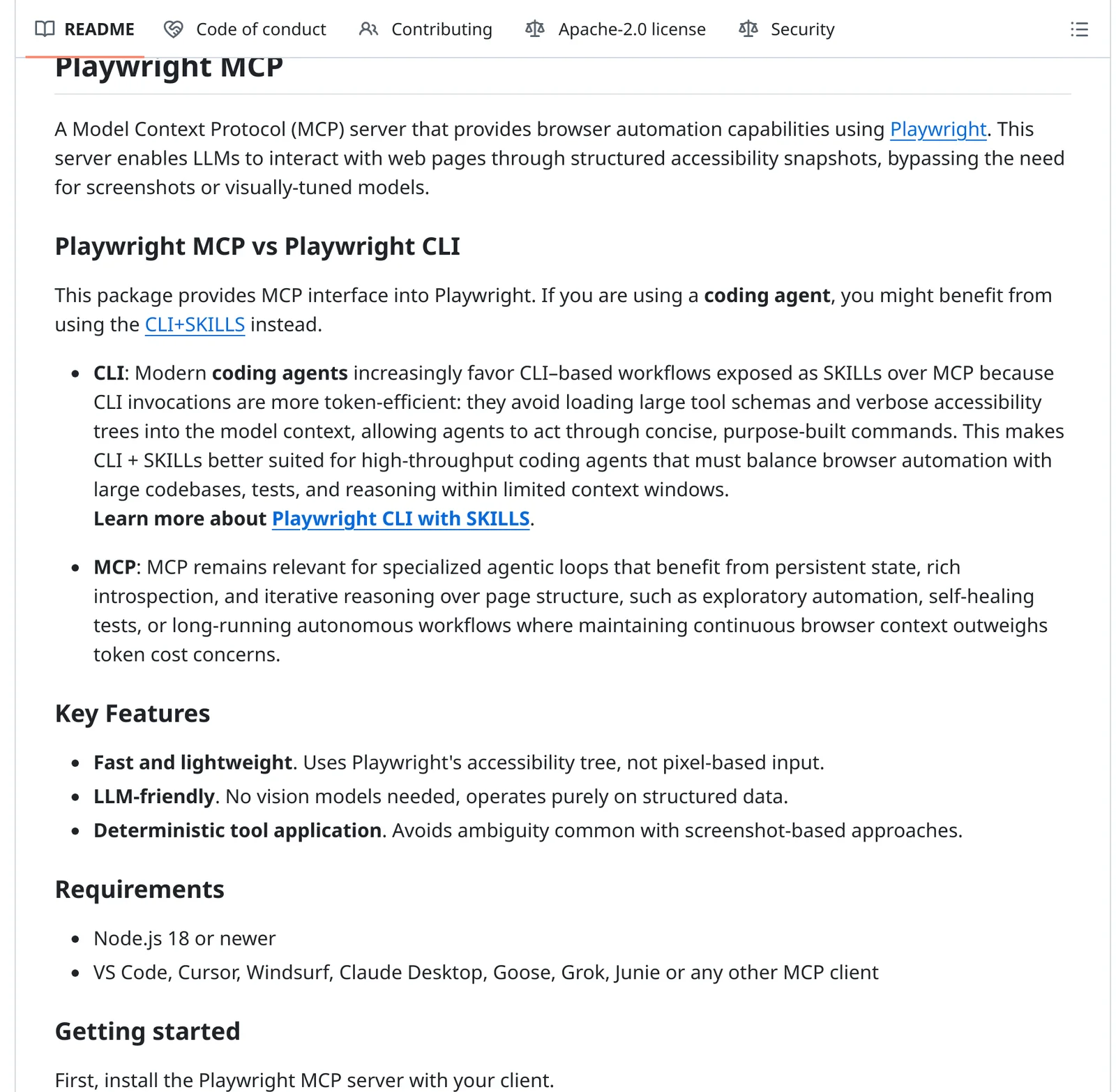
Caption: Microsoft's Playwright CLI-versus-MCP guidance; source captured October 2026.
Chrome DevTools MCP: best for console, network and performance
Chrome DevTools MCP adds screenshots, device emulation, CSS inspection, console messages, performance traces and lighthouse_audit. Use it after changes to inspect errors, requests and Lighthouse scores.
Usage statistics are enabled by default; --no-usage-statistics disables them. It officially supports Chrome only. The server is free and Apache-2.0 licensed.
claude mcp add chrome-devtools --scope user npx chrome-devtools-mcp@latest
MCP server comparison
| Server | Job | Who designs | Connection | Official MCP Registry name |
|---|---|---|---|---|
| Mowgli | Design source, two-way | Mowgli's design agent | Remote, OAuth; skill; CLI | io.github.mowgli-ai/mowgli |
| Figma MCP | Read + write | Designer or the coding agent | Remote, OAuth | com.figma.mcp/mcp |
| Framelink | Read | Designer | Local, Figma token | io.github.GLips/Figma-Context-MCP |
| Penpot MCP | Read + write | Designer or the coding agent | Remote or local | - |
| shadcn MCP | Components | - | Local | - |
| 21st MCP | Components | 21st AI (optional) | Remote, API key | dev.21st/mcp |
| Google Stitch MCP | Design source | Gemini | Remote, API key or OAuth | com.googleapis.stitch/mcp |
| Flowstep MCP | Design source | Flowstep AI | Remote, OAuth | ai.flowstep/mcp |
| Playwright MCP | Verify | - | Local | io.github.microsoft/playwright-mcp |
| Chrome DevTools MCP | Verify | - | Local | io.github.ChromeDevTools/chrome-devtools-mcp |
Search the official MCP Registry by name and avoid look-alike community servers.
Prices are from each vendor's pricing page, October 2026.
Which MCP servers should you install?
For an existing Figma design with a Dev or Full seat, install Figma MCP, shadcn MCP and Playwright MCP.
With a View or Collab seat, remember that each frame read or screenshot counts toward the 20-call monthly limit. Consider importing the file into Mowgli or Flowstep.
With no design yet, use Mowgli for a whole product with every screen and state. Choose Stitch or Flowstep for individual screens and variants. Add Playwright for implementation checks.
If an existing app looks generic, start with a manual redesign pass. Audit typography, spacing, color, hierarchy and repeated component patterns. Inventory every screen plus empty, error and loading states. Establish one visual direction and reusable tokens, then fix the most visible shared components before individual screens.
Next, push the codebase into Mowgli through the agent skill or MCP. Redesign all screens and states together, then pull coordinated changes back through Claude Code, Codex, Cursor or another coding agent. See how to redesign a vibe-coded app without rebuilding.
claude mcp add --transport http mowgli https://app.mowgli.ai/mcp
pnpm dlx shadcn@latest mcp init --client claude
claude mcp add playwright npx @playwright/mcp@latest
Read SPEC.md and frontend.xml from my Mowgli project. Implement the Today
screen and every state listed for it, using shadcn components where they
exist. Then start the dev server, screenshot each state at 390px and 1280px
wide with Playwright, compare against the Mowgli screen, and fix differences.
Common mistakes
Do not load every server simultaneously. Tool schemas consume context, so prefer a skill or CLI where available.
Do not commit secrets. Stitch warns against committing API keys, and header-bearing .mcp.json files are easy to push accidentally.
Do not stop at the happy path. Verify empty, error, loading and success states with a screen and state matrix.
Verdict
For a whole app with no existing design, choose Mowgli. Its spec, screens and states are exposed as files, with two-way design and code updates. Start a Mowgli project and connect Claude Code.
For existing Figma designs with Dev or Full seats, use Figma MCP for variables and Code Connect mappings. For free individual screens and variants, use Google Stitch MCP. Choose Flowstep when rendered images are important during generation.
Use shadcn MCP for real components, Playwright MCP for screenshot comparisons, and Chrome DevTools MCP for console, network and performance checks. For a broader workflow comparison, read design handoff to coding agents.
FAQ
Are there any MCP servers that help with UI design?
Yes. Readers include Figma, Framelink and Penpot; component sources include shadcn and 21st; design sources include Mowgli, Google Stitch and Flowstep; verification servers include Playwright and Chrome DevTools.
What is the best MCP server for generating UI designs?
Mowgli is the best fit for a whole multi-screen app with a spec and every state. Google Stitch MCP and Flowstep MCP fit individual screens and variants. Figma can write frames, but the connected coding agent performs the design work.
Is the Figma MCP server free?
It is included with Figma plans. View and Collab seats plus Starter receive up to 20 tool calls per month. Dev and Full seats on paid plans receive 200 calls per day, while Enterprise receives 600 calls per day.
Which design MCP servers work with Codex?
Remote servers connect through codex mcp add NAME --url URL. Figma, Flowstep, Playwright, Chrome DevTools and shadcn document Codex setup directly. See the Codex frontend design guide.
Should I use an MCP server or an agent skill for UI design?
Prefer a skill or CLI when Claude Code, Codex, Cursor or another coding agent can execute one. Use MCP for clients that cannot run commands, including Claude.ai. Figma, Playwright, 21st, Stitch and Mowgli also provide skills or plugins alongside MCP.
Can Claude Code see the UI it builds?
Yes. Playwright MCP provides screenshots, viewport changes and accessibility snapshots. Chrome DevTools MCP adds CSS, console, network, performance and Lighthouse checks.
Sources
- Figma MCP server documentation
- Figma remote server installation
- Figma MCP tools and prompts
- Figma MCP rate limits and access
- Figma write to canvas
- Figma REST API rate limits
- Framelink
- Framelink source repository
- Penpot
- Penpot MCP documentation
- shadcn MCP documentation
- 21st MCP
- Magic MCP repository
- 21st pricing
- Mowgli
- Mowgli app
- Mowgli MCP endpoint
- Mowgli agent skill repository
- Mowgli MCP
- Mowgli agent skill
- Mowgli pricing
- Google Stitch
- Google Stitch MCP setup
- Google Stitch MCP guide
- Flowstep MCP
- Flowstep pricing
- Playwright MCP repository
- Chrome DevTools MCP repository
- Claude Code MCP documentation
- Cursor MCP documentation
- Codex MCP documentation
- Official MCP Registry