Uizard 2026: Miro Status, Pricing and Who Should Still Use It
Uizard remains available under Miro: Pro is $12/mo yearly or $19 monthly. Compare its plans, limits, Miro Prototypes and the best alternatives.
Uizard in 2026: the short answer
Uizard remains available in 2026, but it is part of Miro. Keep using Uizard for existing projects or inexpensive drag-and-drop mockups. Choose Miro Prototypes when your research, workshops and planning already happen in Miro. Choose Mowgli when you need a complete multi-screen product designed from a written spec, including every screen and state.
Uizard still sells Free, Pro, Business and Enterprise plans at uizard.io. Existing projects remain accessible, and neither Uizard nor Miro has published a shutdown date.
We make Mowgli.
| Question | Answer |
|---|---|
| Is Uizard still available? | Yes. uizard.io sells Free, Pro, Business and Enterprise plans, and existing projects stay accessible |
| Who owns it? | Miro. Uizard announced it was joining Miro on May 27, 2024; terms were not disclosed |
| Cheapest paid plan | Pro: $12 per creator/month billed yearly ($144 a year), or $19 billed monthly |
| Free plan | $0: 3 AI generations a month, Autodesigner 1.5, 2 projects, up to 5 screens per project |
| Where uizard.io sends new users | "Try out in Miro", meaning Miro Prototypes, which Uizard's site calls "powered by Uizard" |
| Miro Prototypes price | Included in Miro Business since June 29, 2026: $20/member/month billed yearly, $25 monthly |
| Exports | Uizard: images and PDF, plus React or CSS one component at a time on Pro and up. Miro: PDF or images, or a push to a coding agent over MCP |
| Alternative for a whole app from a spec | Mowgli: writes the PRD, then designs every screen and state; exports to Figma and React + Tailwind |
What happened to Uizard after it joined Miro?
On May 27, 2024, Uizard announced that it was "joining the Miro family." The announcement said Uizard was "used today by more than 3M professionals worldwide" and that "for now, Uizard will continue to be available."
Neither company disclosed a price or other deal terms. Claims about an acquisition figure or an imminent Uizard closure are therefore unsupported by the cited pages.
The product timeline shows Uizard continuing alongside a new prototyping workflow inside Miro:
- June 12, 2024: Uizard launched Autodesigner 2.0.
- May 20, 2025: Miro introduced its Prototyping beta. It was free during the beta for Free, Starter, Business and Education users.
- June 29, 2026: Miro Prototypes moved from a paid add-on into the current Business plan.
- July 15, 2026: add-on renewals stopped for Starter and legacy Business plans.
- October 2026: uizard.io still sells its own plans. Its header shows "miro | LABS," while some homepage visits display "Uizard is now part of Miro" and a "Try out in Miro" button.
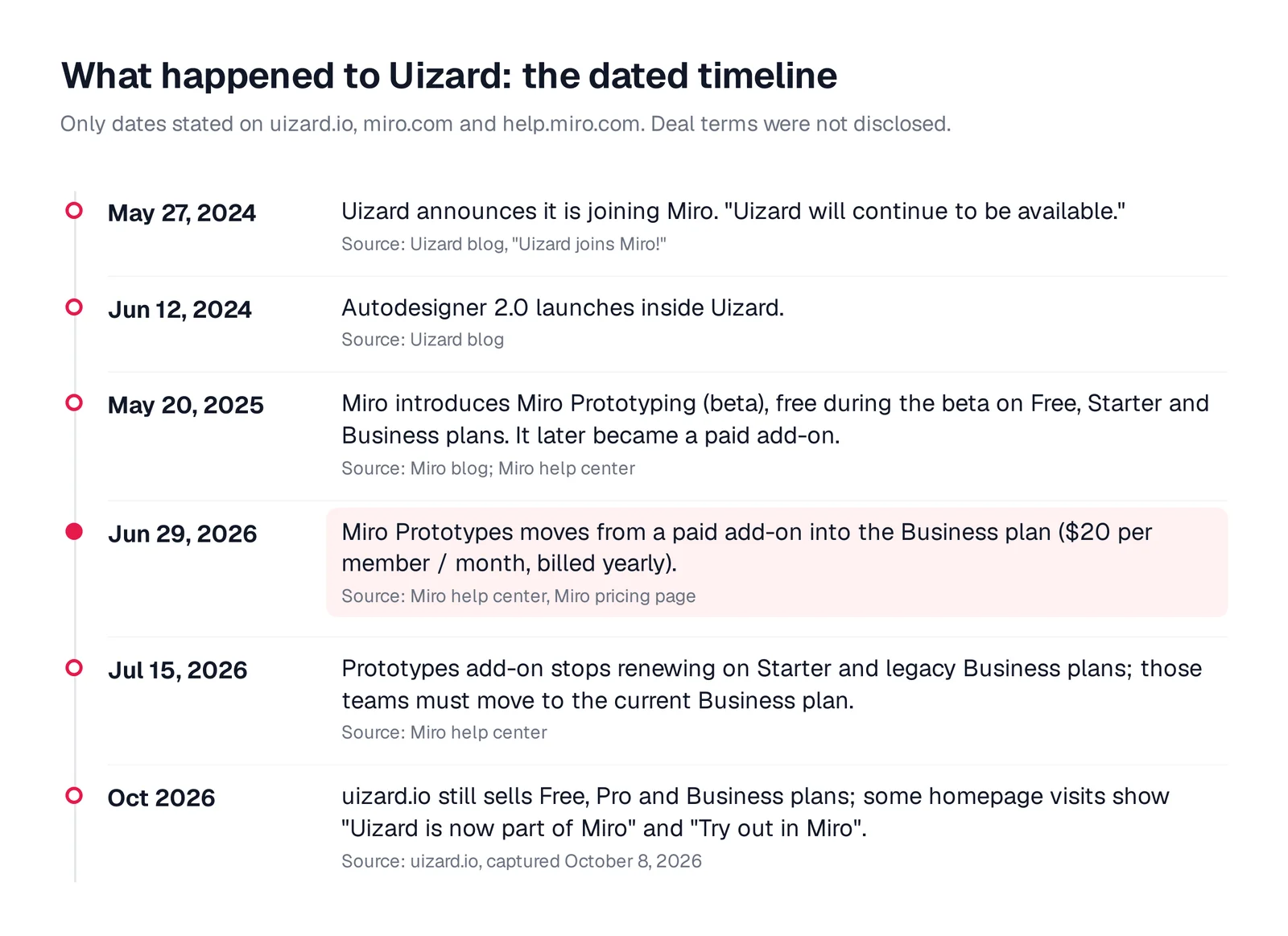
Caption: The Uizard and Miro timeline, built from the Uizard blog, the Miro blog and the Miro help center.
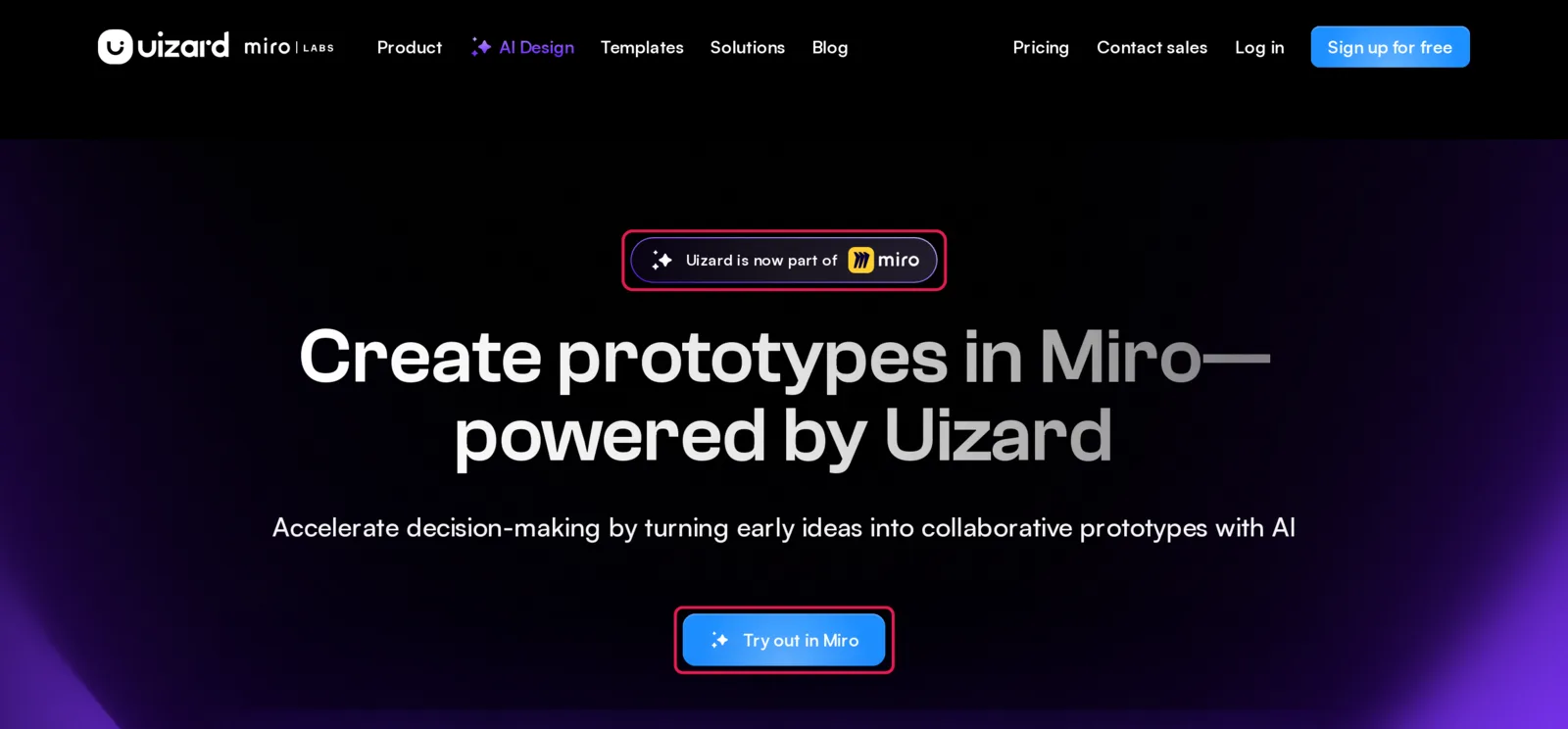
Caption: One version of the uizard.io homepage, notice and button highlighted. Source: Uizard website, captured October 2026.
Uizard pricing and plan limits in 2026
Uizard charges per creator. Every plan supports unlimited viewers and commenters, so you do not need a creator seat for each reviewer.
| Plan | Billed yearly | Billed monthly | AI generations a month | AI engine | Projects | Notable extras |
|---|---|---|---|---|---|---|
| Free | $0 | $0 | 3 | Autodesigner 1.5 | 2, up to 5 screens each | 10 templates, image export at 1x only |
| Pro | $12 per creator/mo ($144/yr) | $19 per creator/mo | 500 | Autodesigner 2.0 | Up to 100 | React and CSS handoff, private projects, all templates |
| Business | $39 per creator/mo | Not offered | 5,000 | Autodesigner 2.0 | Unlimited | Faster generation, custom brand kit, priority support |
| Enterprise (15+ creators) | Custom | Not offered | Unlimited | Autodesigner 2.0 | Unlimited | Design system setup, AI data SLA, SSO via sales |
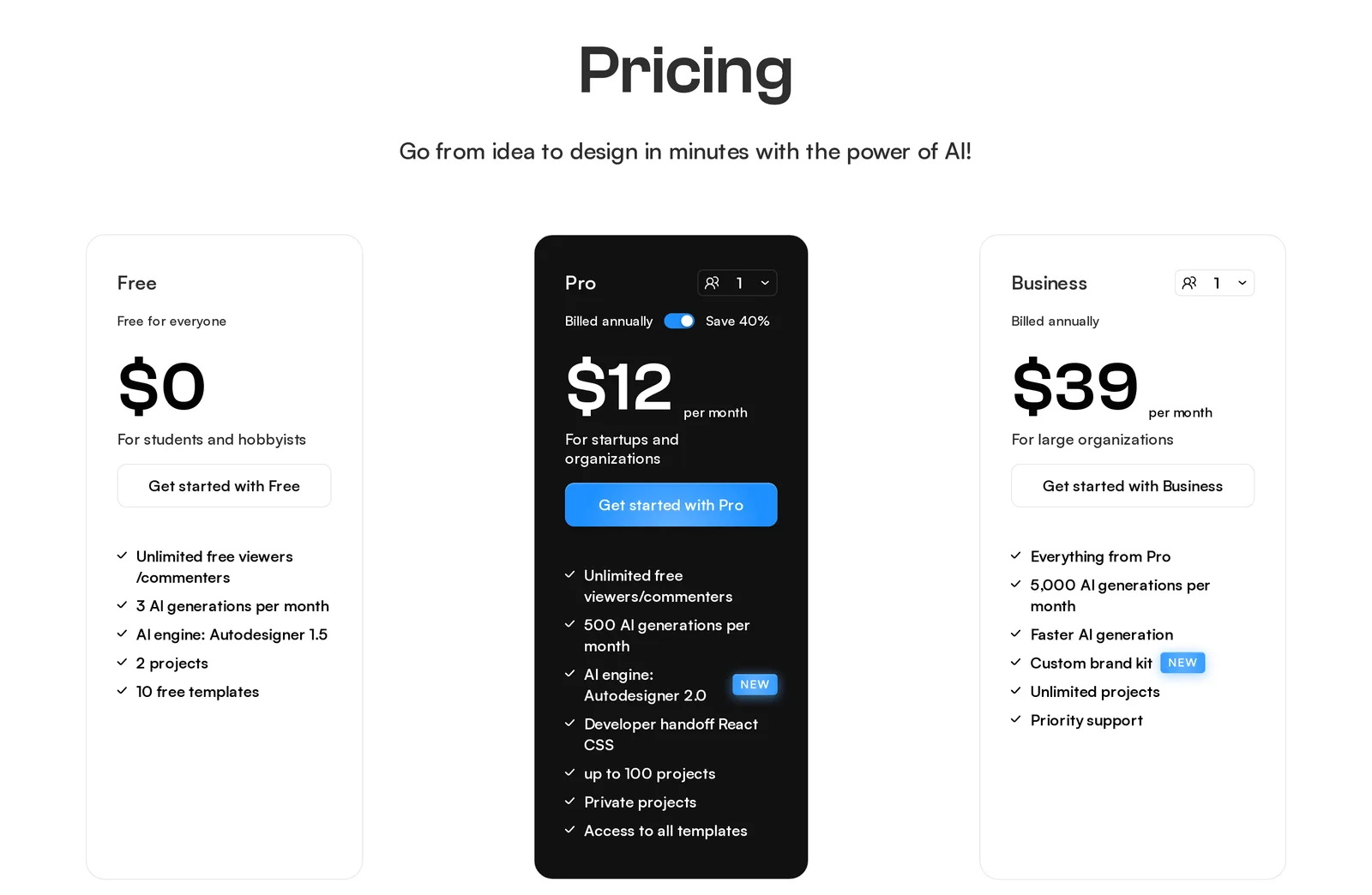
Caption: Uizard's pricing page with yearly billing selected. Source: Uizard website, captured October 2026.
The price numbers are easy to mix up. The $12 price is Pro with annual billing. The same plan costs $19 with monthly billing. Business costs $39 per creator per month and requires annual billing. A $49 plan price does not appear on the current official pricing page or subscription help page.
The Pro card says "Save 40%." Comparing $144 per year with twelve monthly payments totaling $228 gives a saving of about 37%.
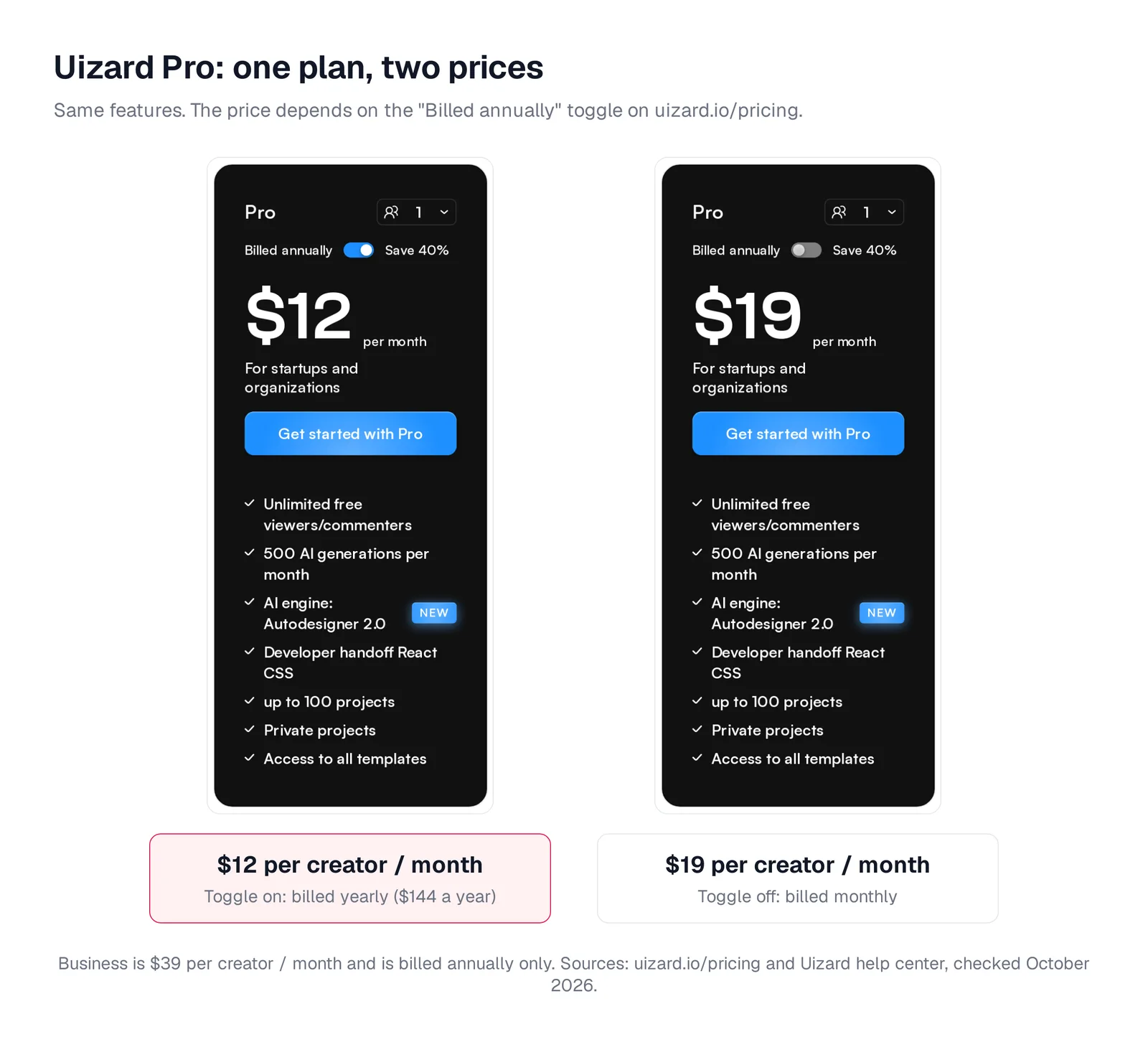
Caption: The same Pro card with the billing toggle on and off. Source: Uizard website, captured October 2026.
AI generations cover projects, screens, themes and images. They also cover heatmaps, design reviews, screenshot scans, wireframe scans, scribble scans, and the text and image assistants.
If you cancel, the subscription remains active until the end of its billing cycle. Your organization then returns to Free. Only the first two projects and up to five screens in each remain accessible, but Uizard does not delete the other work. Resubscribing restores access. You can also pause a subscription for 1, 2, 6 or 12 months.
What Uizard is good at and where its boundaries are
Uizard works well when you want editable, multi-screen mockups without starting in a professional design tool. You can generate from a short text prompt, modify components through text instructions, turn a screenshot into an editable mockup or convert a hand-drawn wireframe.
Its editor supports mobile, tablet, web app and website designs. Templates, drag-and-drop controls, real-time collaboration and free viewers make it practical for solo makers and teams that need quick review cycles.
Paid plans use Autodesigner 2.0, but every plan has a 300-character prompt cap. Uizard's documentation says Autodesigner "usually won't follow strict guidelines, such as the number of screens, specific flows, or placement of components." It also says the feature "is designed to create simple flows."
Screenshot Scanner accepts JPG, PNG and HEIC files. It processes one image at a time, and the documentation states, "There isn't a feature to scan screenshots in bulk."
For export, Uizard supports JPG, PNG, SVG and PDF. Pro and higher plans let you copy CSS or React one component at a time. Uizard does not offer whole-project HTML, JavaScript or script export, and its export documentation does not list Figma.
For a broader comparison of design and code workflows, see v0, Uizard and Galileo compared.
Miro Prototypes pricing, credits and workflow
Miro Prototypes creates clickable prototypes inside a Miro board. It can use sticky notes, screenshots, diagrams, text prompts and other canvas context as input. You refine screens with drag-and-drop controls, connect hotspots and open a full-screen preview.
Miro positions the output as intentionally lower fidelity, focused on helping a team decide what to build before implementation.
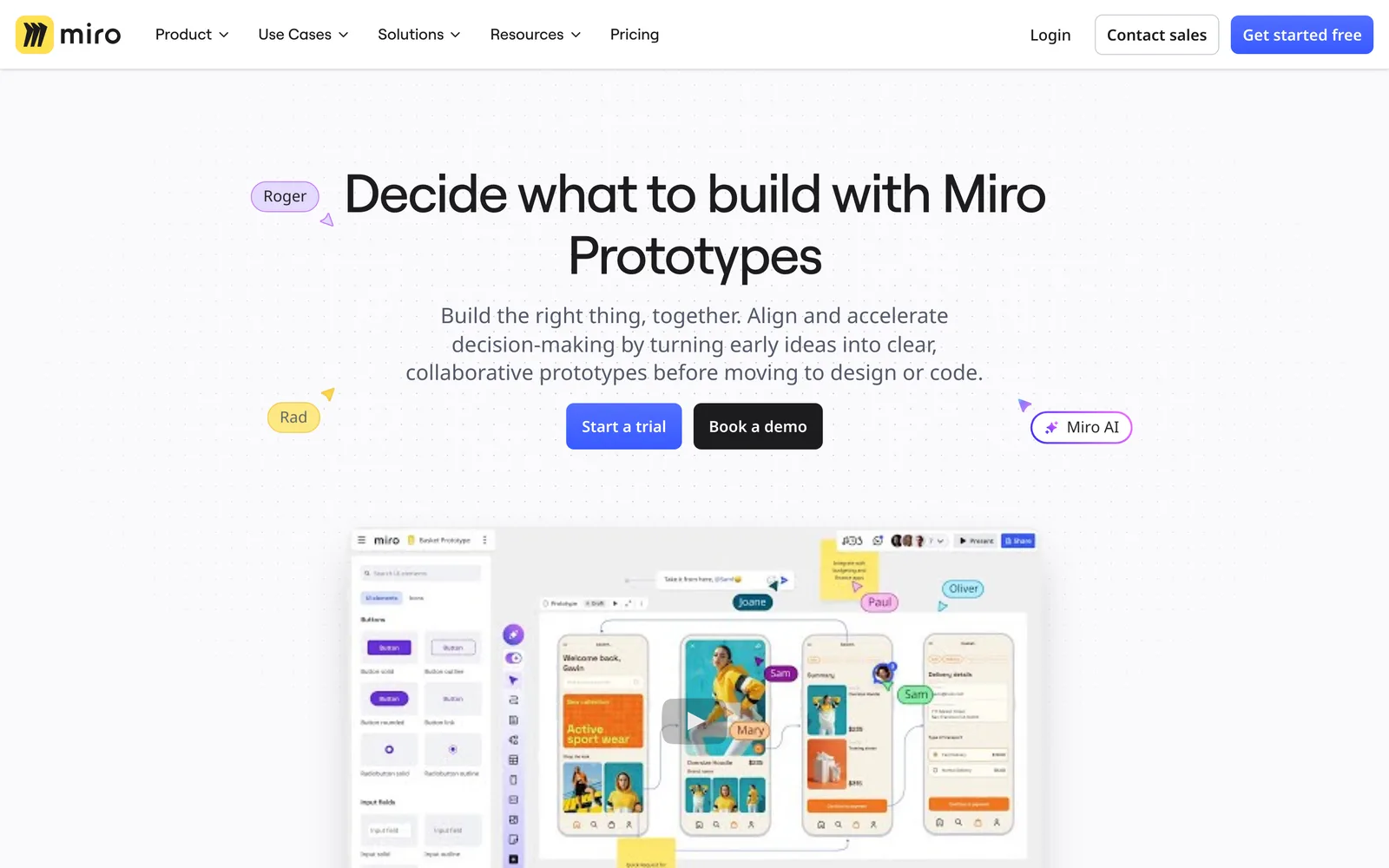
Caption: Miro's Prototypes page. Source: Miro website, captured October 2026.
Since June 29, 2026, the current Business plan includes Prototypes. The separate paid add-on no longer renews. Starter and legacy Business customers stopped renewing that add-on from July 15 and must move to the current Business plan for AI prototyping.
Free and Starter users retain manual screens and a basic UI library. AI generation, screenshot-to-mockup, navigation and preview require Business. Enterprise access comes with the Accelerate license.
One older Miro page still describes Prototypes as a paid add-on. The later pricing page and help-center notice reflect the June 2026 change.
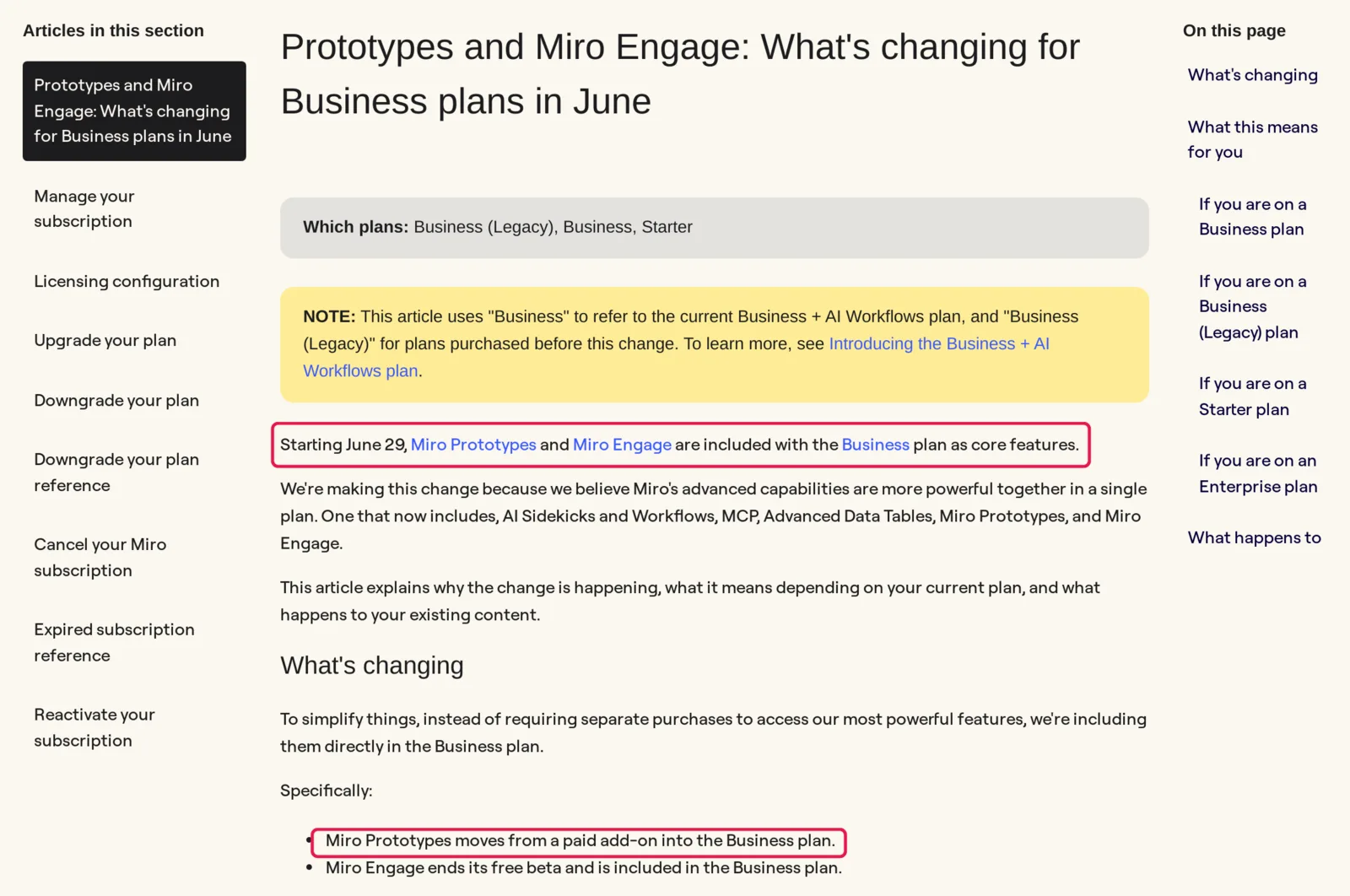
Caption: Miro's help center article on the June 2026 change, key lines highlighted. Source: Miro help center, captured October 2026.
| Miro plan | Price per member | AI prototyping | AI credits |
|---|---|---|---|
| Free | $0 | Manual screens and basic components only | Limited trial |
| Starter | $8/mo yearly, $10 monthly | Manual only | 25 per member/month |
| Business | $20/mo yearly, $25 monthly | Included (14-day free trial) | 50 per member/month |
| Enterprise | Custom, from 30 members | With the Accelerate license | Varies by license |
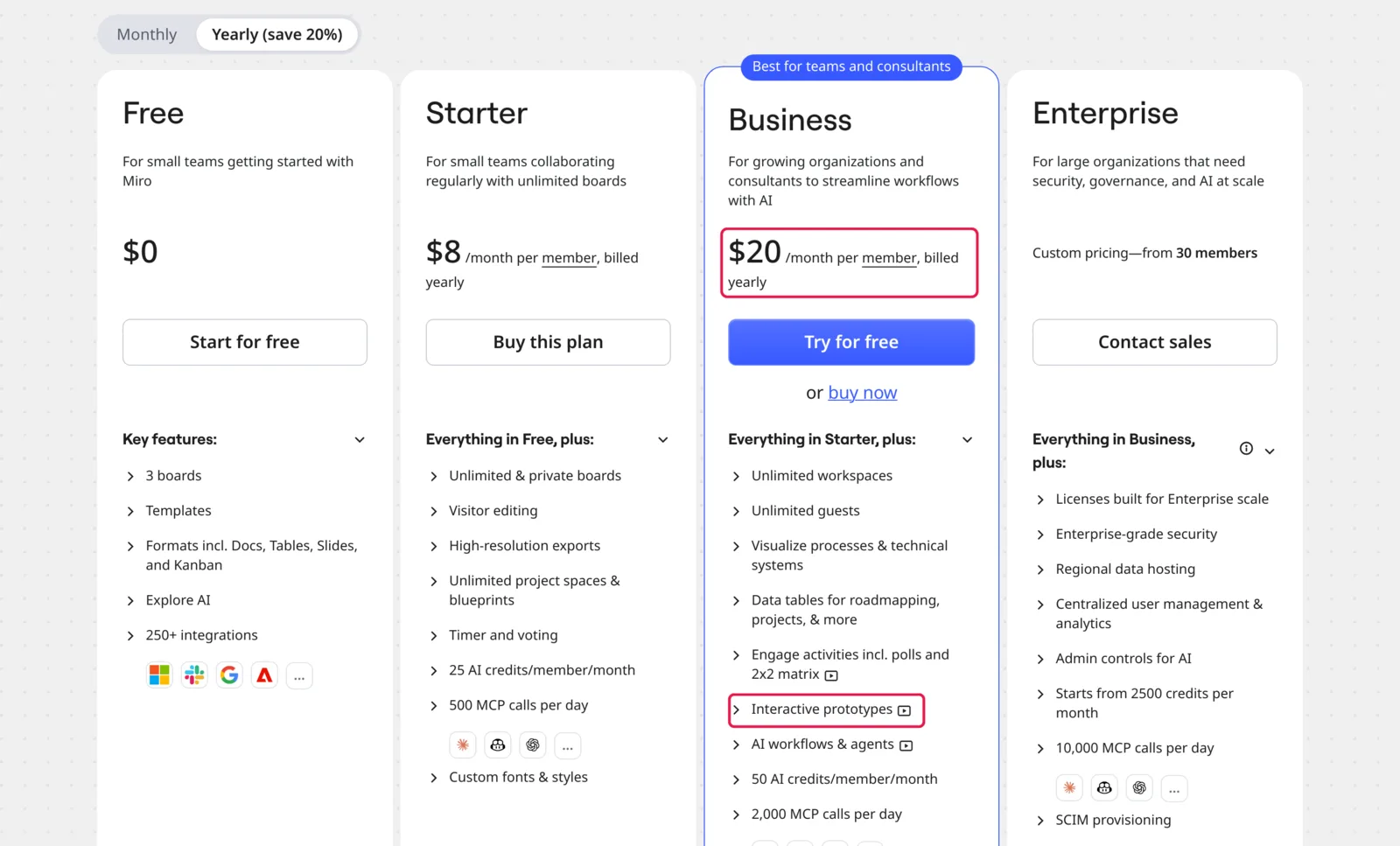
Caption: Miro's pricing page, Business price and "Interactive prototypes" highlighted. Source: Miro website, captured October 2026.
Each generated screen costs 5 AI credits, and regenerating a screen consumes credits again. Business includes 50 pooled credits per member each month. That permits approximately 10 generated screens per member if no other Miro AI feature uses the pool. Starter and Business customers can buy extra credit bundles.
Miro recommends generating fewer screens at once for more accurate results.
Uizard vs Miro Prototypes
Prices are from each vendor's pricing page, October 2026.
| Uizard (uizard.io) | Miro Prototypes | |
|---|---|---|
| Where you work | Uizard's own design editor | A Miro board, next to stickies, docs and diagrams |
| Price for one editor | $12/mo yearly or $19 monthly (Pro) | $20/mo yearly or $25 monthly (Business seat) |
| AI allowance | 500 generations a month on Pro | 50 credits per member a month; 5 credits per screen |
| Starting points | Text prompt, screenshot, hand-drawn wireframe; style from a prompt, screenshot or URL | Prompt, sticky notes, PRDs, diagrams, screenshots, HTML, code |
| Output | Editable mockups and click-through prototypes | Lower-fidelity clickable prototypes on the canvas |
| Handoff | Images and PDF; React or CSS per component | PDF or images; push to a coding agent via MCP |
| Best for | Existing Uizard users and solo makers | Teams that already run discovery in Miro |
Choose Uizard when you want a standalone editor, need to preserve existing projects, value its larger Pro AI allowance or mainly generate from prompts and screenshots.
Choose Miro Prototypes when research, planning and workshops already live on Miro boards. Keeping the prototype beside the evidence and diagrams avoids moving context into a separate editor.
Neither product is the whole-app-from-spec choice in this comparison.
Who should still use Uizard?
Existing Uizard users have the clearest reason to stay. You can preserve established projects and workflows, and annual Pro costs less than one Miro Business seat. If your work is seasonal, pausing can make more sense than canceling.
Solo makers and non-designers can test the workflow on Free, although three monthly AI generations is restrictive. Monthly Pro at $19 provides a short-project option without an annual commitment.
Uizard also remains a good fit for prompt-to-mockup and screenshot-to-mockup work where you want to continue editing through a drag-and-drop interface.
Miro-centered teams should choose Miro Prototypes in Business. Teams that require Figma files or a complete codebase should choose a workflow that explicitly provides those outputs. Uizard offers image and PDF export plus per-component React or CSS, not a listed Figma export or whole-project code export.
There is no published shutdown date for uizard.io. However, new Miro AI-prototyping work began in 2025, while uizard.io continues to promote Autodesigner 2.0 from 2024. Base your choice on the workflow available now, not an assumed product timeline.
Best Uizard alternatives, ranked by job
There is no universal replacement. Start with the reason you are leaving: whole-product coverage, a familiar visual editor, free drafts or deeper Figma integration.
See the broader guides to Banani alternatives and AI design tool pricing and limits for more options.
Prices are from each vendor's pricing page, October 2026.
Mowgli: best for a whole multi-screen app from a spec
Mowgli is an AI design tool that designs every screen of your app. A short questionnaire becomes a PRD with user journeys and a data model. You then choose from a moodboard with 16+ styles and steer the visual direction.
Mowgli designs 30+ screens and states, including empty and error states, on an infinite canvas. You can make chat edits, build an interactive prototype, and import or export Figma files. React + Tailwind export supports implementation.
Through MCP, CLI and an agent skill, Claude Code, Codex, Cursor or another coding agent can read the product spec, screens and states. The workflow runs both ways between an existing codebase and the design.
Mowgli designs and prototypes; to host and ship, you hand off to a builder or coding agent (Claude Code, Codex, Cursor, Lovable).
Free to start (300 credits); credit packs from $12; plans from $15/mo. See the direct Uizard comparison.
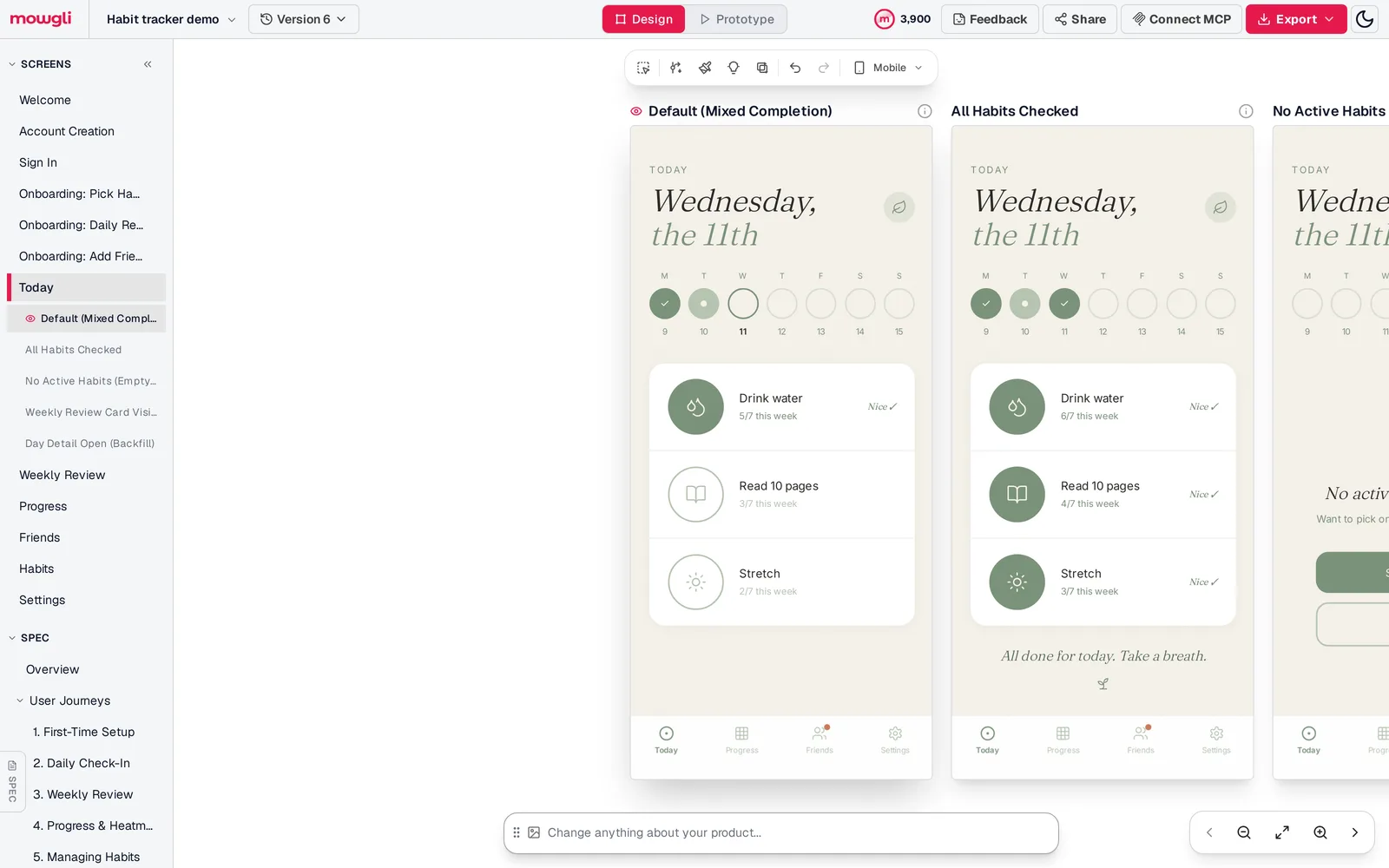
Caption: Mowgli's canvas for a habit tracker demo, with every screen and state listed next to the spec. Captured October 2026.
Visily: closest Uizard-style editor for non-designers
Visily combines AI-generated drafts with a drag-and-drop canvas. Its free Starter plan includes 300 AI credits each month and two editable boards.
Pro adds Figma import and export, code export and an MCP server. It costs $14 per editor per month. Business costs $29 per editor per month when billed annually.
Google Stitch: best for free first drafts
Google Stitch generates UI screens from text or images on an infinite canvas. Its daily credit allowance resets at midnight UTC.
The product is free and exports to Figma or HTML and CSS. It does not export React components. Read more about multi-screen consistency in Google Stitch or see the Google Stitch comparison.
Figma Make: best for teams already in Figma
Figma Make turns prompts into working prototypes inside Figma. Make kits can include npm packages, library styles and guidelines. On paid plans, "Copy design" moves a preview into Figma Design as layers.
AI usage is metered. Figma's example places "Generate an app from scratch" at about 100+ credits. Starter is free with 150 AI credits per day, up to 500 per month. Professional costs $16 per month for each Full seat when billed yearly and includes 3,000 AI credits per month.
See the Figma Make comparison.
| Tool | Best for | Free plan | Paid from | Figma | Code |
|---|---|---|---|---|---|
| Uizard | Non-designer mockups | 3 AI generations/mo | $12/mo yearly | Not listed | React/CSS per component (Pro) |
| Miro Prototypes | Teams working in Miro | Manual screens only | $20/member/mo yearly (Business) | Not listed | Coding-agent handoff via MCP |
| Mowgli | Whole app from a spec | 300 credits | $15/mo ($12/mo yearly); packs from $12 | Import + export | React + Tailwind, MCP |
| Visily | Closest Uizard-style editor | 300 AI credits/mo | $14/editor/mo | Import + export (Pro) | Export (Pro) |
| Google Stitch | Free first drafts | Free, daily credits | Free | Export | HTML/CSS |
| Figma Make | Figma teams | 150 credits/day, up to 500/mo | $16/seat/mo yearly | Native | Code download |
Verdict
Uizard is still available, with no announced end date. Stay with it if you have existing projects, prefer its standalone editor or need prompt and screenshot mockups. Use its pause option between active projects when appropriate.
Choose Mowgli for a whole app from a spec, including every screen and state. Choose Miro Prototypes when research and product planning already happen on Miro boards. Choose Figma Make when your libraries and collaboration already center on Figma.
Visily is the closest standalone Uizard-style alternative for non-designers. Google Stitch is the clearest option for free early concepts.
FAQ
Is Uizard still available in 2026?
Yes. uizard.io still sells Free, Pro, Business and Enterprise plans, and existing projects remain accessible. No Uizard or Miro page cited here announces a shutdown date.
Did Miro buy Uizard, and for how much?
Uizard announced that it was joining Miro on May 27, 2024. Neither company published a price or deal terms on the cited pages, so there is no supported acquisition figure to report.
How much does Uizard cost in 2026?
Uizard Free costs $0 and includes three AI generations per month. Pro costs $12 per creator per month billed yearly, totaling $144 a year, or $19 billed monthly. Business costs $39 per creator per month and is billed yearly only.
Is Miro Prototypes included in Miro Business?
Yes. Miro Prototypes has been included in the current Business plan since June 29, 2026. Business costs $20 per member per month billed yearly or $25 monthly. Enterprise access requires the Accelerate license, while Starter and legacy Business do not include AI prototyping.
Can Uizard export to Figma or code?
Uizard exports JPG, PNG, SVG and PDF. Pro and higher plans can copy CSS or React one component at a time. Its documentation does not list Figma export or whole-project HTML and JavaScript export.
What is the best Uizard alternative in 2026?
The best alternative depends on your job. Choose Mowgli for a complete multi-screen app from a spec, Visily for the closest non-designer drag-and-drop workflow, Google Stitch for free first drafts, Figma Make for Figma-centered teams or Miro Prototypes when discovery already happens in Miro.
See the guides to the best AI app design tools and best AI mockup generators for mobile apps.
Sources
- Uizard pricing
- Uizard website
- Uizard joins Miro
- Autodesigner 2.0 announcement
- Uizard Screenshot Scanner
- Understanding Uizard subscriptions
- Canceling or pausing a Uizard subscription
- Exporting Uizard projects
- Uizard Autodesigner guide
- Using Uizard Screenshot Scanner
- Miro Prototypes
- Miro Prototyping trial page
- Miro pricing
- Introducing Miro Prototyping
- Miro Prototypes Business plan changes
- Miro Prototypes overview
- Miro Prototypes help
- Miro AI credits
- Miro Business plan
- Visily
- Visily pricing
- Visily AI Chat Assistant
- Google Stitch
- Figma Make
- Figma pricing
- Figma AI credits
- Mowgli pricing
- Mowgli and Uizard comparison