Experiment With Your Existing App's Design Without Breaking It
Explore variants on a canvas or in Storybook, build the winner on a preview branch, then ship it behind a feature flag and measure one metric.
The short answer: pick the sandbox that matches the question
Do not test an unfinished redesign in production. Explore broad directions on a design canvas, verify components in Storybook, build the winner on a preview branch, and expose it to users behind a feature flag.
Use five different sandboxes for five different questions:
- For whole-app directions before coding, use a design canvas. Mowgli imports your existing codebase through Claude Code, Codex, Cursor or another coding agent, generates variations of real screens and states, compares them side by side, and syncs the winner back. Claude Code
/designand Cursor/best-of-nare agent-side alternatives. - For components, states and design tokens in real code, use Storybook stories and its Themes addon.
- For the full app on a real URL, use a Git branch with a Vercel or Netlify preview deployment. v0 creates one per chat.
- For a small in-place change, use v0 Design Mode, Lovable's preview toolbar, Cursor Design Mode or Bolt visual edits.
- For real users and a real metric, use PostHog, LaunchDarkly, GrowthBook or the Vercel Flags SDK.
Move up this ladder only after the cheaper rung has reduced your options: many canvas variants, one or two previews, then one test against the control.
Mowgli is our product.
For a broader process covering audits, flows and usability testing, read how to redesign an existing app with AI. For direction selection, see how to explore visual styles for an app. This guide focuses on running the experiment safely.
The experiment loop: from hypothesis to a measured result
1. Write one hypothesis
Write it before opening a tool:
Because [evidence: funnel drop, support tickets, session replays],
we believe [specific visual change] on [screen]
will move [one primary metric] from [baseline] to [target]
for [user segment], without hurting [guardrail metric].
PostHog frames its experiment wizard around the same questions: "What are we testing?", "Who sees which variant?", and "How do we measure impact?" It distinguishes primary metrics that determine success from secondary metrics that monitor side effects. Use one secondary metric as your guardrail.
2. Choose the hardest screen
Test the densest table, longest form, or screen with the most empty, loading and error states. A direction that works only on a sparse homepage is not ready. Use the screen and state checklist to find the difficult cases.
3. Generate 3-5 variants
NN/g recommends a minimum of three alternatives and says five is probably the maximum. This gives you meaningful range without turning review into a sorting exercise.
4. Narrow and merge
Do not simply vote for the prettiest option. Combine the strongest decisions into one direction.
NN/g measured usability 56% higher than the average of four original designs after selecting and iterating on the best one, 70% higher with a merged design, and 152% higher after another iteration on the merged design. Review the variants on a canvas, then test the click-through winner with five users.
5. Build on a branch
Implement the winner away from the production branch. Review its components in Storybook and its complete flows on a preview URL.
6. Release behind a flag
Keep the current screen as the control. Send a percentage of eligible users to the test variant.
7. Decide and remove
Roll the winner to everyone or return the flag to zero. Then delete the flag and losing code. Martin Fowler recommends treating toggles "as inventory which comes with a carrying cost and seek to keep that inventory as low as possible."
Keep each experiment tied to one hypothesis. NN/g warns that changing several design elements at once prevents you from understanding each element's impact. Multivariate tests require even more data. A complete visual overhaul can tell you whether the package won, but not which part caused the result.
Explore variants of your real screens on a canvas
Off-code exploration makes alternatives cheap to discard. Nobody needs to alter the repository until a direction survives comparison.
-
Start a project with Import my existing codebase. The other starting options are designing from scratch and starting from a Figma design.
-
Connect Claude Code, Codex, Cursor or another coding agent. The connection dialog provides this prompt:
I'd like to sync with a Mowgli project! Help me by either:
1. Installing the Mowgli skill with `npx skills add mowgli-ai/skills`.
2. Running `npx mowgli-cli --help` to learn how to use the Mowgli CLI.
3. Connecting the Mowgli MCP server at https://app.mowgli.ai/mcp.
You can also connect directly:
npx skills add mowgli-ai/skills
The skill lets a coding agent push designs from a real codebase into a project and pull them back through the mowgli CLI.
claude mcp add --transport http mowgli https://app.mowgli.ai/mcp
codex mcp add mowgli --url https://app.mowgli.ai/mcp
Codex detects OAuth support when it runs and starts the sign-in flow.
- Ask the coding agent to push the app into the canvas:
Push every screen with all its states (loading, empty, error, modals). Infer the spec from routes and the data model. Work in small batches.
The agent recreates the screens as editable React and Tailwind designs. It infers SPEC.md, frontend.xml, and one <ScreenId>.tsx file per screen, using a single state prop for screen states.
-
Open Redesign from the project menu. The moodboard offers 16+ styles, style steering and reference images. Preview four directions on a real screen before applying one. Use Duplicate first when you want an isolated experiment.
-
Ask for alternatives:
Give me five variations of this screen with different visual directions
The alternatives appear beside the current screen. Once one wins, ask to apply that direction across all screens.
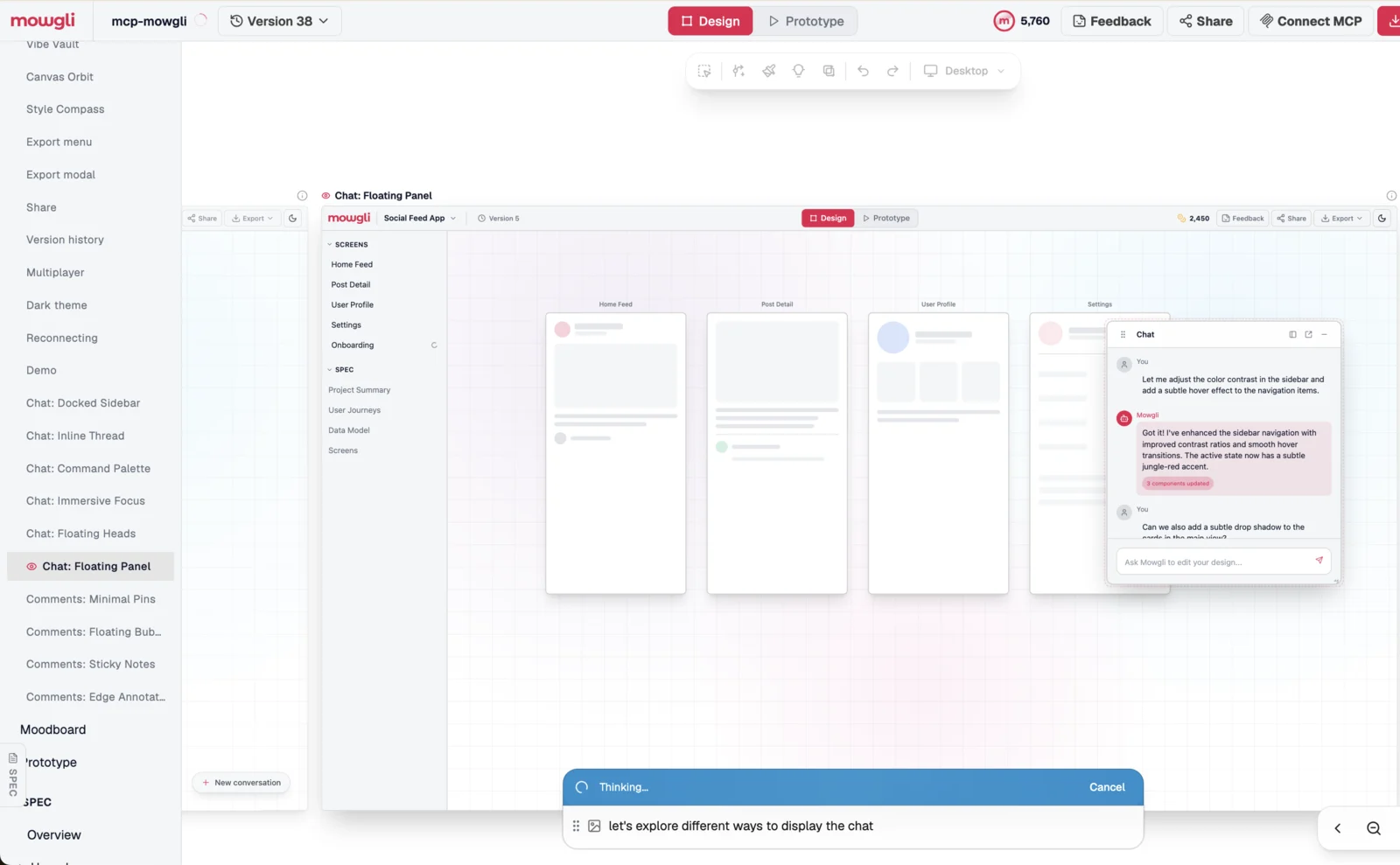
Caption: Mowgli's own codebase pushed into Mowgli, with six chat layouts explored as variants before any code changed.
In this example, the prompt "let's explore different ways to display the chat" produced Docked Sidebar, Inline Thread, Command Palette, Immersive Focus, Floating Heads and Floating Panel variants. Comment concepts included Minimal Pins, Floating Bubbles and Sticky Notes.
-
Test the winner in prototype mode with five users.
-
Use version history as the design-side rollback. Every change has a numbered version and its prompt. You can search and pin versions.
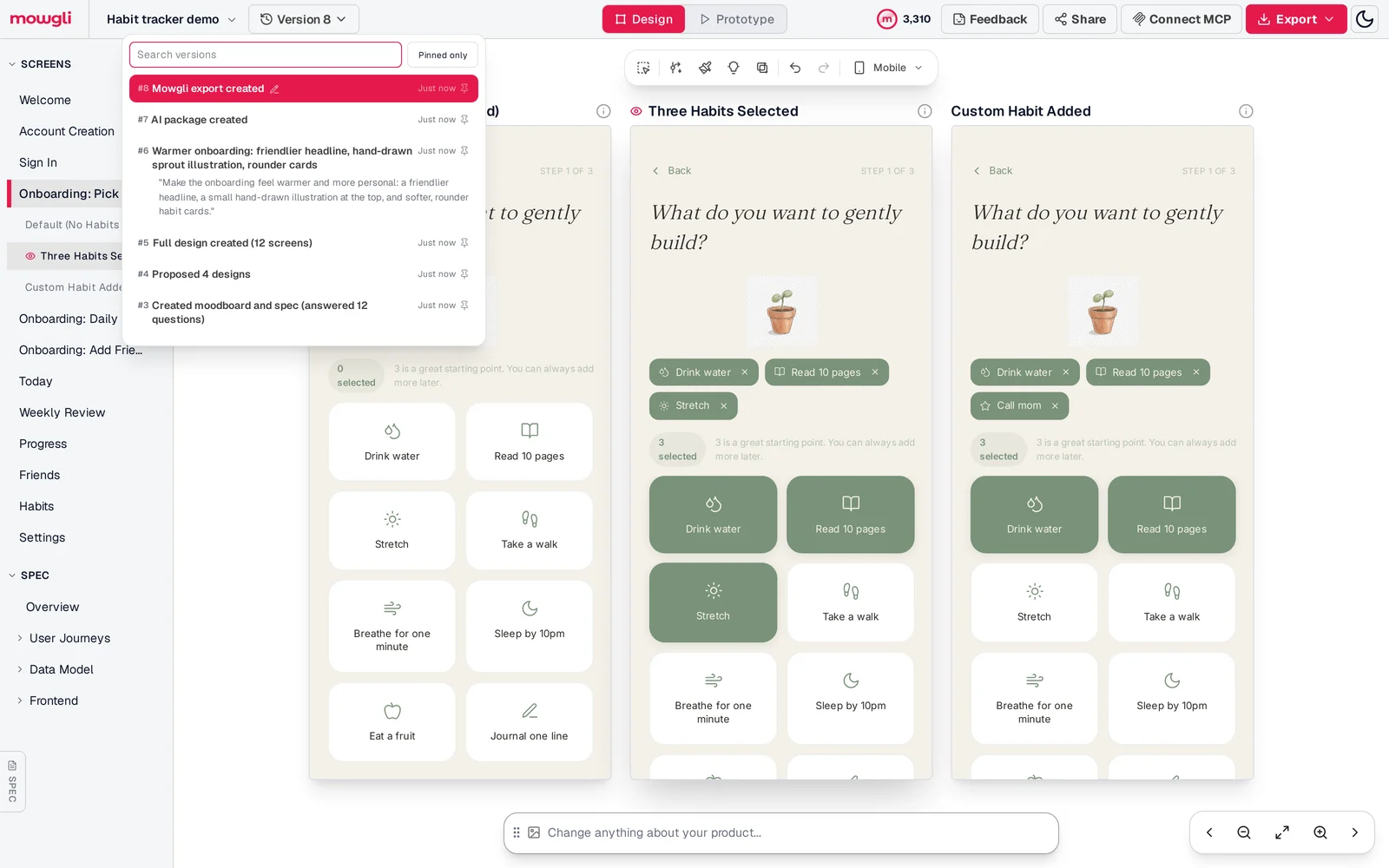
Caption: Every change is a numbered version with its prompt, so any experiment can be rolled back.
- Ask the coding agent to pull the chosen screen into a branch. The MCP server exposes tools including
list_versions,diffandread_file, and the commit can be recorded in version metadata.
Pull the [Dashboard] variant and its states from Mowgli into src/pages/Dashboard.tsx as DashboardNew. Keep the current screen as DashboardCurrent. Do not change hooks, data fetching or routing. Gate the two behind the PostHog flag dashboard-redesign. Record the commit in the Mowgli version metadata.
See the coding-agent workflow, Mowgli skill, MCP connection, moodboard, and redesign tool. The guides to MCP and agent skills, skills versus MCP servers, and agent-editable canvases explain the connection options.
Free to start with 300 credits; credit packs from $12; plans from $15/mo. The free credits cover pushing an existing codebase in and making changes.
Mowgli designs and prototypes; to host and ship, you hand off to a builder or coding agent (Claude Code, Codex, Cursor, Lovable).
Two agent-side alternatives cover narrower jobs:
- Claude Code
/design, a research preview from the week of August 17-21, 2026, publishes editable artboards from a brief. Pick one, edit it, and ask Claude to implement it. It requires Claude Code v2.1.265 or later and a Pro, Max, Team or Enterprise plan. Example:/design redesign the composer based on what people actually use it for. - Cursor
/best-of-nruns the same task across multiple models. Each result gets an isolated worktree, separate from the other candidates and main checkout. Pick one and commit it or use/apply-worktree. The default cap is 25 worktrees per machine throughcursor.worktreeMaxCount.
Try components and new tokens in Storybook
Storybook isolates a component or screen in real code without running the full app or touching its data. Version 10.6 supports Next.js 14+, Vue 3+, Angular 18+, Svelte 5+, SvelteKit 1+, React Native 0.72+, Preact, Lit and Web Components.
npm create storybook@latest
A story captures a rendered component state. Args define variations, while Controls lets you change them dynamically to stress-test edge cases.
Use the documented Component Story Format shape:
import type { Meta, StoryObj } from '@storybook/your-framework';
import { Button } from './Button';

const meta = {
  component: Button,
} satisfies Meta<typeof Button>;

export default meta;
type Story = StoryObj<typeof meta>;

export const Primary: Story = {
  args: {
    backgroundColor: '#ff0',
    label: 'Button',
  },
};
Apply the same pattern to stories named Current and Proposed for the screen under test. Do not add behavior or invented props just to make the comparison work.
For a token experiment, install the Themes addon:
npm i -D @storybook/addon-themes
export default {
  addons: ['@storybook/addon-themes'],
};
Configure theme switching with the documented decorator:
import { withThemeByDataAttribute } from '@storybook/addon-themes';
import '../src/index.css';

const preview: Preview = {
  decorators: [
    withThemeByDataAttribute<Renderer>({
      themes: {
        light: 'light',
        dark: 'dark',
      },
      defaultTheme: 'light',
      attributeName: 'data-theme',
    }),
  ],
};

export default preview;
Define proposed tokens under their own data-theme value in global CSS, then add that value as a third themes entry. Every story can then switch between the current and proposed token sets.
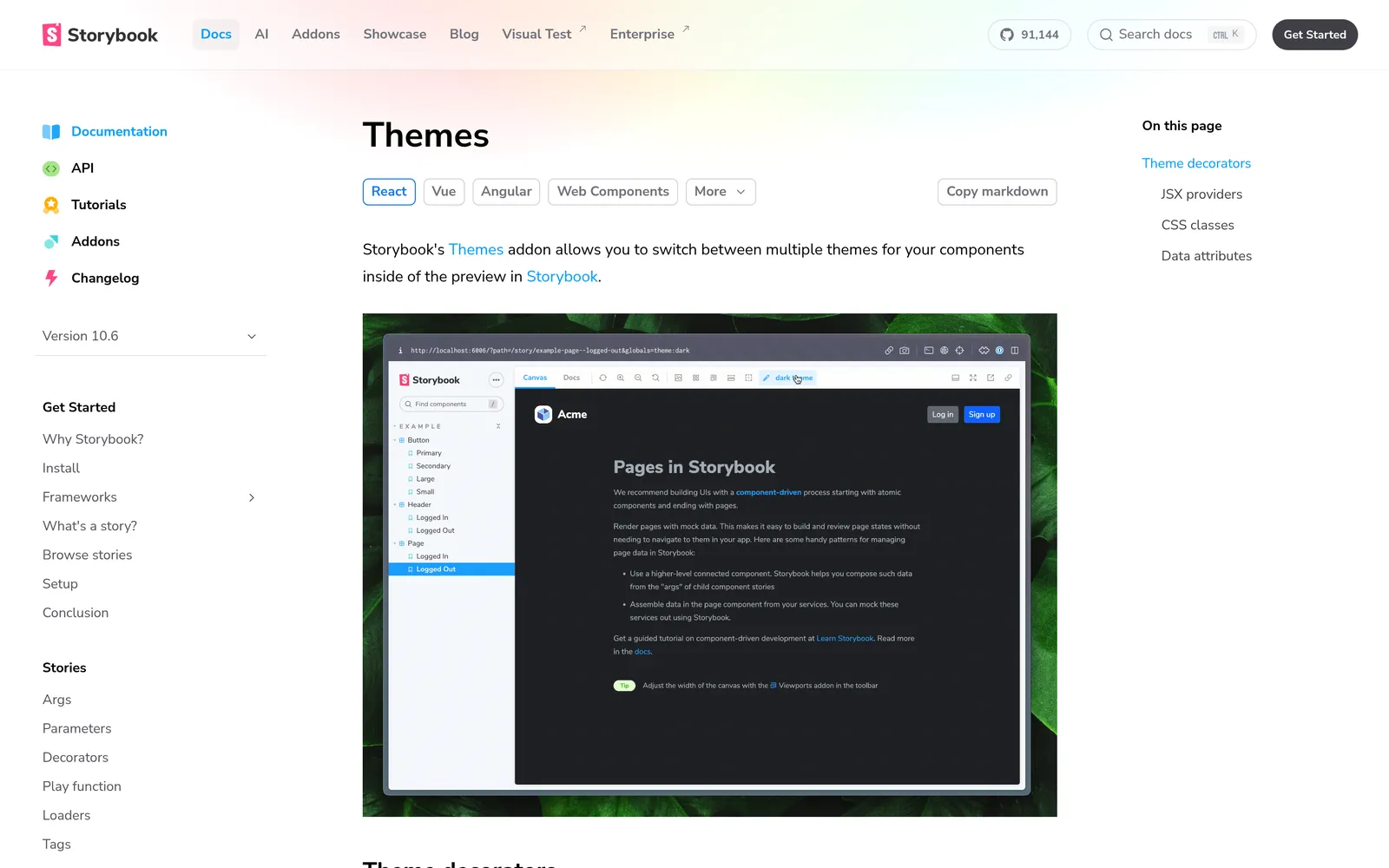
Caption: The Themes addon is one way to flip every story between the current and a proposed token set. Source: Storybook docs, captured October 2026. Source: storybook.js.org, captured October 2026.
Add visual testing with npx storybook@latest add @chromatic-com/storybook. Every story becomes a test: the first build establishes baselines and later builds show pixel differences. It requires a Chromatic account.
Prices are from each vendor's pricing page, October 2026.
Chromatic Free includes 5,000 snapshots per month. Starter costs $179 per month for 35,000 snapshots.
Build a static copy with npm run build-storybook, which outputs storybook-static, or publish with npx chromatic --project-token=<your-project-token>. For a contact sheet covering every state, use the Storybook state workflow.
Put the whole app on a preview URL
A preview deployment gives you real routes and data shapes on a shareable URL while production remains untouched.
Vercel creates a preview when you push to a non-production branch, open a pull request on GitHub, GitLab or Bitbucket, or run vercel without --prod. Its branch-specific URL always follows the latest branch changes. Its commit-specific URL preserves one exact deployment. Share the branch URL during an ongoing experiment.
Vercel Comments are enabled by default on preview deployments across all plans and are free. Reviewers need a Vercel account; Pro and Enterprise projects can invite external users.
Netlify creates Deploy Previews for pull or merge requests from GitHub, GitLab, Bitbucket or Azure DevOps. Pull request 42 uses a URL shaped like deploy-preview-42--mysitename.netlify.app.
The Netlify Drawer supports comments, screenshots, video and responsive testing on a mobile device. Open it with Cmd+\ on Mac or Ctrl+\ on Windows and Linux.
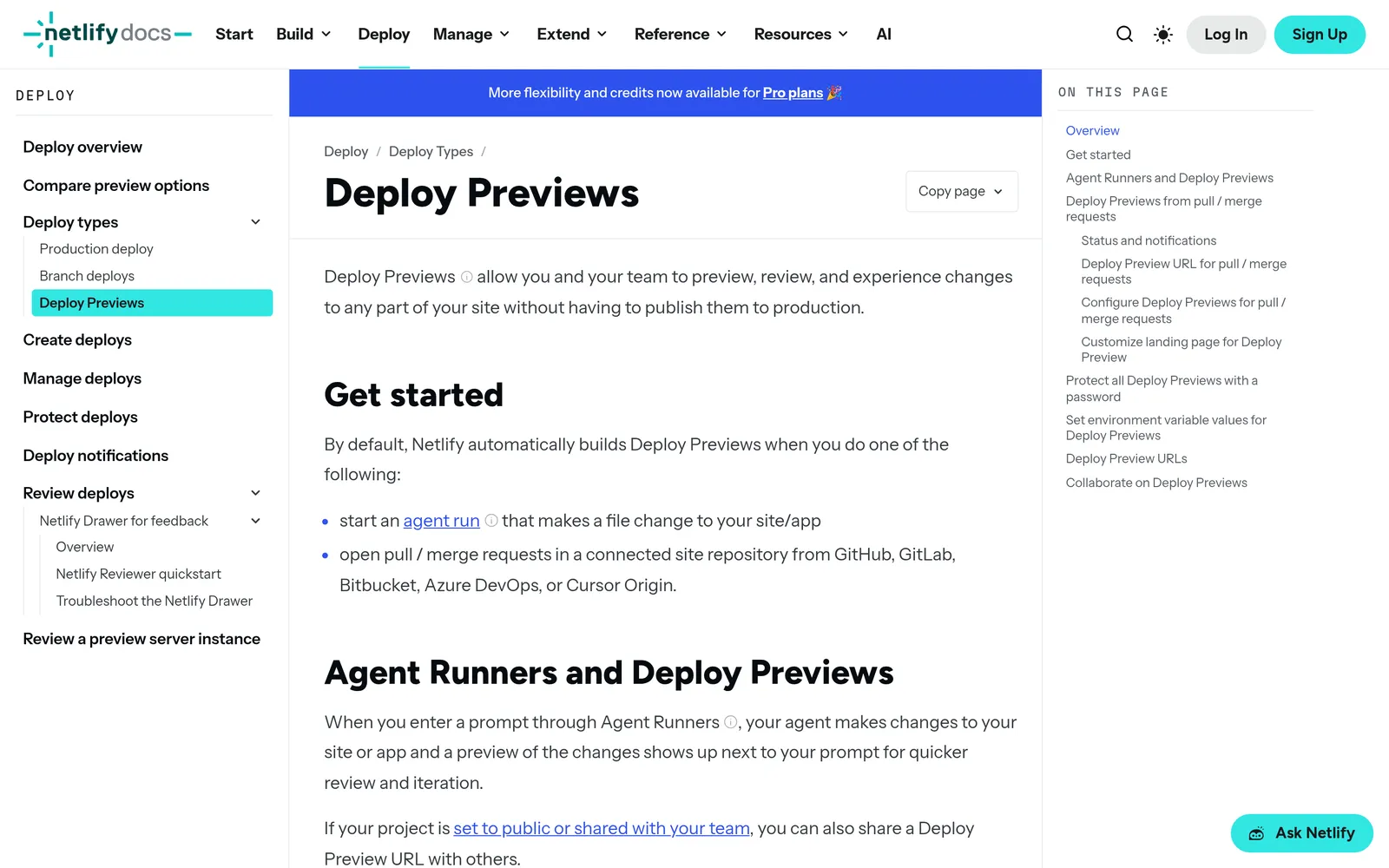
Caption: Every pull request gets its own preview URL on Netlify. Source: Netlify docs, captured October 2026. Source: docs.netlify.com, captured October 2026.
Netlify branch deploys are opt-in and use branch-name--sitename.netlify.app. A Developer or Owner enables them, and wildcards such as features/* are supported. A convention like experiment/dashboard-dense gives each variant a recognizable URL.
For imported repositories, each v0 chat starts from its selected base branch and creates an isolated working branch with its own Vercel preview. Two chats can therefore hold two variants on two URLs. Bolt can also create branches from its GitHub menu; you merge them in GitHub.
Pair previews with the visual diff and Playwright screenshot checks.
Tweak in place with builder design modes
Builder design modes suit small changes to one element. They edit the current version rather than displaying several alternatives side by side.
- v0 Design Mode opens from the Design tab in the preview toolbar. It edits typography, text and background colors, spacing, borders, opacity, radius, shadow and text content. Applying a change creates a normal, diffable, reviewable and revertable chat version. It works only on the latest version, not read-only chats or mobile viewports, and is listed on the Free plan.
- Lovable's preview toolbar can select elements, edit text inline, draw annotations and add comments. It is available on all plans. Select and Draw consume credits. Each account gets 100 free inline text edits, with each edit becoming available again 24 hours after use. Comments are free until sent to Lovable. Every change creates a version; reverting restores code but not database data, so bookmark the desired version.
- Cursor Design Mode runs in the browser inside the Agents Window. Toggle it with
Cmd+Shift+D, then click, multi-select, draw an area or speak. The agent receives the element identity and a screenshot. Use a branch or worktree to keep the change off main. - Bolt's Select tool supports visual edits from the chatbox. Editing is free; tokens are used when you save. It is available on all plans, but you cannot navigate while Select is active.
For controlled edit instructions, use these prompts for editing an app design by chat.
Ship the winner behind a feature flag and measure
An experiment toggle assigns each user to a cohort and consistently routes that user to the control or test code path. Keep the old screen in the code until you make the decision.
PostHog installs in React with:
npm install --save posthog-js @posthog/react
Its experiment wizard creates a feature flag automatically. Experiments start with control and test variants. This rendering pattern is adapted from PostHog's React documentation:
import { useFeatureFlagVariantKey } from '@posthog/react'

export function Dashboard() {
  const variant = useFeatureFlagVariantKey('dashboard-redesign')
  return variant === 'test' ? <DashboardNew /> : <DashboardCurrent />
}
Experiments use the events and feature flags already in PostHog, so you do not need separate experiment instrumentation. You can choose Bayesian or frequentist statistics. Its running-time calculator estimates duration from traffic and the minimum detectable effect, but enough sample size does not guarantee a significant result.
PostHog includes 1 million feature flag requests per month for free, with experiments billed through feature flags.
LaunchDarkly's $0 Developer plan includes unlimited seats and flags, five service connections, 1,000 client-side monthly active users, and 100,000 experimentation monthly active users. Foundation costs $10 per service connection per month plus $8.33 per 1,000 client-side monthly active users, billed yearly.
GrowthBook Starter is free for up to three users and one project, with unlimited flags, experiments and traffic. Pro costs $40 per seat per month and adds the AI Visual Editor, power calculator and safe rollouts.
The Vercel Flags SDK is a free, open-source library for Next.js and SvelteKit:
npm install flags
Its documented Next.js example is:
import { flag } from 'flags/next';

export const exampleFlag = flag({
  key: 'example-flag',
  decide() {
    return Math.random() > 0.5;
  },
});
Provider adapters use the @flags-sdk npm scope. For PostHog, install pnpm i @flags-sdk/posthog.
Flags Explorer is available in the Vercel Toolbar on all plans. It overrides flags for your current session without changing what teammates or automated tests see. You can save recommended overrides per branch; they appear on previews but not production. This lets a stakeholder inspect both variants through one preview URL.
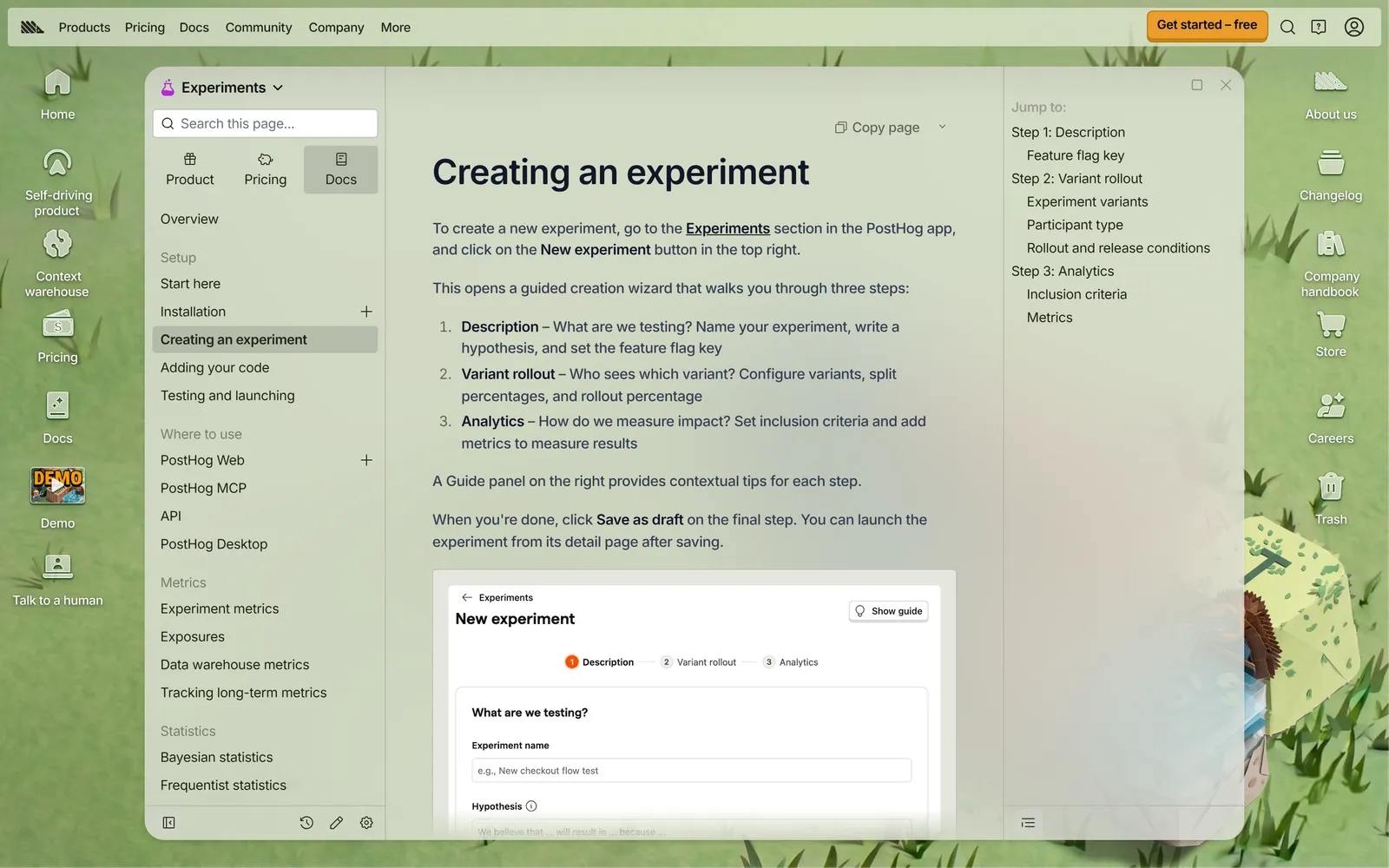
Caption: PostHog's wizard asks for the change, the rollout and the metric, then creates the flag. Source: PostHog docs, captured October 2026. Source: posthog.com, captured October 2026.
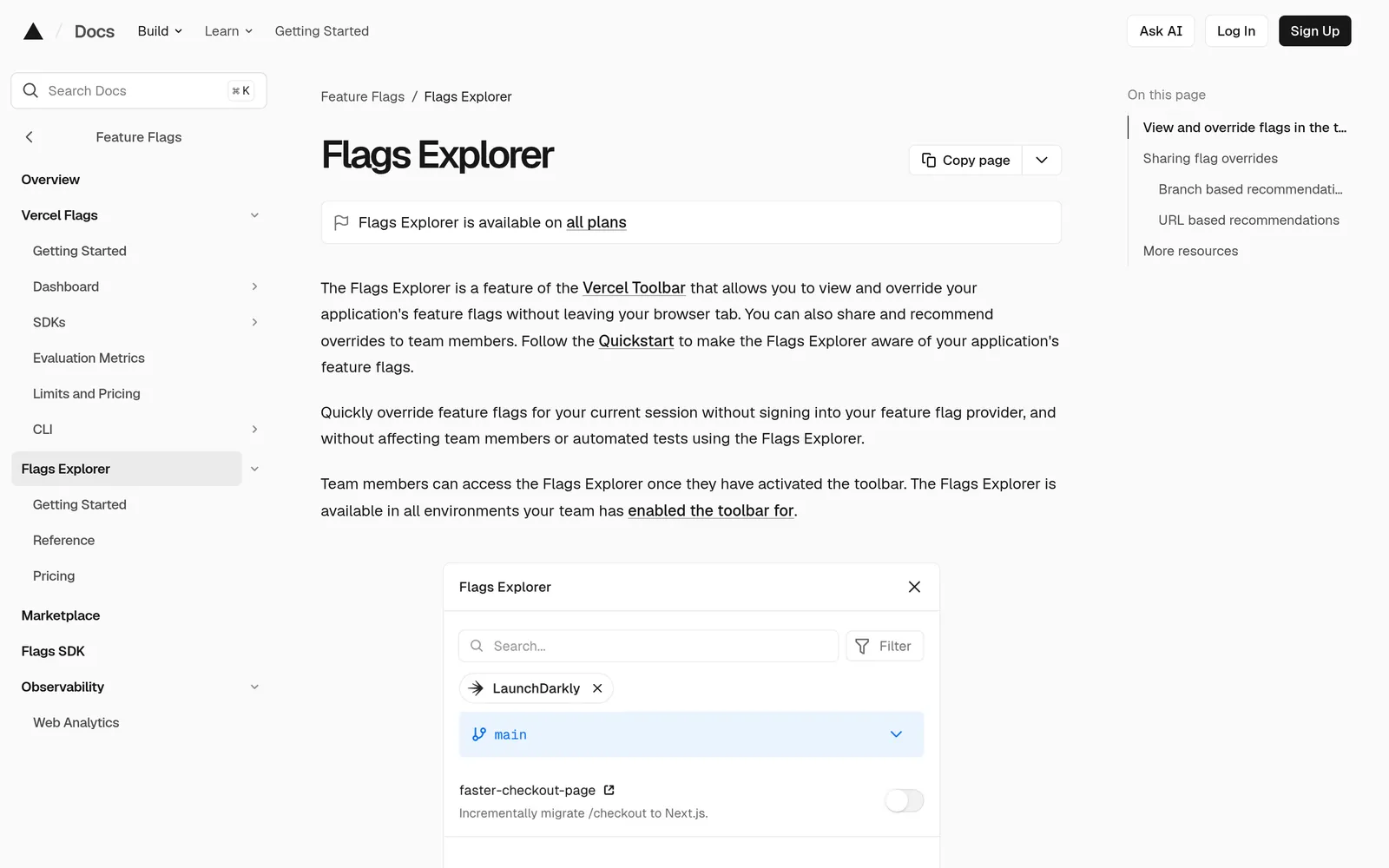
Caption: Flags Explorer overrides a flag for your own session on a preview, so reviewers can see both variants. Source: Vercel docs, captured October 2026. Source: vercel.com, captured October 2026.
Do not force a statistical A/B test onto a low-traffic app. NN/g says you often need thousands of users to reach significance. A test shows how behavior changed, but not why. Combine quantitative results with qualitative research.
For a small app, test the prototype or preview with five users. Then use the flag for a guarded percentage rollout with a kill switch and guardrail metric.
When the experiment ends:
- Decide which version ships.
- Roll the flag to 100% or back to 0%.
- Delete the flag and losing component.
- Update the design source. If you use Mowgli, ask the coding agent to push the shipped change back so design and code match.
Which method fits which experiment
| Method | Best for | Variants at once | Who sees it | Real code? | Free to start |
|---|---|---|---|---|---|
| Mowgli canvas | Whole-app directions on real screens and states | Many, side by side | Team and prototype test users | React and Tailwind per screen, synced through Claude Code, Codex or Cursor | 300 credits |
Claude Code /design | Artboard options for one UI | Several artboards | You | Implemented after selection | Claude Pro, Max, Team or Enterprise |
Cursor /best-of-n | Competing code versions of one task | One per model in isolated worktrees | You | Yes | Cursor plan |
| Storybook and Themes | Components, states and token sets | As many stories and themes as you write | Team through published Storybook | Yes | Open source; Chromatic Free includes 5,000 snapshots per month |
| Preview deployment | Full app on a real URL | One per branch or pull request | Anyone with the link; Vercel comments require an account | Yes | Comments are free on all Vercel plans |
| Builder design modes | Small element tweaks | One current version | You | Yes | v0 on Free; Lovable toolbar on all plans; Bolt editing free until saved |
| Feature flag or experiment | Real users and one metric | Control plus 1-2 variants | A percentage of users | Yes | PostHog 1M flag requests per month; LaunchDarkly Developer $0; GrowthBook Starter free; Flags SDK free |
The practical sequence is simple:
- Explore whole-app directions from the real codebase on a Mowgli canvas and sync the winner back.
- Verify the implementation in Storybook and on a preview URL.
- Prove the result behind a PostHog, LaunchDarkly or GrowthBook flag.
FAQ
How can I try a new design for my app without breaking it?
Keep every experiment off main. Explore variants on a design canvas or in Storybook, build the winner on a branch with a preview URL, and ship it behind a flag so the old screen remains the control. Keep logic out of the visual change and roll back with the flag rather than a redeploy.
How do I test UI design variations on an existing app?
Generate 3-5 versions of the hardest screen, narrow them through team review or a five-user test, and compare the winner against the current screen in PostHog, LaunchDarkly or GrowthBook. Mowgli can import the existing codebase through Claude Code, Codex or Cursor so you can compare real screens and states side by side.
Can I preview design changes before deploying them?
Yes. Vercel creates previews for non-production branch pushes and pull requests, with a branch URL that tracks the latest commit. Netlify builds Deploy Previews at URLs shaped like deploy-preview-<PR number>--<site>.netlify.app. Vercel Comments and the Netlify Drawer collect feedback on the preview.
Should I A/B test a redesign of a small app?
Usually not as a statistical test. NN/g notes that reaching significance can require thousands of users. Run five-user tests on a prototype or preview, then use a guarded percentage rollout with a kill switch and guardrail metric.
Can AI tools generate design variations of my existing app?
Yes. A Mowgli canvas handles whole-app variations from an imported codebase, Claude Code /design creates editable artboards, and Cursor /best-of-n runs the same task across models in isolated worktrees. v0 Design Mode, Lovable's preview toolbar and Bolt visual edits are better suited to small in-place changes.
How do I bring an existing codebase into a design tool?
Choose Import my existing codebase, then connect Claude Code, Codex or Cursor with npx skills add mowgli-ai/skills or https://app.mowgli.ai/mcp. Ask the coding agent to push every screen and state into the project. The same connection can pull the winning design back into the repository.
Sources
- Mowgli agent skill repository
- Mowgli MCP server
- Mowgli coding-agent workflow
- Mowgli pricing
- Claude Code MCP documentation
- Claude Code August 2026 updates
- Cursor worktrees documentation
- Cursor Design Mode documentation
- Storybook installation
- Storybook stories
- Storybook Themes addon
- Storybook addon-themes repository
- Storybook visual testing
- Publishing Storybook
- Chromatic pricing
- Vercel deployment environments
- Vercel Comments
- Vercel Flags Explorer
- Flags SDK
- Flags SDK for Next.js
- Flags SDK PostHog provider
- Netlify Deploy Previews
- Netlify branch deploys
- v0 GitHub integration
- v0 Design Mode
- v0 pricing
- Lovable preview toolbar
- Lovable project history
- Bolt visual edits
- Bolt GitHub integration
- PostHog React library
- PostHog experiments
- Creating a PostHog experiment
- PostHog sample size and running time
- PostHog pricing
- LaunchDarkly pricing
- GrowthBook pricing
- Martin Fowler on feature toggles
- NN/g on parallel and iterative design
- NN/g on A/B testing