Agent Skills vs MCP Servers: What Designers and PMs Need (2026)
Skills teach Claude Code, Codex or Cursor how to do a job and load on demand; MCP servers connect them to live apps and data. When to use each, and how.
Agent skills vs MCP servers: the short answer
An agent skill is a recipe that Claude Code, Codex or Cursor reads when your task matches it. An MCP server is a live connection to another app's tools and data. Use a skill to teach a workflow, and use MCP when the agent needs authenticated access to systems such as Figma, Notion or a design canvas. They complement each other.
Anthropic puts it this way: "MCP connects Claude to data; Skills teach Claude what to do with that data." Its recommendation is equally direct: "Use both together: MCP for connectivity, Skills for procedural knowledge."
| Your situation | Use | Why |
|---|---|---|
| Teach a repeatable workflow, house style or checklist | Skill | Instructions load only when the task matches |
| Agent runs in a terminal or IDE and the vendor ships a CLI | Skill that calls the CLI | The CLI reads local files and returns compact output |
| Chat app with no shell | MCP server | Remote MCP needs only a URL and an OAuth sign-in |
| Live data behind a login with no CLI | MCP server | Per-user OAuth and typed tools |
| A vendor offers a plugin | Plugin | One install can include skills and MCP |
Mowgli ships both a skill and an MCP server. Its setup prompt tells Claude Code, Codex or Cursor to try the skill first. We make Mowgli.
What is an agent skill?
A skill is a directory containing, at minimum, a SKILL.md file. That file provides a name, description and instructions. The directory can also contain scripts/ for executable code, references/ for documentation and assets/ for templates, images or data.
The minimum valid file is:
---
name: skill-name
description: A description of what this skill does and when to use it.
---
Both fields are required. name has a maximum of 64 characters, uses lowercase letters, numbers and hyphens, and must match the folder name. description has a maximum of 1,024 characters and explains what the skill does and when to use it.
Optional frontmatter includes license, compatibility, metadata and the experimental allowed-tools field.
Skills use progressive disclosure:
- The agent loads the
nameanddescriptionfor every available skill, about 100 tokens per skill according to the specification. - It reads the full
SKILL.mdinstructions when the task activates the skill. The specification recommends keeping these instructions below 5,000 tokens. - It opens scripts, references and assets only when required.
Keep SKILL.md below 500 lines and move detailed material into referenced files. This gives the agent enough information to recognize the job without placing the entire workflow in every conversation.
The description is the trigger. If it does not contain terms you actually use, such as "redesign", "design system" or "handoff", the agent might never open it. Codex recommends front-loading the main use case and trigger words.
Anthropic launched Agent Skills on October 16, 2025 and published the format as an open standard on December 18, 2025. The agentskills.io showcase now lists more than 40 compatible products, including Claude Code, Claude, ChatGPT and Codex, Cursor, GitHub Copilot, VS Code and Gemini CLI.
| Client | Where skills live | How they load |
|---|---|---|
| Claude Code | ~/.claude/skills/ or .claude/skills/ | Run /skill-name, use /skills, or let Claude match the description |
| Codex | .agents/skills/, $HOME/.agents/skills or /etc/codex/skills | Run /skills, type $, or let Codex match the description |
| Cursor | .agents/skills/, .cursor/skills/ and equivalent user folders | Type / in Agent chat or let Cursor match the description |
| Claude.ai | Upload a skill ZIP under Customize > Skills | Claude loads it when relevant; code execution must be enabled |
Claude Code keeps an invoked skill in context across turns. Its skill listing uses 1% of the model context window and truncates combined description and when_to_use text at 1,536 characters.
Codex caps its initial skill list at 2% of the context window, or 8,000 characters when the window is unknown. It detects new skills automatically, though a restart can help if one does not appear.
Cursor also reads skills from Claude and Codex directories. It supports optional paths frontmatter for file-based activation and disable-model-invocation: true for skills that should run only when explicitly selected.
Claude.ai accepts the six fields defined by the specification. Skill uploads are available on Free, Pro, Max, Team and Enterprise plans.
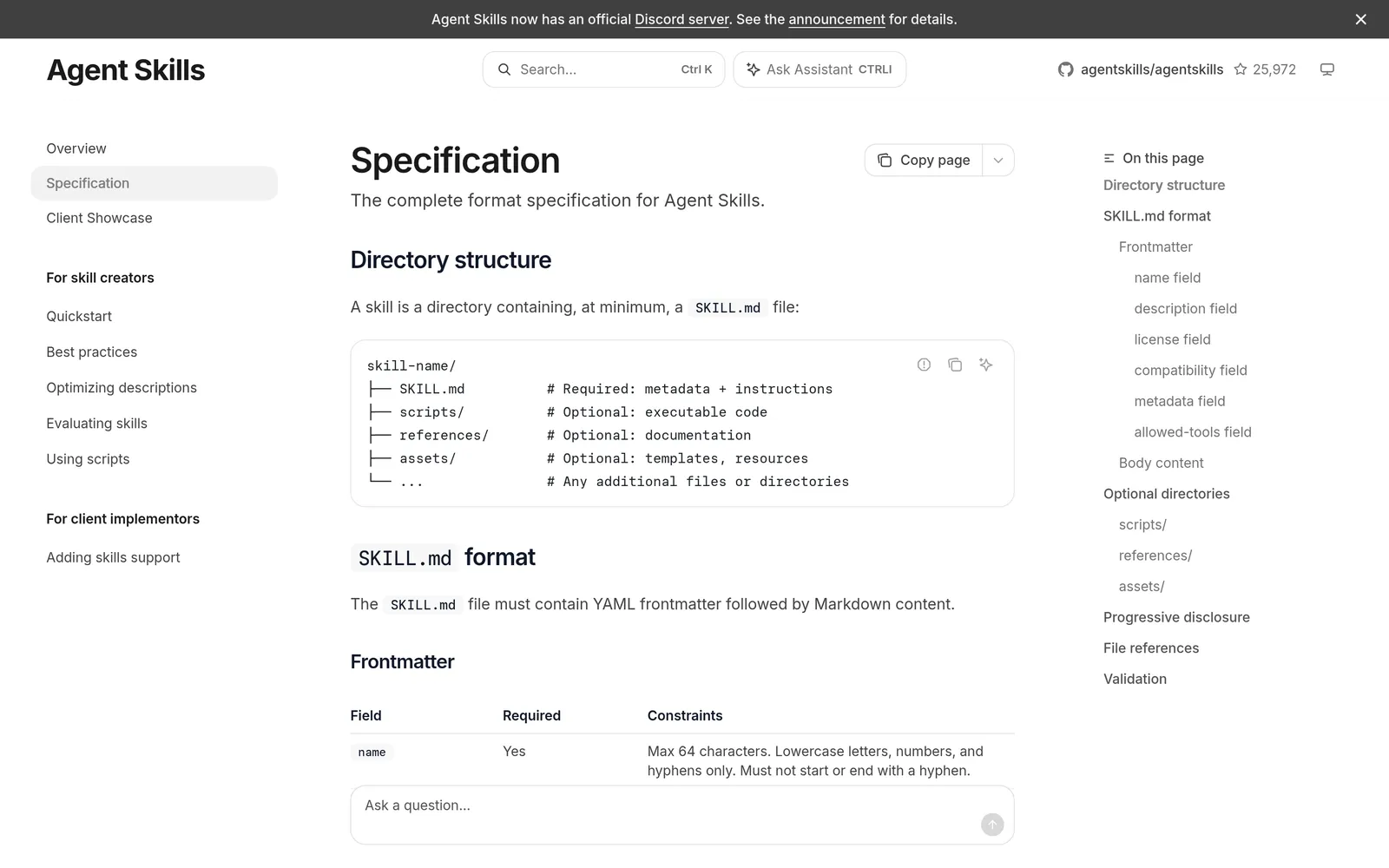
Caption: The Agent Skills spec: a skill is a folder with a SKILL.md file, plus optional scripts, references and assets. Source: agentskills.io, captured October 2026.
See the recommended agent skills for UI design for practical design workflows.
What is an MCP server?
MCP, or Model Context Protocol, is an open-source standard for connecting AI applications to external systems. Its documentation compares it to a USB-C port for AI applications.
Anthropic open-sourced MCP on November 25, 2024. The current specification revision is 2026-07-28.
An MCP setup has three roles. The host is the AI application, such as Claude Code, Claude Desktop, VS Code or Cursor. The host creates one MCP client for each connected server. The server exposes capabilities:
- Tools are executable functions the AI application can invoke.
- Resources are data sources that provide context.
- Prompts are reusable templates.
- Cursor also supports MCP Apps, which are interactive UI views returned by MCP tools.
A local MCP server usually uses stdio. The client launches a process on your machine, and credentials commonly come from environment variables. The MCP authorization specification says stdio implementations should retrieve credentials from the environment instead of following its HTTP authorization flow.
A remote server uses Streamable HTTP. Each message is an HTTP POST to one MCP endpoint, and one server can support many clients. Claude Code recommends HTTP for remote MCP servers. SSE is deprecated.
Authorization is optional. Remote servers that support it follow OAuth 2.1 and related registration standards. In practice, you add a URL, approve access in a browser, and let the client store and refresh the token. Claude Code says authentication tokens are stored securely and refreshed automatically.
Find servers through the official MCP Registry, the Cursor Marketplace or cursor.directory.
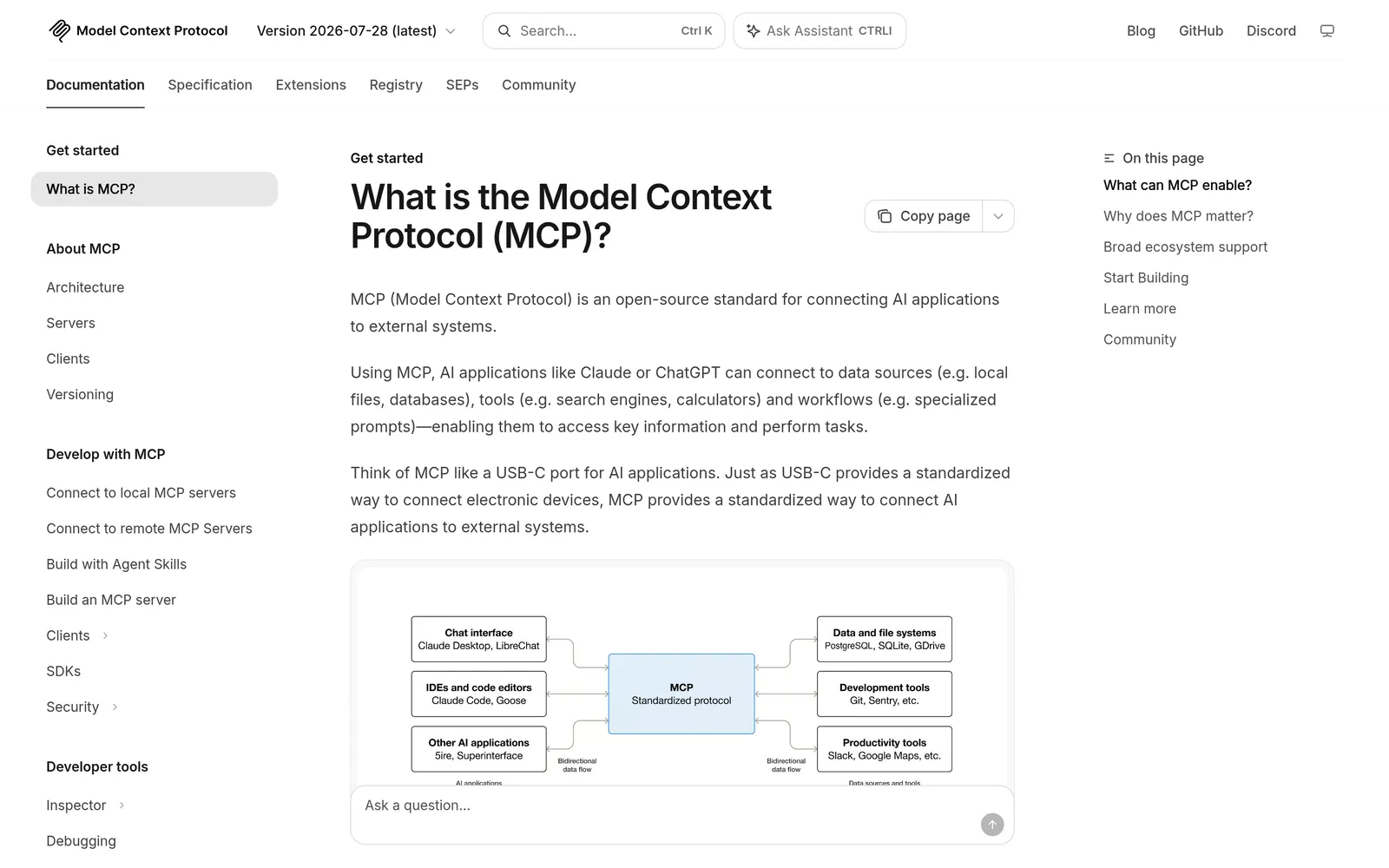
Caption: MCP is the protocol behind connectors in Claude Code, Codex, Cursor and Claude.ai. Source: modelcontextprotocol.io, captured October 2026.
For specific options, see MCP servers for UI design and MCP servers for product managers.
Skills vs MCP: the practical differences
| Agent skill | MCP server | |
|---|---|---|
| What it is | Folder with SKILL.md, plus optional files | Program exposing tools, resources and prompts |
| Carries | Know-how, steps, rules and templates | Live data and actions in another app |
| Always in context | Name and description | Tool names or complete tool definitions, depending on the client |
| Loaded on use | Instructions, then supporting files | Tool arguments and results |
| Setup | Copy a folder or run npx skills add | Add a URL or command to client config |
| Auth | None by itself; a CLI can handle login | OAuth for remote servers or environment variables for local ones |
| Needs a shell | Only when it runs a CLI or script | Not for remote servers |
| Works in Claude.ai | Yes, as a ZIP with code execution enabled | Yes, as a custom connector |
| Portability | One folder across more than 40 clients | One URL, with different client configuration formats |
Context and token cost
Skills keep only their metadata loaded until use. Once Claude Code invokes a skill, however, every line becomes a recurring token cost because the content stays across turns. After compaction, Claude Code reattaches the first 5,000 tokens of each invoked skill within a combined 25,000-token budget.
Traditional MCP clients load every tool definition up front. Tool arguments and intermediate results also consume tokens. Anthropic demonstrated a code-execution approach that reduced one example from 150,000 tokens to 2,000 tokens, a 98.7% reduction.
Newer clients reduce the definition cost. Claude Code tool search loads only tool names and server instructions at session start. It warns when one MCP response exceeds 10,000 tokens and caps output at 25,000 by default through MAX_MCP_OUTPUT_TOKENS.
Cursor syncs tool descriptions to a folder and reported 46.9% fewer total agent tokens in runs that called an MCP tool. Codex lets you set enabled_tools, disabled_tools and a per-tool output_token_limit.
A skill paired with a CLI is usually leaner for local work. The CLI can read files from disk and print a compact result. A remote MCP server cannot see your disk, so required source travels through tool arguments and returned data travels back through tool results.
In Claude Code, use /context to inspect skill and MCP usage. Use /doctor to compare unused skills, servers and plugins with their context cost.
What each cannot do
A skill cannot log in to a remote service or maintain a live connection by itself. It needs a CLI, script or MCP server. Scripts also need a shell or code execution environment.
An MCP server provides access, but it does not provide a complete multi-step workflow unless its server instructions and tool descriptions contain one. Codex reads the MCP instructions field and recommends making its first 512 characters self-contained.
A remote MCP server cannot read local files. MCP configuration also lives in a different file for each client.
How skills and MCP servers work together
A skill can teach the workflow while a CLI handles authentication, local files and API calls. It can also teach the agent how to combine several tools from an MCP server. Anthropic describes skills as procedural knowledge that complements MCP access.
Codex skills can declare MCP dependencies:
dependencies:
  tools:
    - type: "mcp"
      value: "openaiDeveloperDocs"
      description: "OpenAI Docs MCP server"
      transport: "streamable_http"
      url: "https://developers.openai.com/mcp"
Plugins can bundle both pieces. Claude Code plugins can contain skills, agents, hooks and MCP servers. Codex plugins can include skills and registered MCP connections. Cursor plugins can package rules, skills, agents, commands, MCP servers and hooks.
Figma recommends its plugin because it combines MCP settings with skills for common workflows. Install it in Claude Code with:
claude plugin install figma@claude-plugins-official
In Cursor Agent chat, type:
/add-plugin figma
The Cursor plugin includes skills for implementing designs, connecting components through Code Connect and creating design system rules.
How to install skills and MCP servers in Claude Code, Codex and Cursor
Install a skill
Vercel's skills CLI supports OpenCode, Claude Code, Codex, Cursor and 75 more clients:
npx skills add vercel-labs/agent-skills
npx skills add vercel-labs/agent-skills --list
npx skills add vercel-labs/agent-skills -a claude-code -a opencode
npx skills list
npx skills update
Project installation is the default. Use -g for a user installation, -a to select clients, -s to choose skills and -y to skip prompts. Symlinks are recommended; --copy creates independent copies.
The CLI writes Claude Code skills to .claude/skills/, Codex skills to .agents/skills/, and Cursor skills to .agents/skills/. Global locations are ~/.claude/skills/, ~/.agents/skills/ and ~/.cursor/skills/.
Anonymous telemetry powers the skills.sh leaderboard. Disable it with DISABLE_TELEMETRY=1 or DO_NOT_TRACK=1.
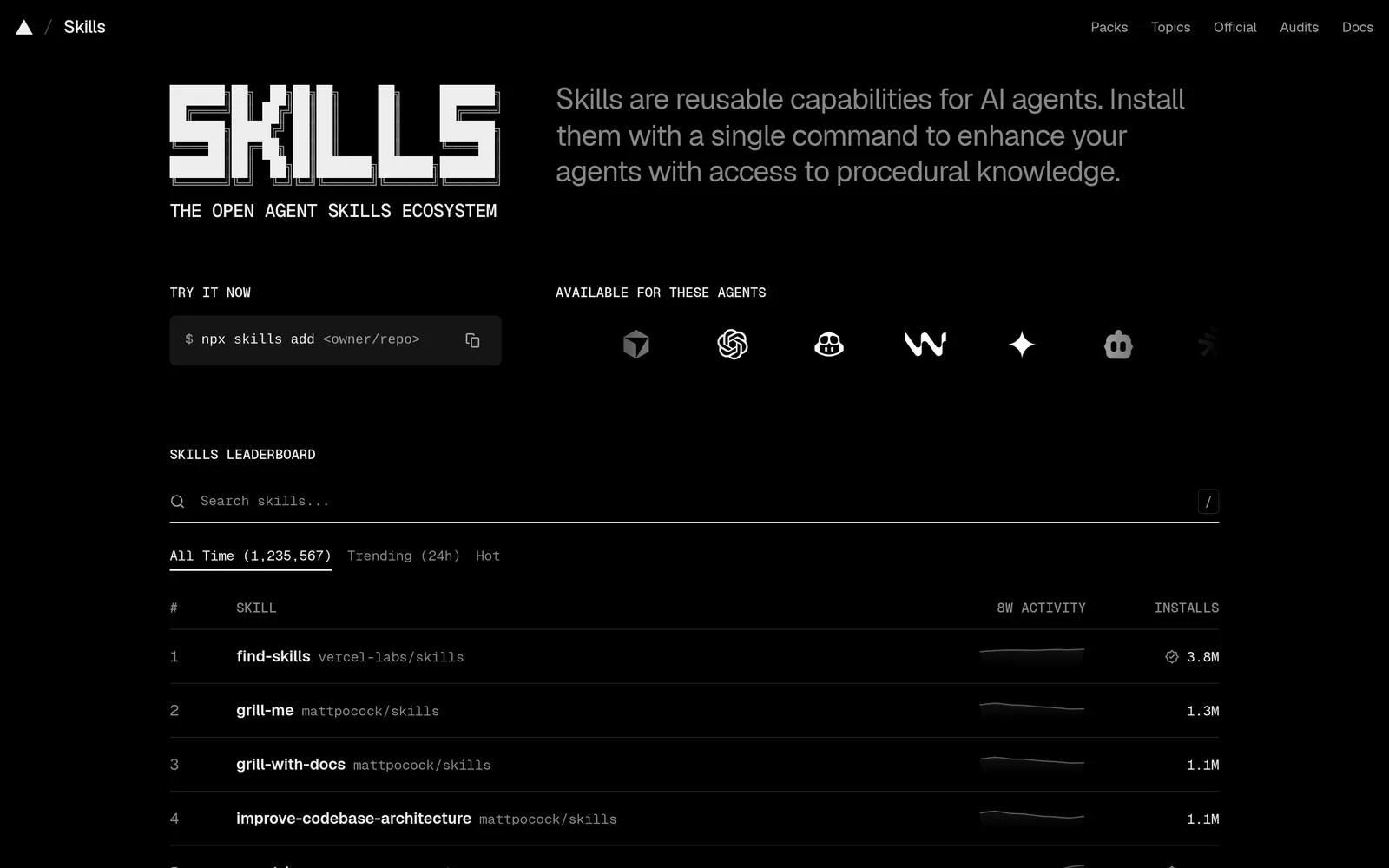
Caption: skills.sh lists skills that install with one npx skills add command, October 2026. Source: skills.sh, captured October 2026.
You can also install skills without that CLI:
- Claude Code: copy the folder into
.claude/skills/or~/.claude/skills/. - Codex: copy it into
.agents/skills/, or run$skill-installer linear. - Cursor: copy it into
.agents/skills/or.cursor/skills/. - Claude.ai: ZIP the skill folder and upload it under Customize > Skills.
For Anthropic's skill marketplace, enter:
/plugin marketplace add anthropics/skills
/plugin install document-skills@anthropic-agent-skills
See agent skills for product managers for a non-engineer installation guide.
Install an MCP server
For Claude Code:
claude mcp add --transport http <name> <url>
claude mcp add --transport http notion https://mcp.notion.com/mcp
claude mcp add --transport http shared-server --scope project https://example.com/mcp
claude mcp login sentry
Run /mcp and complete browser sign-in. Local scope is the default and uses ~/.claude.json. Project scope uses a shareable .mcp.json. User scope applies across projects.
For Codex:
codex mcp add figma --url https://mcp.figma.com/mcp
codex mcp login <server-name>
You can also edit its shared ~/.codex/config.toml or a trusted project's .codex/config.toml:
[mcp_servers.figma]
url = "https://mcp.figma.com/mcp"
bearer_token_env_var = "FIGMA_OAUTH_TOKEN"
http_headers = { "X-Figma-Region" = "us-east-1" }
In the Codex desktop app, open Settings > MCP servers > Add server, choose stdio or Streamable HTTP, then restart.
Cursor uses .cursor/mcp.json per project or ~/.cursor/mcp.json globally:
{
  "mcpServers": {
    "server-name": {
      "url": "http://localhost:3000/mcp",
      "headers": {
        "API_KEY": "value"
      }
    }
  }
}
Cursor also offers one-click Marketplace installs and supports OAuth.
In Claude.ai or Claude Desktop, open Customize > Connectors > + Add > Add custom connector. Enter a name and remote MCP URL. Free users can add one custom connector. Team and Enterprise owners first add connectors under Organization settings > Connectors.
Worked example: Mowgli ships a skill and an MCP server
Mowgli turns a product idea into a full multi-screen app design: it writes the spec first, then designs every screen. Each project contains SPEC.md, frontend.xml and one React + Tailwind <ScreenId>.tsx file per screen.
Its connection dialog gives Claude Code, Codex or Cursor three options in order: install the skill, run the CLI, or connect the MCP server.
"Using the skill is most preferable, but if you don't have the capability, use the CLI directly. Using MCP is more token-inefficient, so use it as a fallback if options 1 and 2 don't work."
The reason is mechanical. The skill drives the mowgli-cli package. Its edit command can attach source files directly from disk with -f <file>, return a compact stat summary and avoid dumping the complete patch into the conversation.
The MCP edit tool instead receives an instruction and project ID. Any local source the service needs must pass through that instruction.
# Skill (Claude Code, Codex, Cursor or any skills-aware agent)
npx skills add mowgli-ai/skills
# CLI fallback for agents that can run shell commands
npx mowgli-cli --help
# MCP fallback
claude mcp add --transport http mowgli https://app.mowgli.ai/mcp
codex mcp add mowgli --url https://app.mowgli.ai/mcp
For Cursor, add "mowgli": { "url": "https://app.mowgli.ai/mcp" } under mcpServers in .cursor/mcp.json.
For Claude.ai or Claude Desktop, add a custom connector named Mowgli with https://app.mowgli.ai/mcp, then connect and authorize it. The CLI uses mowgli login with browser approval. MCP uses OAuth in the browser, and you can revoke access later.
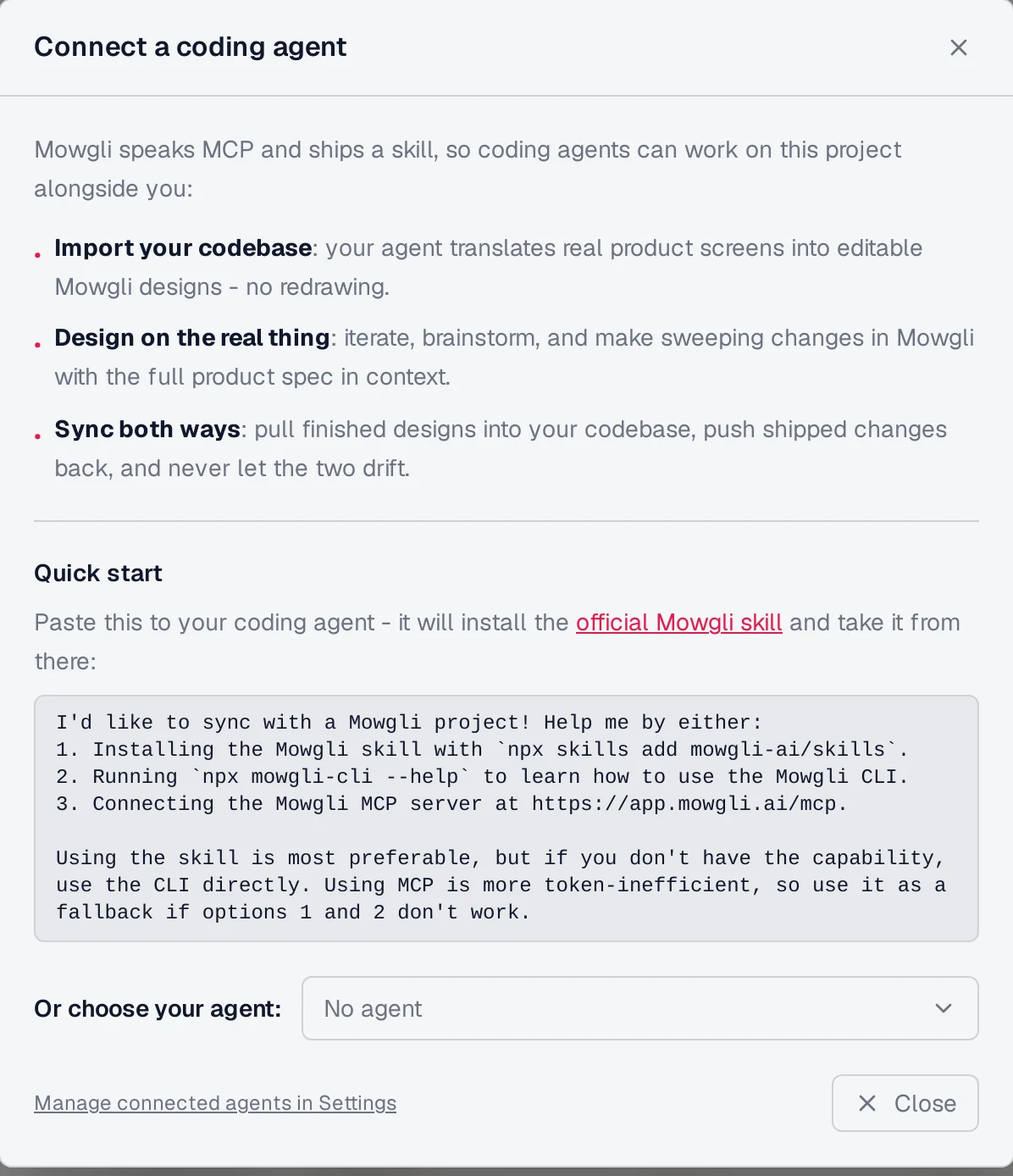
Caption: Mowgli's setup prompt puts the skill first, the CLI second and the MCP server last.
Either route can push existing screens into Mowgli as editable designs, read the spec and screen states, apply natural-language edits, compare versions and record which git commit matches a version.
The MCP server exposes nine tools: list_projects, get_project, set_project_metadata, list_versions, set_version_metadata, list_files, read_file, diff and edit.
Read SPEC.md, frontend.xml and the Today screen from my habit tracker project in Mowgli, and implement it with all of its states.
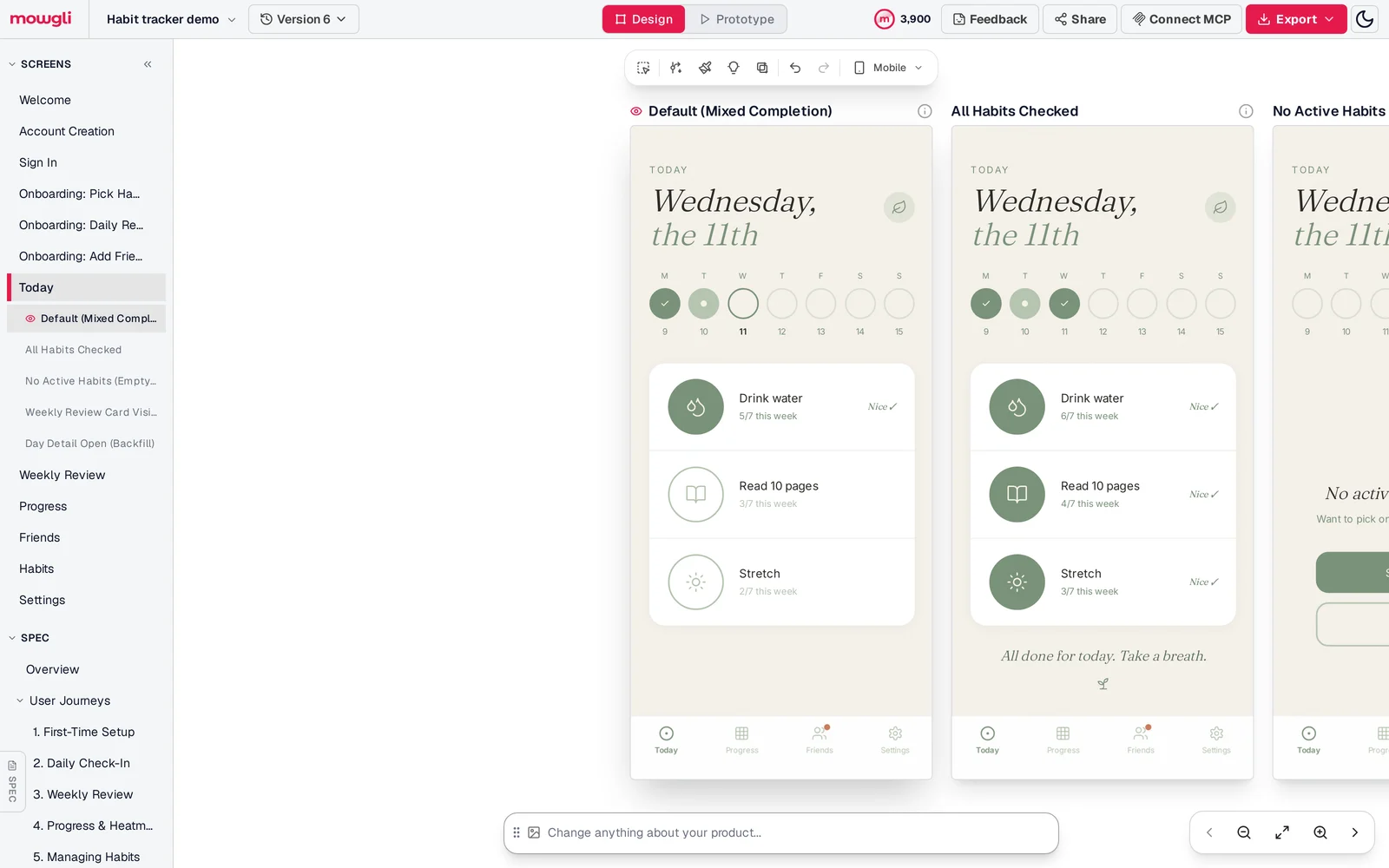
Caption: What Claude Code, Codex or Cursor reads through the skill or MCP: every screen, its states and the spec.
Mowgli designs and prototypes; to host and ship, you hand off to a builder or coding agent (Claude Code, Codex, Cursor, Lovable).
Free to start with 300 credits; credit packs from $12; plans from $15/mo. Connecting a coding agent is included on the free plan.
Read about the Mowgli agent workflow, Mowgli skill, Mowgli MCP server, Claude integration, Codex integration, Claude Code design workflow and Codex frontend design workflow.
When to use a skill, an MCP server or both
Use a skill when the job is procedural: a design review checklist, handoff format, set of brand rules or PRD template. Prefer it when Claude Code, Codex or Cursor can run commands and the vendor provides a CLI. Commit project skills to the repository when your team should share the same process.
Use MCP when you work in a chat app without a shell, need live access to a logged-in service with no CLI, or want administrators to control available connections and tools.
Use both, or install a plugin, when the vendor packages access and instructions together. Figma and Mowgli both support this model. Keep only the servers you use enabled.
Apply the same security discipline to either route:
- Install skills only from trusted sources and audit unfamiliar ones.
- Read
SKILL.mdbefore installing. - Review
allowed-toolsbecause project skills can pre-approve commands. - Check third-party audit results on skills.sh.
- Connect only to MCP servers you trust and review their requested permissions.
The verdict is simple: use skills for how and MCP for access. Prefer a skill when Claude Code, Codex or Cursor can run it; use MCP in chat apps or when no CLI exists. For a whole multi-screen app design that coding agents can read and sync both ways, Mowgli's skill is the default route, while its MCP server covers Claude.ai.
See MCP and skills for visual design for more examples of canvases agents can inspect and edit.
FAQ
What is the difference between agent skills and MCP servers?
A skill is a SKILL.md folder of instructions that Claude Code, Codex or Cursor loads when a task matches. An MCP server is a live connection that gives the agent tools and data from another app. "MCP connects Claude to data; Skills teach Claude what to do with that data."
Do skills replace MCP servers?
No. A skill cannot log in to a remote service on its own; it needs a CLI, script or MCP server. Vendors can ship both in one plugin, as Figma does for Claude Code and Cursor.
Do MCP servers use more tokens than skills?
Often, yes. A skill keeps about 100 tokens of metadata in context until used, while MCP calls carry arguments and results through the conversation. Claude Code tool search and Cursor dynamic context discovery defer tool definitions, and Cursor measured 46.9% fewer total agent tokens in runs that called an MCP tool.
What is skills.sh?
skills.sh is Vercel's open directory and leaderboard of agent skills. Each listing installs with npx skills add <owner/repo>. Rankings use anonymous telemetry from the skills CLI, and its Audits page shows results from Gen Agent Trust Hub, Socket and Snyk.
How do I install a skill in Claude Code, Codex or Cursor?
Run npx skills add <owner/repo> and select the clients, or copy the folder into .claude/skills/, .agents/skills/ or .cursor/skills/. For Claude.ai, upload a ZIP under Customize > Skills with code execution enabled.
Can I use skills or MCP in Claude.ai without a terminal?
Yes. Upload skills under Customize > Skills and connect MCP servers under Customize > Connectors. Free plans support one custom connector. If a skill depends on a CLI or local file access, use the vendor's remote MCP server instead.
Sources
- Agent Skills
- Agent Skills specification
- Anthropic: Equipping agents for the real world with Agent Skills
- Anthropic: Skills explained
- Anthropic: Code execution with MCP
- Anthropic: Introducing the Model Context Protocol
- Claude Code skills documentation
- Claude Code MCP documentation
- Claude Code plugins documentation
- Claude.ai skills documentation
- Claude custom connectors documentation
- Anthropic skills repository
- Codex skill documentation
- Codex MCP documentation
- Cursor skills documentation
- Cursor MCP documentation
- Cursor plugins documentation
- Cursor dynamic context discovery
- MCP introduction
- MCP architecture
- MCP transports specification
- MCP authorization specification
- Official MCP Registry
- Vercel skills CLI
- skills.sh
- skills.sh documentation
- skills.sh audits
- Figma MCP remote server installation
- Mowgli skills repository
- mowgli-cli package
- Mowgli MCP server
- Mowgli agent integration
- Mowgli skill
- Mowgli MCP
- Mowgli pricing