Agent Skills for PRDs and Specs: Claude Code, Codex, Cursor
Use a PRD skill (write-spec, bmad-prd, to-spec) or a spec kit (Spec Kit, OpenSpec, cc-sdd), keep the spec in the repo, and re-check it after every change.
A PRD skill writes the what and why. A spec-driven development kit carries that spec through planning, tasks and code. Neither stays accurate unless you choose a sync model and re-check the spec after every change.
For one PRD in Claude Code, use Anthropic's write-spec. For new features, use GitHub Spec Kit. For changes to an existing codebase, use OpenSpec. For Kiro-style requirements in Claude Code, Codex or Cursor, use cc-sdd. For a multi-screen app, add a screen-and-state specification.
The short answer: pick by the job
| Your job | Install | What you get |
|---|---|---|
| One PRD from an idea, in Claude Code | Anthropic write-spec product-management plugin | PRD with goals, non-goals, user stories, P0/P1/P2 requirements, open questions |
| A coached PRD you will update and validate later | BMAD bmad-prd | Create, Update or Validate modes; prd-<slug>.md plus decision log |
| Get interviewed, then file the spec as an issue | Matt Pocock grill-me plus to-spec | Spec published to your issue tracker, labeled ready-for-agent |
| Spec -> plan -> tasks -> code for each new feature | GitHub Spec Kit | spec.md, plan.md, tasks.md per feature, plus a converge check |
| Changes to an existing codebase, specs as living truth | OpenSpec | Delta specs per change, merged into openspec/specs/ on archive |
| Kiro-style requirements, design, tasks without the Kiro IDE | cc-sdd | EARS requirements.md, design.md, tasks.md as skills |
| Your team already writes PRDs in ChatPRD | ChatPRD MCP server | Read, search, create and update ChatPRD documents from the agent |
| A multi-screen app: spec plus every screen and state, synced both ways | Mowgli skill or MCP | SPEC.md, frontend.xml with every screen and state, one React + Tailwind file per screen |
Mowgli is our product.
For the reasoning behind this workflow, read spec-driven app development. See agent skills for product managers for the wider PM toolkit, and agent skills versus MCP servers for the connection model.
What a good spec file contains
The templates shipped by these tools agree on the core sections:
- Problem and users: state the problem in two or three sentences, identify who has it and describe the cost of leaving it unsolved.
- Goals and non-goals: define three to five measurable outcomes and three to five exclusions with reasons. Anthropic's template says, "Non-goals are as important as goals. They prevent scope creep during implementation."
- Prioritized user journeys: make each journey independently testable. Spec Kit adds a priority, rationale, independent test and Given/When/Then acceptance scenarios.
- Numbered requirements: Spec Kit uses
FR-001: System MUST .... Kiro uses EARS statements such asWHEN [condition/event] THE SYSTEM SHALL [expected behavior]. OpenSpec uses Requirement and Scenario sections with SHALL, WHEN and THEN. - Edge cases: include empty, loading, error and boundary conditions.
- Data: name the important entities and fields.
- Success criteria: make each criterion measurable and technology-agnostic.
- Assumptions and open questions: identify who can answer each question and whether it blocks delivery.
- Agent boundaries: define Always, Ask first and Never rules. Schema changes, dependencies and CI configuration can require approval. Secrets, vendor directories and failing tests stay protected.
Keep the tech stack in the plan, not the product spec. Spec Kit tells /speckit.specify to focus on what and why. Matt Pocock's to-spec also excludes file paths and code snippets because they become outdated quickly.
The missing layer is screens. The Spec Kit, Anthropic and Addy Osmani templates do not list every screen and its states. Add that section for UI work. See turning an app idea into flows and screens and empty, error and loading states.
Here is a composite starter based on those conventions:
# Spec: Invoice approvals

## Problem
AP clerks chase approvers by email; late approvals cost early-payment discounts.

## Goals / Non-goals
- Goal: approvals decided within 2 business days
- Non-goal: payments (handled by the ERP)

## User journeys (P1 first)
### P1 Approver approves an invoice
Given an invoice is pending, When the approver taps Approve, Then it moves to Approved and the clerk is notified.

## Requirements
- FR-001: WHEN an invoice is rejected THE SYSTEM SHALL require a reason.
- FR-002: Reminders after [NEEDS CLARIFICATION: 2 or 3 business days?]

## Data
- Invoice: id, amount, status (pending | approved | rejected), approverId

## Screens and states
- Invoice Detail: pending, approved, rejected (reason banner), loading, error

## Success criteria
- SC-001: 90% of invoices decided within 2 business days

## Boundaries
- Ask first: schema changes. Never: change payment logic.

## Open questions
- Who approves invoices over the limit? (finance, blocking)
Skills that write the PRD
The Vercel skills CLI installs skills into Claude Code, Codex and Cursor. Target an agent with -a claude-code, -a codex or -a cursor.
Anthropic write-spec
write-spec turns a problem statement or feature idea into a PRD. It asks about the user problem, target users, success metrics, constraints and prior work without dumping every question at once.
The output covers Problem Statement, Goals, Non-Goals, User Stories, prioritized Requirements, Success Metrics, Open Questions and Timeline Considerations. Connected trackers, knowledge bases and design tools can supply context; otherwise it works from your input.
Install the product-management plugin in Claude Code:
claude plugin marketplace add anthropics/knowledge-work-plugins
claude plugin install product-management@knowledge-work-plugins
Install only the skill in any skills-aware agent:
npx skills add https://github.com/anthropics/knowledge-work-plugins --skill write-spec
Invoke it with /write-spec <feature or problem statement>.
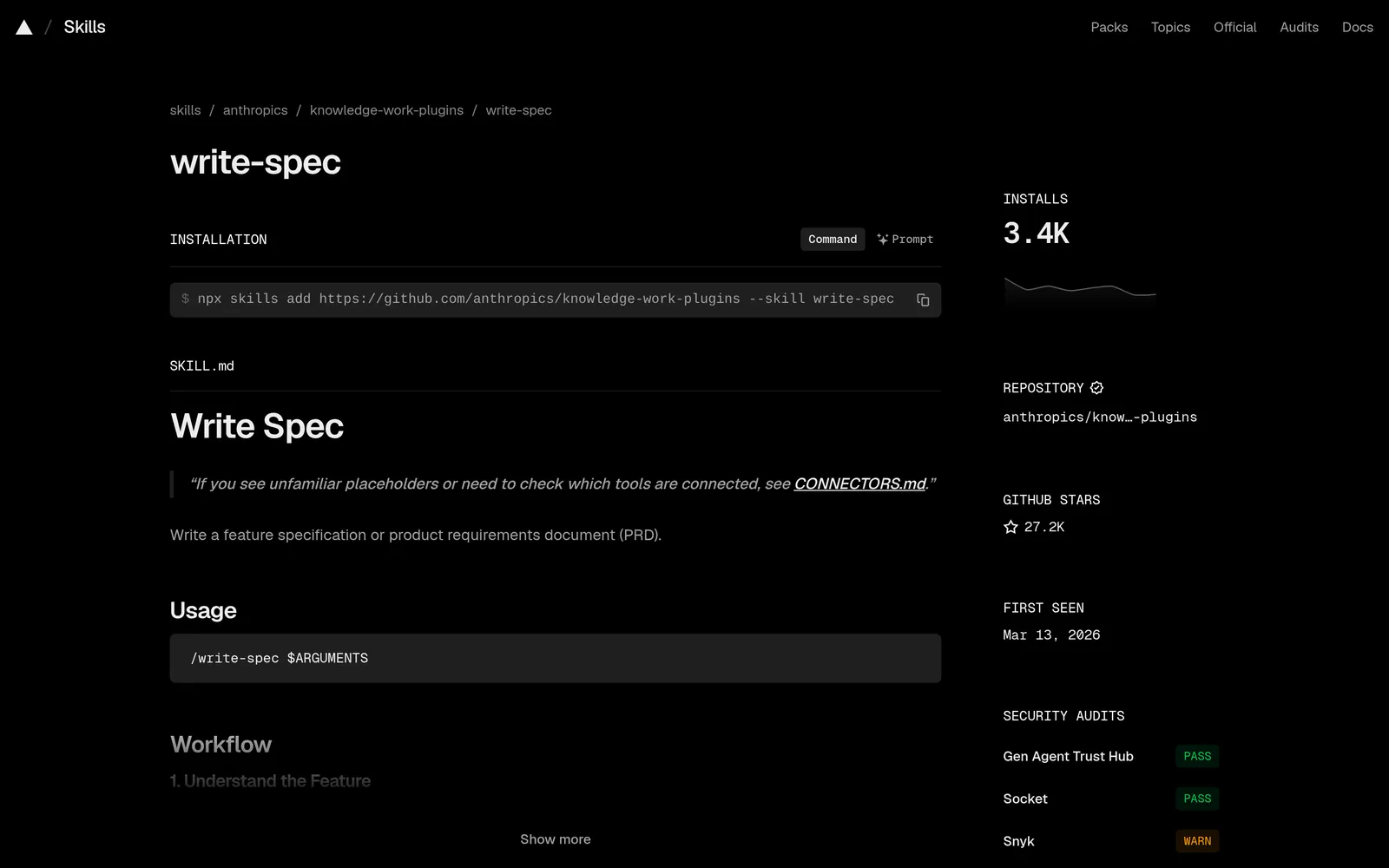
Caption: Anthropic's write-spec skill installs with one command in any skills-aware agent. Source: skills.sh, captured October 2026.
BMAD Method bmad-prd
bmad-prd creates, updates or validates a PRD. Start with a brain dump and any briefs, research, transcripts or earlier PRDs. Choose the Fast path for a complete draft with [ASSUMPTION] tags, or a Coaching path organized around vision, features or journeys.
It writes prd-{slug}/prd-{slug}.md, addendum.md and an append-only .memlog.md decision log. Update mode reconciles a change signal with previous decisions. Validate mode critiques without editing.
Install with npx skills add bmad-code-org/BMAD-METHOD, then select bmad and the skills you need. Claude Code uses /plugin marketplace add bmad-code-org/bmad-plugins. Codex uses codex plugin marketplace add bmad-code-org/bmad-plugins. Ask the bmad skill to run bmad setup. Setup scripts require uv. BMad is free and open source.
Matt Pocock grill-me and to-spec
grill-me interviews you until branches in the design are resolved. to-spec synthesizes the conversation into Problem Statement, Solution, User Stories, Implementation Decisions, Testing Decisions and Out of Scope, then applies the ready-for-agent label.
Run /setup-matt-pocock-skills once per repository to choose GitHub, GitLab, local files or another tracker. to-spec replaced to-prd on July 2, 2026.
Install in Claude Code with claude plugin install mattpocock-skills@claude-plugins-official. For Codex, run codex plugin marketplace add mattpocock/skills, then codex plugin add mattpocock-skills@mattpocock. For Cursor, use npx skills@latest add mattpocock/skills -a cursor.
Addy Osmani spec-driven-development
This single skill gates work through SPECIFY -> PLAN -> TASKS -> IMPLEMENT, with human review after every phase. Its template adds the tech stack, commands, project structure, code style, testing strategy and boundaries.
npx skills add https://github.com/addyosmani/agent-skills --skill spec-driven-development
ChatPRD MCP server
If the source document lives in ChatPRD, its MCP server lets Claude Code or Cursor list, read, search, create and update documents. OAuth handles sign-in without an API key.
claude mcp add --transport http ChatPRD https://app.chatprd.ai/mcp
{
  "mcpServers": {
    "ChatPRD": {
      "url": "https://app.chatprd.ai/mcp"
    }
  }
}
ChatPRD offers Free with three chats and limited length, Pro at $15/mo billed $179/year, and Teams at $29/seat/mo billed $349/seat/year.
Superpowers is another option: its brainstorming skill refines ideas through questions and saves an approved design document, then writing-plans creates tasks.
Spec-driven development kits for Claude Code, Codex and Cursor
A kit installs coordinated skills that turn a specification into a plan, tasks and code while keeping the artifacts in the repository.
GitHub Spec Kit
Spec Kit is an MIT-licensed toolkit for structured agent workflows. Version 1.1.2 was released October 7, 2026. It requires Python 3.11 or later and uv.
uv tool install specify-cli
specify init my-project --integration claude
Use integration key claude, codex or cursor-agent. For an existing repository, commit or stash your work, then run specify init --here --force --integration <key>.
The flow is constitution -> specify -> clarify -> plan -> checklist -> tasks -> analyze -> implement -> converge. Clarify asks up to five focused questions and writes the answers into spec.md. Analyze reports gaps across the spec, plan and tasks. Converge only appends missing tasks.
/speckit-constitution Create principles focused on code quality, testing, and maintainability.
/speckit-specify Build a photo organizer with albums grouped by date and a tile preview of each album.
/speckit-plan Use Vite with vanilla JavaScript. Keep images local and store metadata in SQLite.
/speckit-tasks
/speckit-implement
/speckit-converge
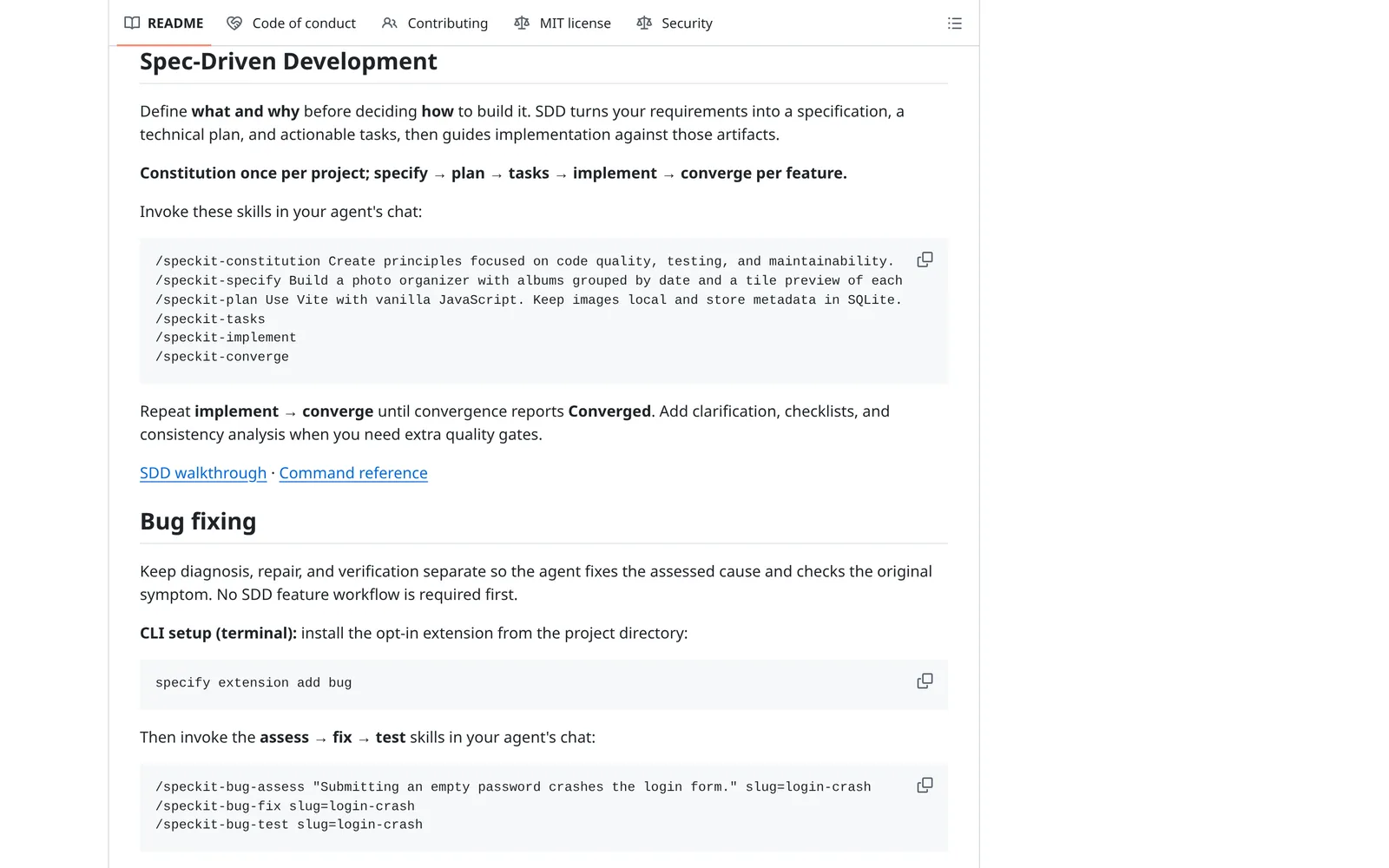
Caption: Spec Kit runs one skill per phase; repeat implement and converge until it reports Converged. Source: github.com, captured October 2026.
OpenSpec
OpenSpec treats openspec/specs/ as the current truth. Each change gets a proposal, delta specs, design and tasks under openspec/changes/. Archiving merges ADDED, MODIFIED and REMOVED requirements into the source of truth.
npm install -g @fission-ai/openspec@latest
cd your-project
openspec init
Choose Claude Code, Codex or Cursor during setup, or run openspec init --tools claude,cursor. The loop is explore -> propose -> apply -> archive.
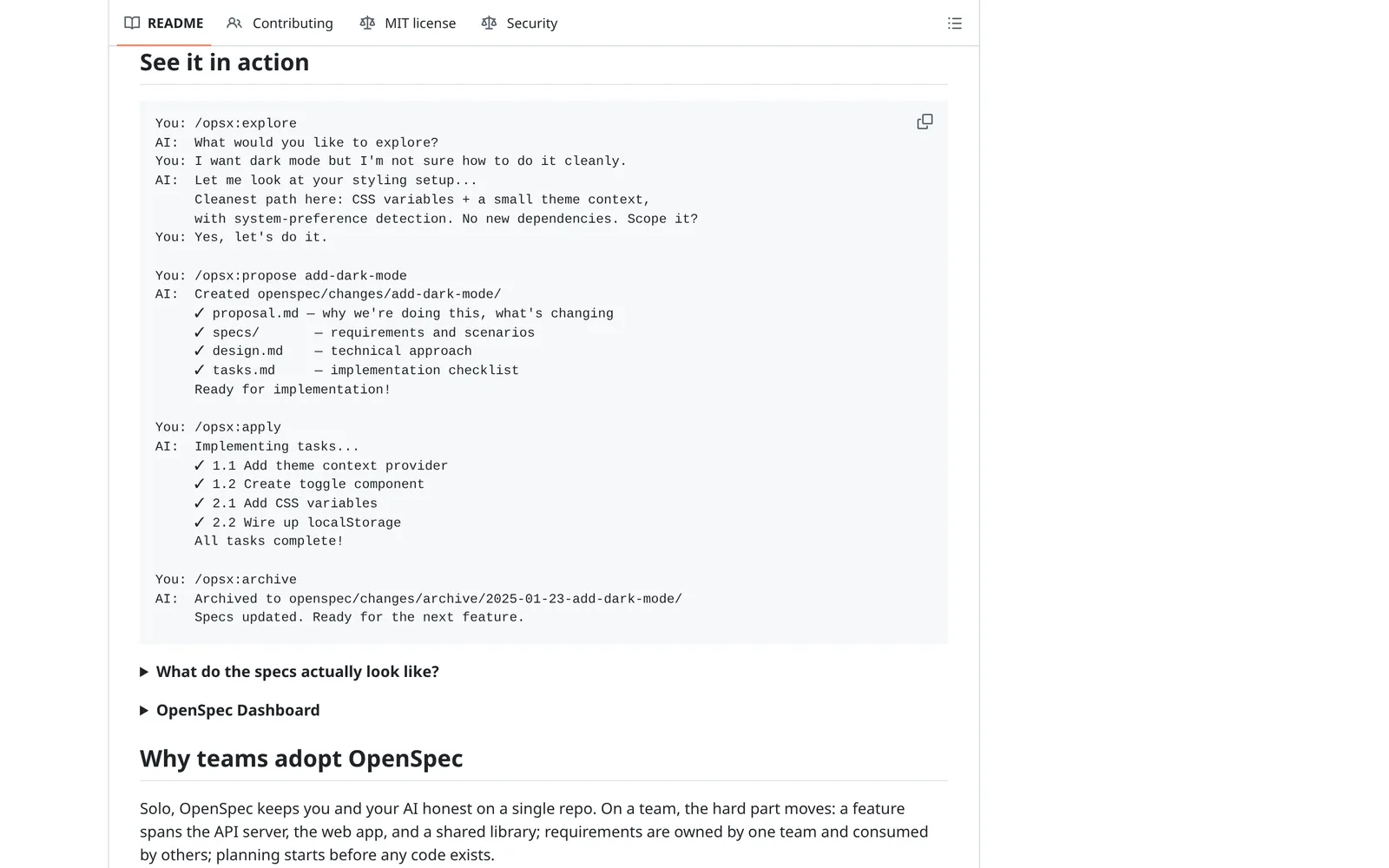
Caption: OpenSpec writes each change as a folder and folds its specs back into the source of truth on archive. Source: github.com, captured October 2026.
Kiro specs and cc-sdd
Kiro creates requirements.md, design.md and tasks.md under .kiro/specs/<feature>/. Requirements can use EARS notation. Quick Spec creates all three files without approval gates.
cc-sdd brings this Kiro-inspired flow to other agents. It installs 17 skills, supports Claude Code and Codex, and marks Cursor support as beta.
npx cc-sdd@latest                  # Claude Code skills (default)
npx cc-sdd@latest --codex-skills   # Codex
npx cc-sdd@latest --cursor-skills  # Cursor (beta)
Run discovery, initialize a spec, write requirements, design and tasks, then implement. For an existing system, begin with kiro-steering and optionally kiro-validate-gap.
Kiro pricing is Free at 50 credits, Pro at $20/mo for 1,000 credits, Pro+ at $40 for 2,000, Pro Max at $100 for 5,000 and Power at $200 for 10,000. Add-on credits cost $0.04 each.
BMAD Method
BMAD covers planning from brief through PRD, UX, specification and architecture, followed by bmad-build. It sizes its workflow as Trivial, One Session, Epic-Sized or Project-Sized.
| Kit | Spec files | Claude Code / Codex / Cursor | How it handles change | Stars (Oct 8, 2026) |
|---|---|---|---|---|
| GitHub Spec Kit | specs/<feature>/spec.md, plan.md, tasks.md | --integration claude, codex, cursor-agent | Flow-forward, living or flow-back models; analyze and converge checks | 140,472 |
| OpenSpec | openspec/specs/ plus openspec/changes/<name>/ | openspec init --tools claude,codex,cursor | Delta specs merged into the source of truth on archive | 71,369 |
| cc-sdd, Kiro-style | requirements.md, design.md, tasks.md | --claude-skills, --codex-skills, --cursor-skills beta | Discovery routes work to extend an existing spec or create new ones | 3,708 |
| BMAD Method | prd-<slug>.md, architecture-<slug>.md, tickets | Skills CLI, Claude Code and Codex plugin marketplaces | Update mode reconciles the PRD with a change signal | 53,944 |
Prices are from each vendor's pricing page, October 2026. Spec Kit, OpenSpec, cc-sdd and BMAD are free and open source.
How to keep the spec in sync with the code
1. Choose a persistence model up front
Spec Kit names three models. Flow-forward keeps each feature directory as historical evidence and creates a new spec for follow-up work. A living spec treats spec.md as the contract and derives the plan and tasks from it. Flow-back permits implementation discoveries, then realigns every artifact.
Do not leave a lower-level code or task change in conflict with spec.md. OpenSpec handles this through change deltas that merge into the current truth on archive.
2. Change the spec first, in the same commit
If the data model or product behavior changes, edit the spec first and implement second. Commit both together and reference the spec in the pull request.
Keep code and file paths out of the product specification. That reduces needless drift when implementation details move.
3. Run a drift check before you merge
For Spec Kit, run /speckit.analyze, then repeat implementation and /speckit.converge until it reports Converged.
OpenSpec's expanded profile adds /opsx:verify, which compares artifacts with code. Before archive, make the specifications describe what the code actually does.
After changing Kiro requirements or design, use Sync Files to create missing tasks or mark completed work. For BMAD, run bmad-prd in Update mode with the change.
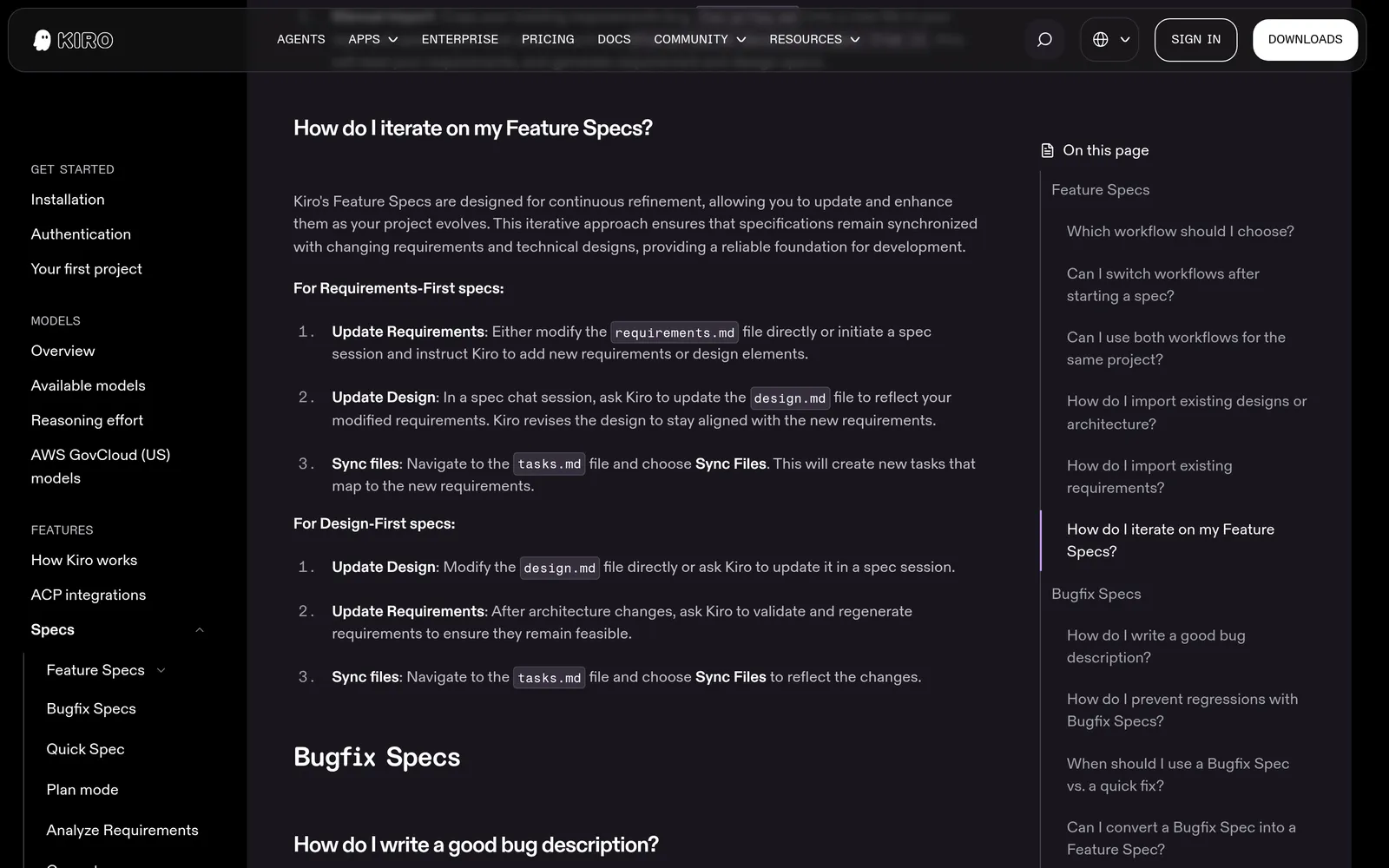
Caption: Kiro's Sync Files turns edited requirements into new tasks in tasks.md. Source: kiro.dev, captured October 2026.
4. Put a standing rule where every agent reads it
Codex reads AGENTS.md before work. Claude Code reads it when no CLAUDE.md exists. Cursor supports AGENTS.md and always-applied .cursor/rules/*.mdc files.
## Spec
- The spec (specs/ or SPEC.md) is the contract for behavior. Read it before changing behavior.
- If a change alters user-facing behavior, the data model or a screen state, update the spec in the same commit.
- Keep file paths and code out of the spec.
- If the spec does not cover a decision, ask instead of inventing one.
Claude Code treats memory files as context rather than enforced configuration, so add a hook for the final check.
5. Add a Stop hook in Claude Code
A prompt hook can reject completion and return a reason that Claude receives as its next instruction.
{
  "hooks": {
    "Stop": [
      {
        "hooks": [
          {
            "type": "prompt",
            "prompt": "You are checking whether Claude changed product behavior without updating the spec. Context: $ARGUMENTS\n\nIf this turn changed user-facing behavior, the data model or a screen state and did not update the spec file, respond {\"ok\": false, \"reason\": \"Update the spec to match the change.\"}. Otherwise respond {\"ok\": true}.",
            "timeout": 30
          }
        ]
      }
    ]
  }
}
Apply the same rule to screens: a screen change should update the spec and screen list in the same edit.
Add the screens and states: Mowgli's SPEC.md and frontend.xml
Behavior specifications rarely describe every screen state. Mowgli keeps that UI layer in files that Claude Code, Codex or Cursor can read and update.
Start with an idea, pasted PRD, chat or email thread. A questionnaire asks about users, key flows and edge cases. The project then contains:
SPEC.md: elevator pitch, user journeys and data model.frontend.xml: afrontend_commonblock and ascreenslist, with summary, contents and states for each screen.<Component>.tsx: one React + Tailwind component per screen, usinglucide-reacticons and onestateprop.
<screen name="Account Settings" component="SettingsScreen">
  <summary>One-line description of the screen.</summary>
  <contents>
    The overall content and design elements, deliberately staying away from tiny
    details (exact layout, colors, spacing). Markdown bullets are fine here.
  </contents>
  <state id="default" name="Active Subscriber">1-2 sentence description.</state>
  <state id="freePlan" name="Free Plan">...</state>
</screen>
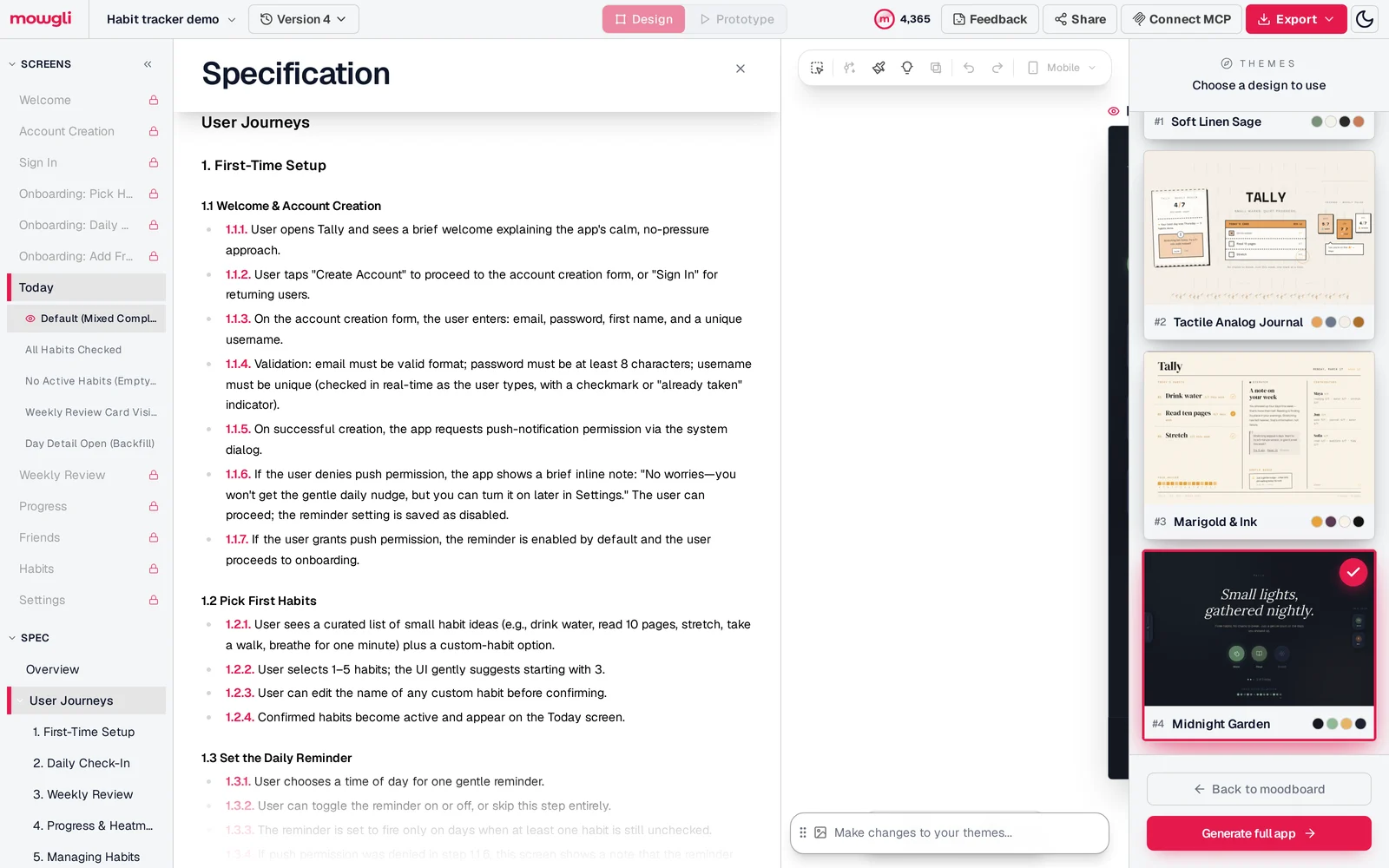
Caption: Mowgli's spec sits next to the screen list: user journeys, data model, and every screen with its states.
Connect a coding agent through the skill or MCP:
npx skills add mowgli-ai/skills
claude mcp add --transport http mowgli https://app.mowgli.ai/mcp
codex mcp add mowgli --url https://app.mowgli.ai/mcp
Cursor can install the skill with -a cursor or use the prompt from the Connect a coding agent dialog.
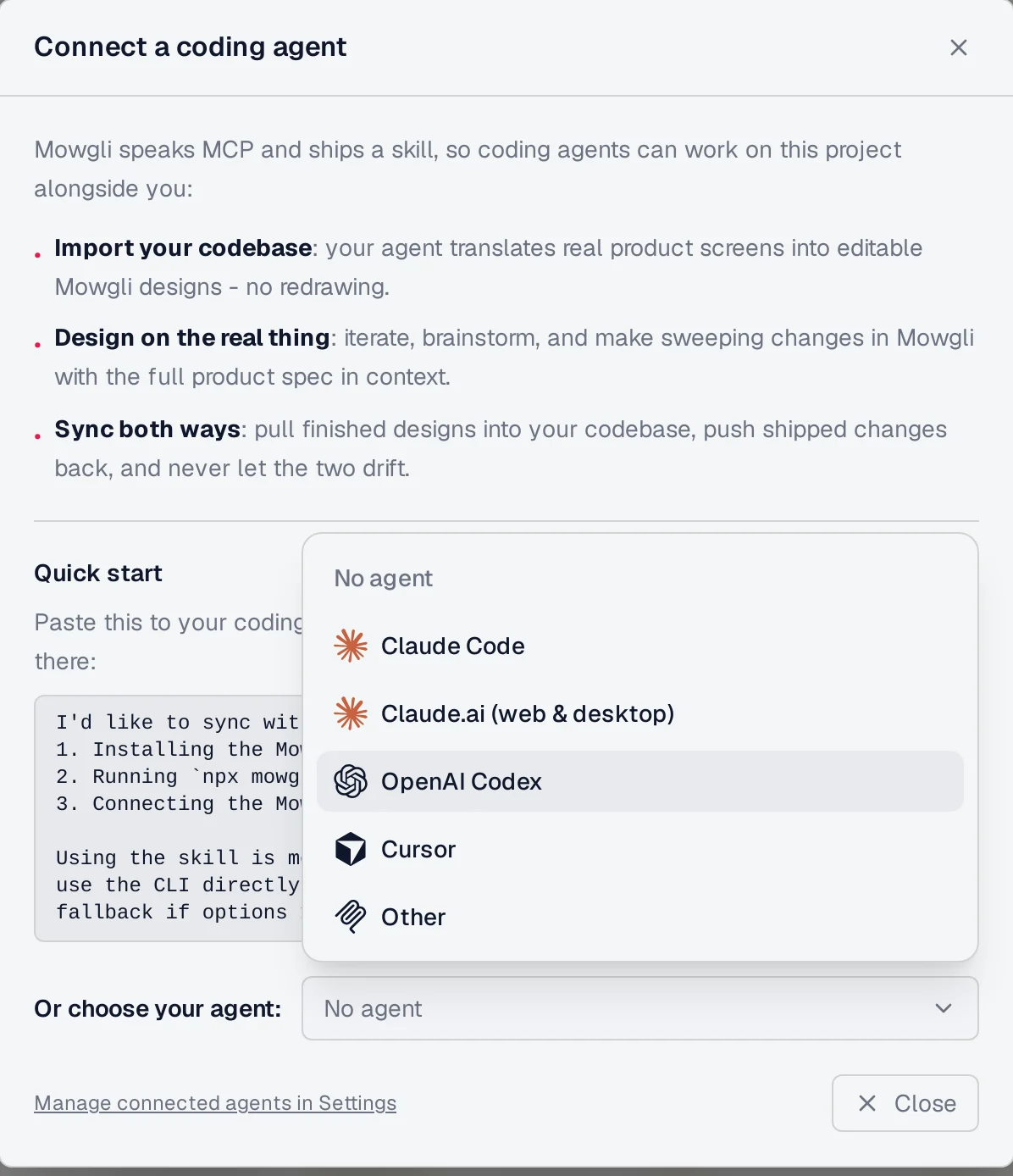
Caption: Pick Claude Code, Codex or Cursor and paste the setup prompt; the agent can then read and update the spec and screens.
Read and compare files from the terminal:
mowgli -p <projectId> read SPEC.md
mowgli -p <projectId> read frontend.xml
mowgli -p <projectId> diff --stat --from 6
Every edit creates a version. Version metadata records the commit shorthash, allowing the next sync to map changed files to screens and specifications. Changes can move from the design into the codebase or from real code screens back into the design.
The skill requires every screen change to update SPEC.md and frontend.xml. A new screen without a matching screen entry is rejected. MCP tools include read_file, edit, diff, list_versions and set_version_metadata.
This screen layer can sit beside Spec Kit or OpenSpec. The kit owns feature behavior and tasks; Mowgli owns screens and states. See design tokens for coding agents, design handoff to coding agents and PRD to wireframes.
Free to start (300 credits); credit packs from $12; plans from $15/mo. The questionnaire, PRD generation and MCP connection are included on the free plan.
Verdict
Use write-spec for one PRD in Claude Code. Choose bmad-prd for coaching, a decision log and later Update or Validate runs. Use grill-me plus to-spec when the agent should interview you and publish the result to an issue tracker.
For implementation, choose Spec Kit for greenfield features with explicit gates, OpenSpec for incremental changes to an existing codebase, or cc-sdd for Kiro-style requirements, design and tasks in Claude Code, Codex or Cursor.
Then choose a persistence model, edit the spec first and run the appropriate drift check before merging. For a multi-screen app, Mowgli's spec-driven design workflow keeps SPEC.md, every screen and every state synchronized through its skill, CLI or MCP.
FAQ
What is the best Claude Code skill for writing a PRD?
Anthropic's write-spec is the best fit for one structured PRD with goals, non-goals, user stories, prioritized requirements and open questions. Choose bmad-prd for coaching and later Update or Validate modes, or grill-me plus to-spec when the result should become an issue.
What is spec-driven development with AI coding agents?
Spec-driven development writes the what and why first, then derives a plan, tasks and code while keeping the specification as the contract. Spec Kit, OpenSpec, Kiro, cc-sdd and BMAD package that flow as agent skills and commands.
Spec Kit or OpenSpec: which should I use?
Use Spec Kit for feature-by-feature work with explicit phases. Use OpenSpec for ongoing changes to an existing codebase, where every change is a delta against openspec/specs/ and merges into that truth on archive.
How do I keep a spec in sync with the code?
Choose a persistence model, update the specification with the code change and run a drift check before merging. Use /speckit.analyze, /speckit.converge, /opsx:verify or Kiro's Sync Files, then reinforce the rule with AGENTS.md and a Claude Code Stop hook.
Do these PRD and spec skills work in Codex and Cursor?
Yes. Spec Kit, OpenSpec and cc-sdd provide Codex and Cursor integrations, while individual skills can target them through the skills CLI. cc-sdd labels its Cursor integration beta.
What should a spec include for an app with many screens?
It should include every screen and each screen's empty, loading, error, permission and success states in addition to the product requirements. Mowgli maintains that layer in frontend.xml beside SPEC.md, where Claude Code, Codex or Cursor can read and update it.
Sources
- GitHub Spec Kit
- Spec Kit specification template
- Spec Kit agentic SDD reference
- Spec Kit evolving specifications guide
- OpenSpec repository
- OpenSpec overview
- OpenSpec editing changes guide
- Kiro specifications documentation
- Kiro specification best practices
- cc-sdd repository
- BMAD Method repository
- Anthropic product-management plugin
- Anthropic write-spec skill
- Matt Pocock skills
- Addy Osmani spec-driven-development skill
- ChatPRD MCP server
- Vercel skills CLI
- Claude Code hooks
- Codex AGENTS.md configuration
- Cursor rules
- Mowgli skill
- Mowgli spec-driven design
- Mowgli pricing