PRD to Wireframes in an Hour: The Screen-Inventory Method
Turn a PRD into wireframes in an hour: spend 45 minutes on roles, objects, actions, screens, states and flows, then 15 minutes drawing.
PRD to wireframes in one hour
Spend 45 minutes inventorying roles, objects, statuses, actions, open questions, screens, states and flows. Spend the final 15 minutes drawing grayscale wireframes. The key is to decide what must be drawn before drawing it.
If you use AI, prefer a tool that identifies gaps and enumerates screens and states before generating UI. Below, you will apply the method manually, copy its template and prompt, then compare Mowgli, figr, ChatPRD with v0, Uizard and Visily.
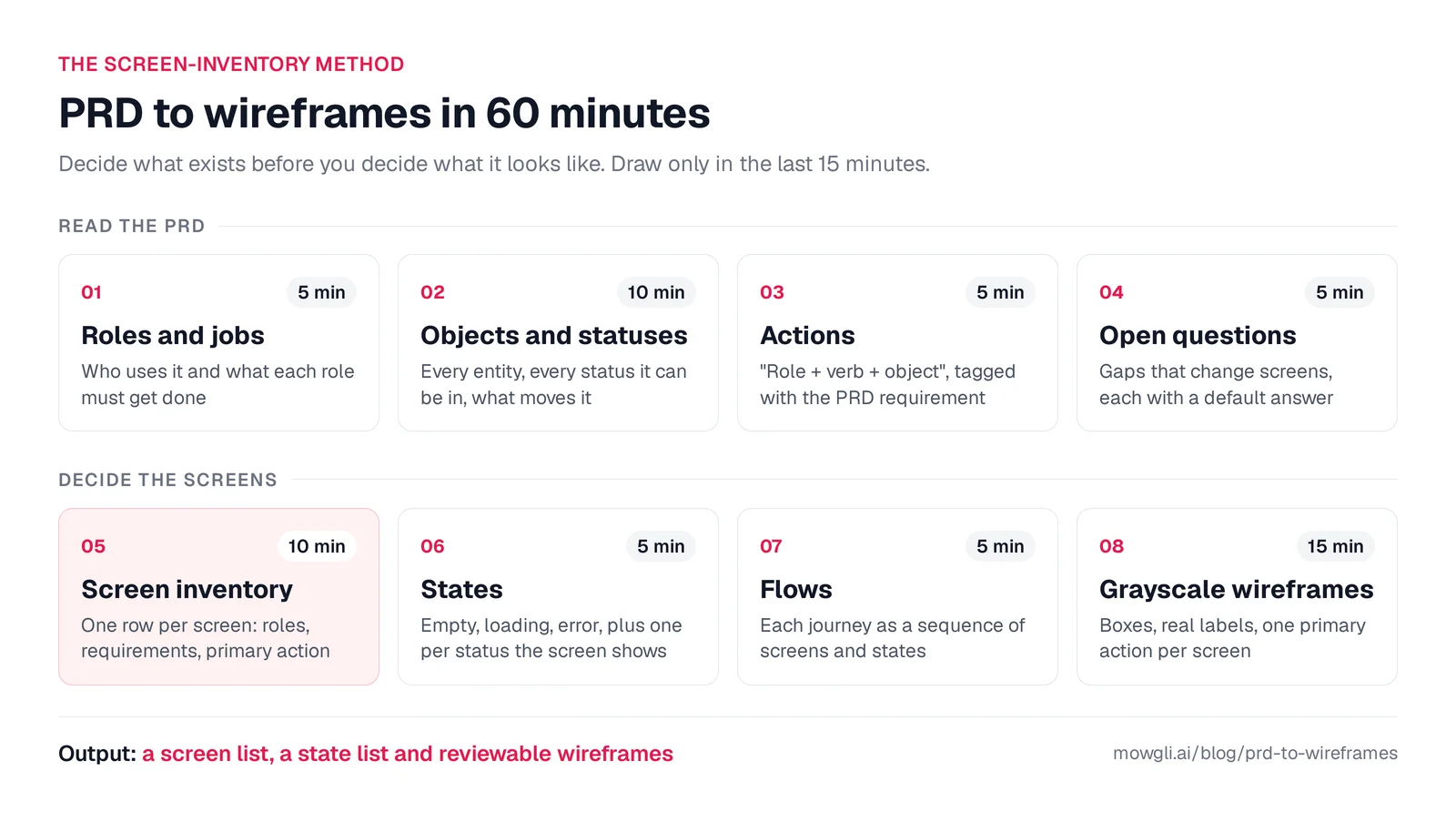
Caption: The screen-inventory method; steps 1-7 are text work, followed by drawing in step 8.
| Step | Time | Output |
|---|---|---|
| Roles and jobs | 5 min | Users and their jobs |
| Objects and statuses | 10 min | Entities, statuses and transitions |
| Actions | 5 min | Role + verb + object, linked to requirements |
| Open questions | 5 min | Screen-changing gaps and provisional decisions |
| Screen inventory | 10 min | One row per screen |
| States | 5 min | Empty, loading, error and status variants |
| Flows | 5 min | Journeys expressed as screen sequences |
| Grayscale wireframes | 15 min | Reviewable frames |
What a screen inventory contains
A screen inventory has one row per screen. Each row records its user roles, covered requirements, primary action, displayed data and every relevant state.
The distinction is simple:
- The PRD defines required behavior.
- The inventory says where that behavior happens.
- The wireframes show how it is presented.
If you are starting with an idea instead of a PRD, first create user flows and a screen list.
The sample PRD
The manual method and Mowgli run use the same input: a desktop invoice-approval app for a 20-person finance team processing about 600 supplier invoices each month.
PRD: Invoice approvals (v1)

Problem
Our 20-person finance team approves about 600 supplier invoices a month over
email and a shared spreadsheet. Invoices get lost, nobody can see who is
holding one up, and at audit time we rebuild the approval evidence by hand.

Users
- AP clerk (4 people): uploads invoices, checks the extracted fields, assigns
  a cost center, chases approvals.
- Approver (about 12 budget owners): approves or rejects invoices for their
  cost center.
- Finance controller (2 people): owns the approval rules, handles escalations,
  reviews the audit trail.

Goals
- Median time from upload to final approval under 3 business days.
- Every paid invoice has a complete approval record.

Requirements
1. AP clerk uploads one or more invoice PDFs. The system extracts supplier,
   invoice number, amount, currency, due date and PO number. The clerk
   corrects fields and assigns a cost center before submitting.
2. Routing by amount: under $5,000 goes to the cost-center owner; $5,000 to
   $25,000 goes to the owner, then the controller; over $25,000 also needs
   the CFO.
3. Approvers have an inbox of invoices waiting on them, sorted by due date.
   They can approve, reject (a reason is required) or send a question back
   to AP.
4. Invoice detail shows the PDF next to the extracted fields, the approval
   chain with each step's status, and a comment thread.
5. Reminder email to the approver after 2 business days; escalation to the
   controller after 5.
6. Warn about likely duplicates (same supplier and invoice number).
7. Audit log of every action (who, what, when, old and new values),
   filterable and exportable to CSV.
8. Controller can edit approval rules (amount thresholds, approvers per cost
   center, delegates for people on leave).

Platform: desktop web app.
Out of scope for v1: paying invoices, ERP sync (CSV export only), a mobile app.
Step 1 - List roles and jobs (5 minutes)
Write one job statement per role:
- AP clerk, 4 people: intake, correction and follow-up.
- Approver, about 12 people: process waiting invoices.
- Finance controller, 2 people: maintain rules, handle escalations and support compliance.
- CFO: participate in approvals over $25,000.
Flag thinly specified roles. Here, the PRD mentions the CFO only in requirement 2, so you must ask whether the CFO needs a separate login.
Step 2 - Map objects and statuses (10 minutes)
List the product's objects: Invoice, Approval step, Rule, Cost center, Comment, Delegation and Audit event. For each important object, name every status and the action that causes each transition.
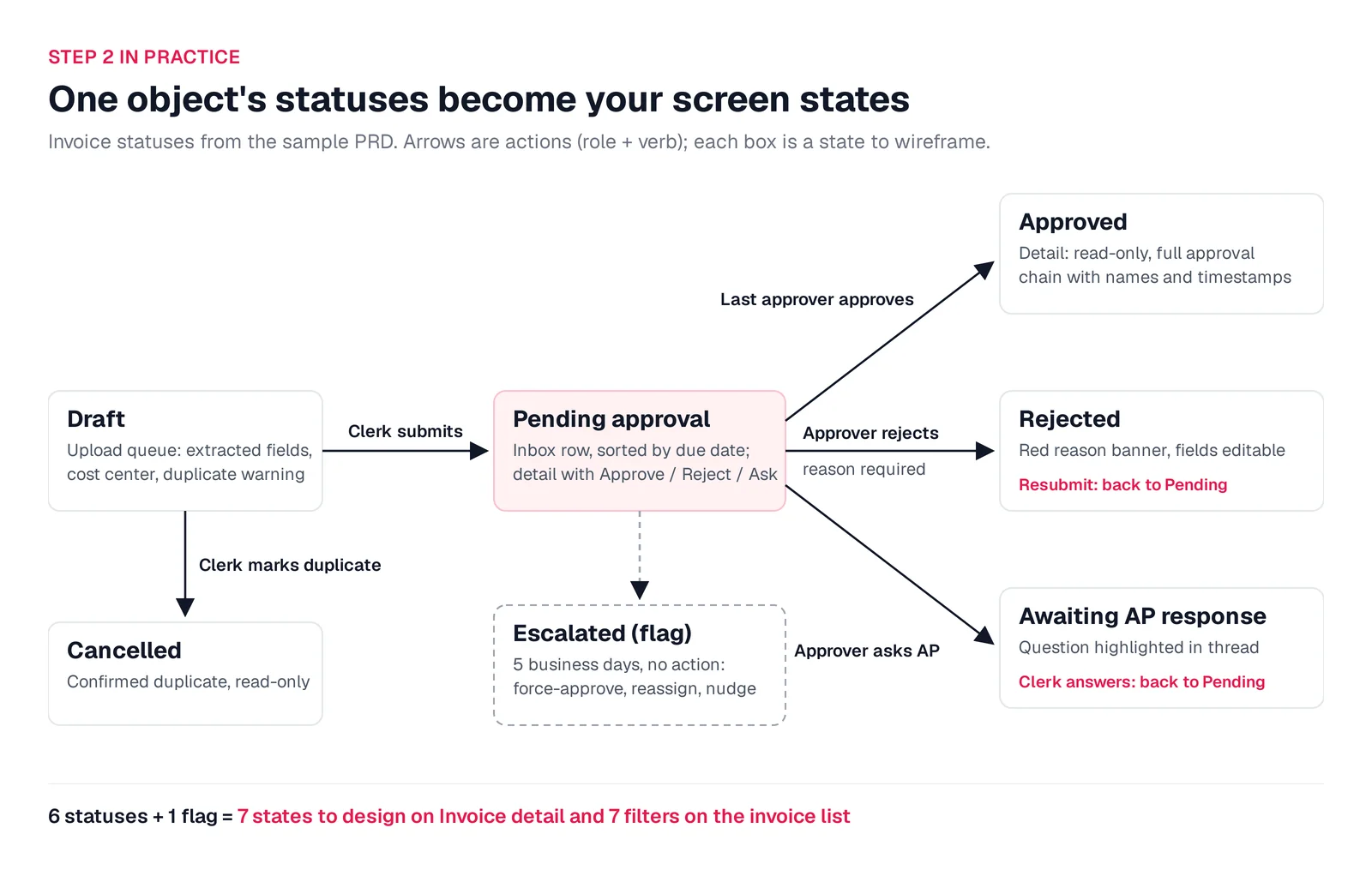
Caption: Invoice lifecycle; status boxes become wireframe states and transition arrows become actions.
"Reject with a reason" implies a Rejected status even though the PRD never names it. Statuses usually become detail-screen states and list filters.
Step 3 - Turn requirements into actions (5 minutes)
Write each action as role + verb + object, retaining its requirement number:
- AP clerk uploads PDFs, corrects fields and assigns a cost center - R1.
- AP clerk resolves a duplicate warning - R6.
- Approver approves, rejects with a reason or asks AP a question - R3.
- AP clerk answers and resubmits - R3.
- Controller edits thresholds, approvers and delegates - R8.
- Controller filters and exports the audit log - R7.
- System sends reminder and escalation emails - R5.
Include emails and exports even though they are not screens.
Step 4 - Resolve open questions (5 minutes)
Record each question, choose a provisional default, mark the affected wireframe and return the list to the PRD owner.
For this PRD, ask:
- Can a rejected invoice be edited and resubmitted, or is it closed?
- Does the CFO have a distinct login and controller screens?
- Which controller receives an approval step?
- Which invoices can each role see?
- Does multi-PDF upload use batch review or a one-at-a-time queue?
- Can a controller force-approve, reassign or nudge an escalation?
- Does the product support one currency or multiple currencies?
- Is there only email, or also an in-app waiting count?
- How is delegated approval identified in the inbox and audit trail?
These are product decisions, not visual details. Each can change screens, states or permissions.
Step 5 - Build the screen inventory (10 minutes)
Create another screen only when its structure or job changes. A data-only variation is a state.
SCREEN INVENTORY: <product>, <PRD version>, <date>

| # | Screen | Roles | PRD reqs | Primary action | Data shown | States |
|---|--------|-------|----------|----------------|------------|--------|
| 1 |        |       |          |                |            | default, empty, loading, error, ... |

Non-screen surfaces (emails, notifications, exports):
Open questions (and the default we assumed):
Requirements no screen covers (should be empty):
The sample produces this inventory:
| # | Screen | Roles | Coverage | Primary action | Key states |
|---|---|---|---|---|---|
| 1 | Sign in | All | Access | Sign in | Wrong password, locked account |
| 2 | Home | All, by role | Goals | Go to what needs me | Nothing pending, items overdue |
| 3 | Approval inbox | Approver, controller, CFO | R3, R5 | Open urgent invoice | Empty, overdue, delegated, loading, error |
| 4 | Invoice detail | All, by permission | R3, R4, R6 | Approve, reject, ask or resubmit | Six statuses, escalated, reject dialog, duplicate, read-only |
| 5 | Upload and review queue | AP clerk | R1, R6 | Submit invoice | Empty, extracting, failed, wrong file, duplicate, batch done |
| 6 | All invoices | AP clerk, controller | R1 | Find and chase an invoice | No results, loading |
| 7 | Approval rules | Controller | R2, R8 | Save rules | Overlap, missing approver, saved |
| 8 | Delegations | Controller | R8 | Add a delegate | None active, upcoming, revoke confirmation |
| 9 | Audit log | Controller | R7 | Export CSV | No results, expanded row, export running |
| 10 | Notification settings | All | R5 | Save preferences | Saved |
Non-screen surfaces are the day-2 reminder email, day-5 escalation email and CSV export. Every numbered requirement has coverage.
Step 6 - Add every state (5 minutes)
Start every screen with Default, Empty, Loading and Error. Add one frame for each displayed status and each meaningful permission difference, such as a read-only invoice.
The Invoice detail screen alone needs about ten frames in the manual estimate. Use the empty, error and loading states checklist for ten state types and a screen x state tracking table.
Step 7 - Express flows as screen sequences (5 minutes)
Write flows as explicit screen and state sequences:
- Clerk: Upload queue (empty) -> extracting -> review -> duplicate warning -> submit -> next in queue -> batch done.
- Approver: Reminder email -> Invoice detail (pending) -> reject dialog -> Approval inbox.
- Controller: Home (escalations) -> Invoice detail (escalated) -> reassign -> Approval inbox.
If a required step has no screen, add an inventory row. If no flow uses a screen, question whether you need it.
Step 8 - Draw grayscale wireframes (15 minutes)
Use Balsamiq, Excalidraw, Figma or paper.
Follow five rules:
- Use grayscale and one typeface.
- Use real labels and data, such as "Acme Paper Co., INV-20931, $12,480.00".
- Give each screen one primary action.
- Draw separate, labelled frames for states.
- Put assumptions directly on affected frames.
See why wireframes still work and why real copy matters.
Use ChatGPT, Claude or Gemini for steps 1-7
General assistants can structure the product analysis and produce rough HTML wireframes. Tell them not to begin visual design before completing the inventory.
Paste this prompt with the PRD:
You are a senior product designer. Below is a PRD. Do not design or
describe visuals yet. Work through these steps and show each one:

1. Roles: every user role and the one job each opens the product to do.
2. Objects: every entity; for the main ones, every status and the action
   that moves it to the next status.
3. Actions: every action as "role + verb + object", tagged with the PRD
   requirement number.
4. Open questions: decisions the PRD leaves open that would change the
   screens (visibility, what happens after rejection or failure, limits,
   permissions, notifications). Give a recommended default for each.
5. Screen inventory as a table: # | screen | roles | PRD requirements |
   primary action | data shown | states. A screen that only differs by data
   is a state, not a new screen.
6. States: for every screen include default, empty, loading and error, plus
   one state per status it shows and one per permission difference.
7. Non-screen surfaces: emails, notifications, exports.
8. Flows: each core journey as a sequence of screens and states.
9. Coverage check: list any PRD requirement that no screen covers.

PRD:
<paste your PRD here>
Then request one screen at a time:
Wireframe screen 4 in all its states as one HTML file with Tailwind from the CDN, grayscale, real labels, each state in a labelled panel.
Separate files require manual synchronization when the PRD changes.
Turn the whole PRD into wireframes with Mowgli
We make Mowgli.
Mowgli fits PMs and founders who have a written PRD and need every screen and state reviewable before design or engineering. It turns a product idea into a full multi-screen app design: it writes the spec first, then designs every screen.
On October 8, 2026, the exact 300-word sample PRD produced 10 screens and 40 states in wireframe mode. Generation took about 13 minutes and used 240 credits from the 300-credit free allowance.
Paste the PRD
Select "Wireframes only," use the neutral shadcn style and skip the moodboard.
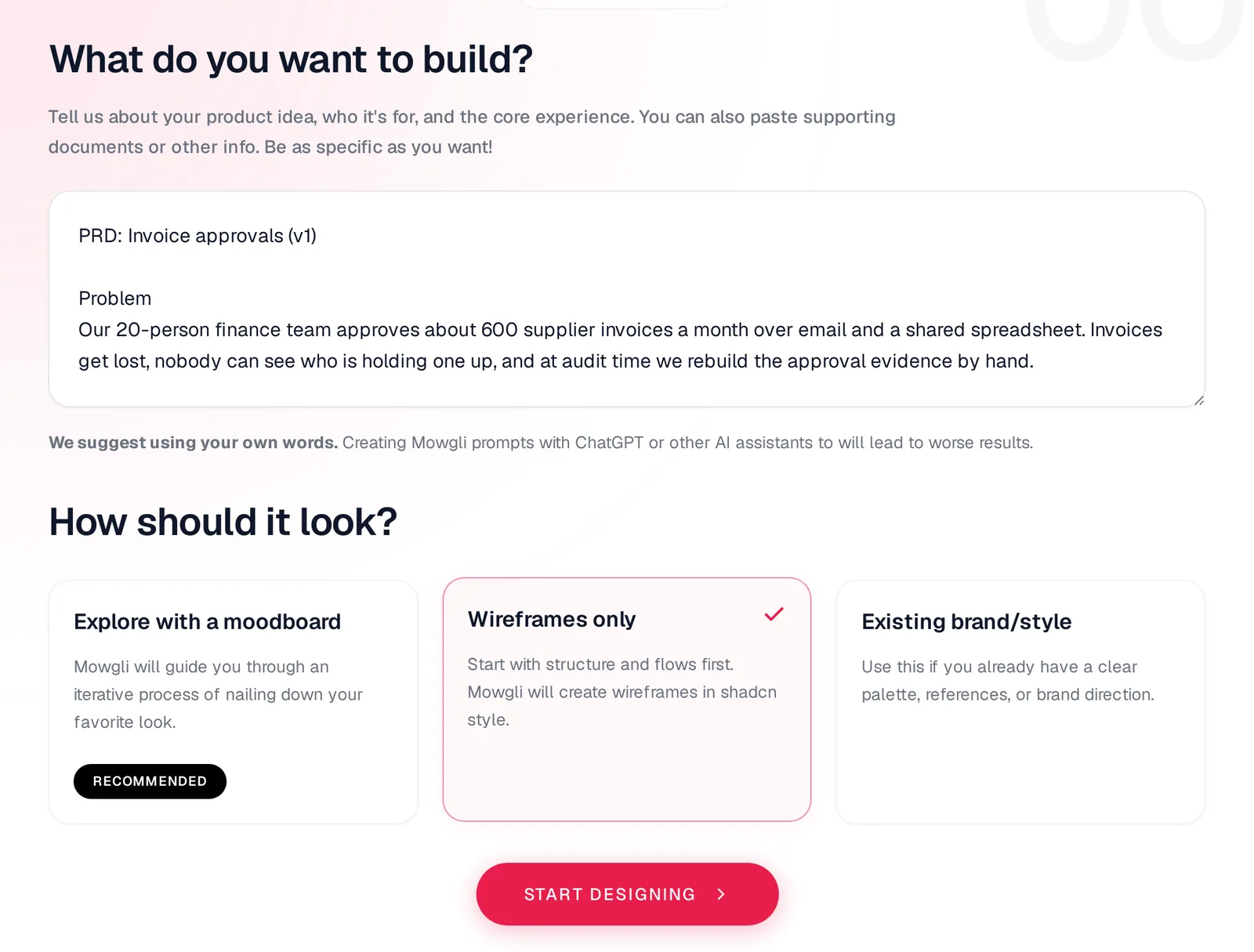
Caption: Sample PRD pasted into a new Mowgli project with "Wireframes only" selected; captured October 2026.
Answer clarifying questions
The first round asked 2 questions. A second round asked 9 more, covering all nine gaps found manually. Each question supplied multiple-choice answers and explained why the decision mattered.
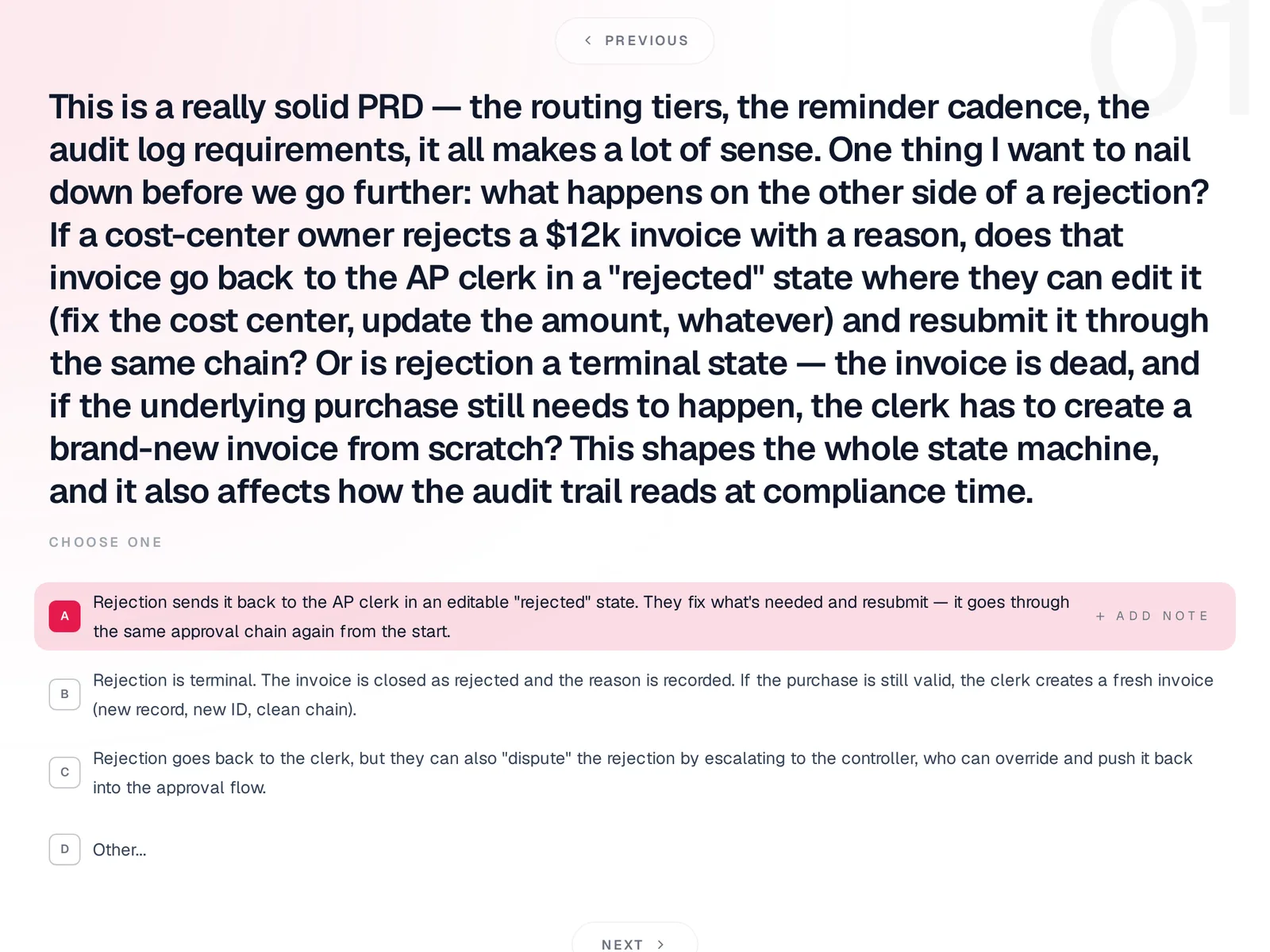
Caption: Clarification of whether rejection is final or returns the invoice to the clerk.
Review the generated spec
About a minute later, the spec contained a pitch, five user journeys, a data model, the same invoice statuses identified manually, 10 screens, each screen's content and states, and an out-of-scope list. It functioned as the screen inventory.
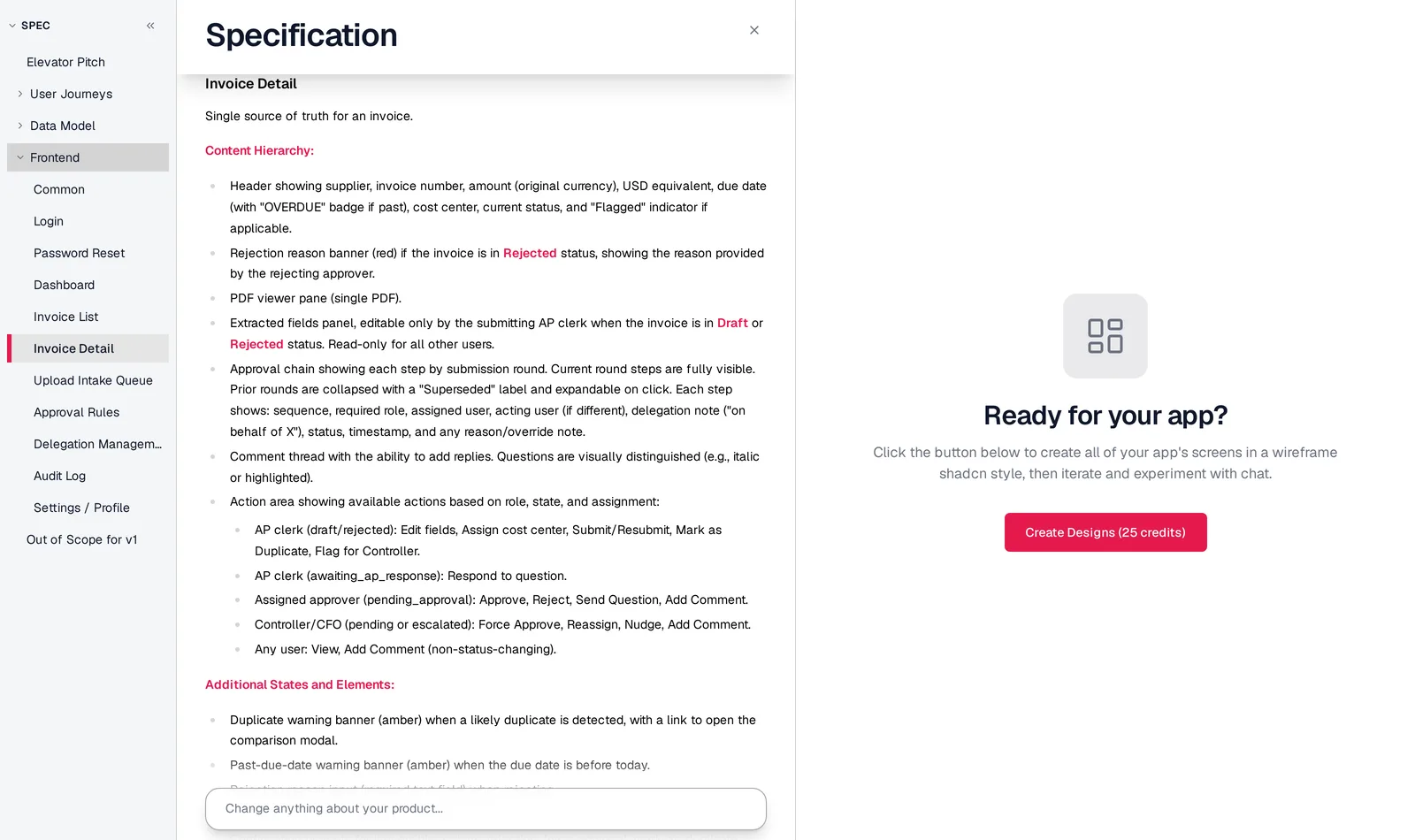
Caption: Generated specification with 10 screens, their content, states and role-based actions.
Generate every screen and state
One click generated the full set. Invoice detail had 11 states, including Pending, Rejected, Awaiting AP response and Escalated. Reassign and nudge actions came from open question 6. The Upload queue had 6 states, including Empty and Routing error.
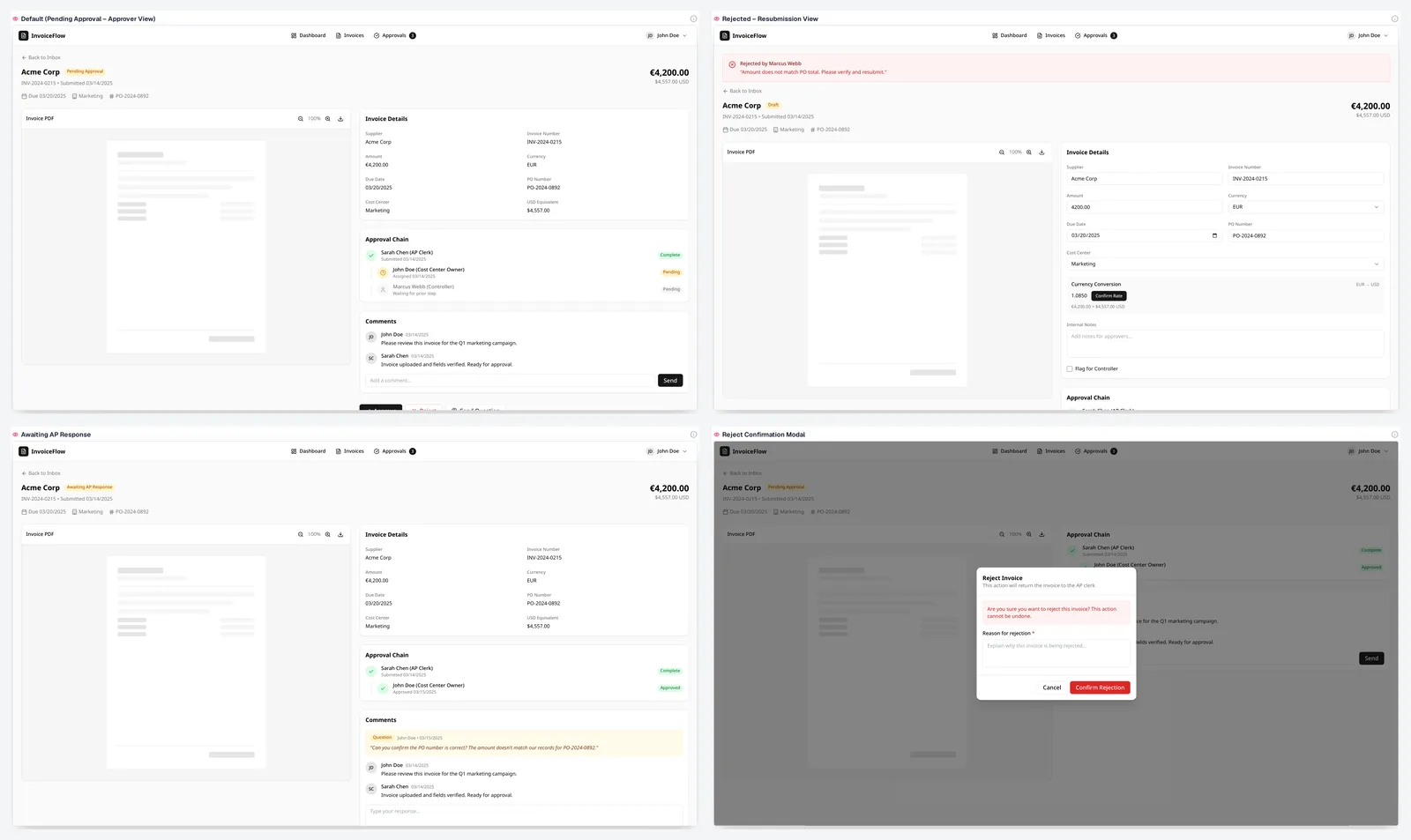
Caption: Four of the 11 generated Invoice detail states; captured October 2026.
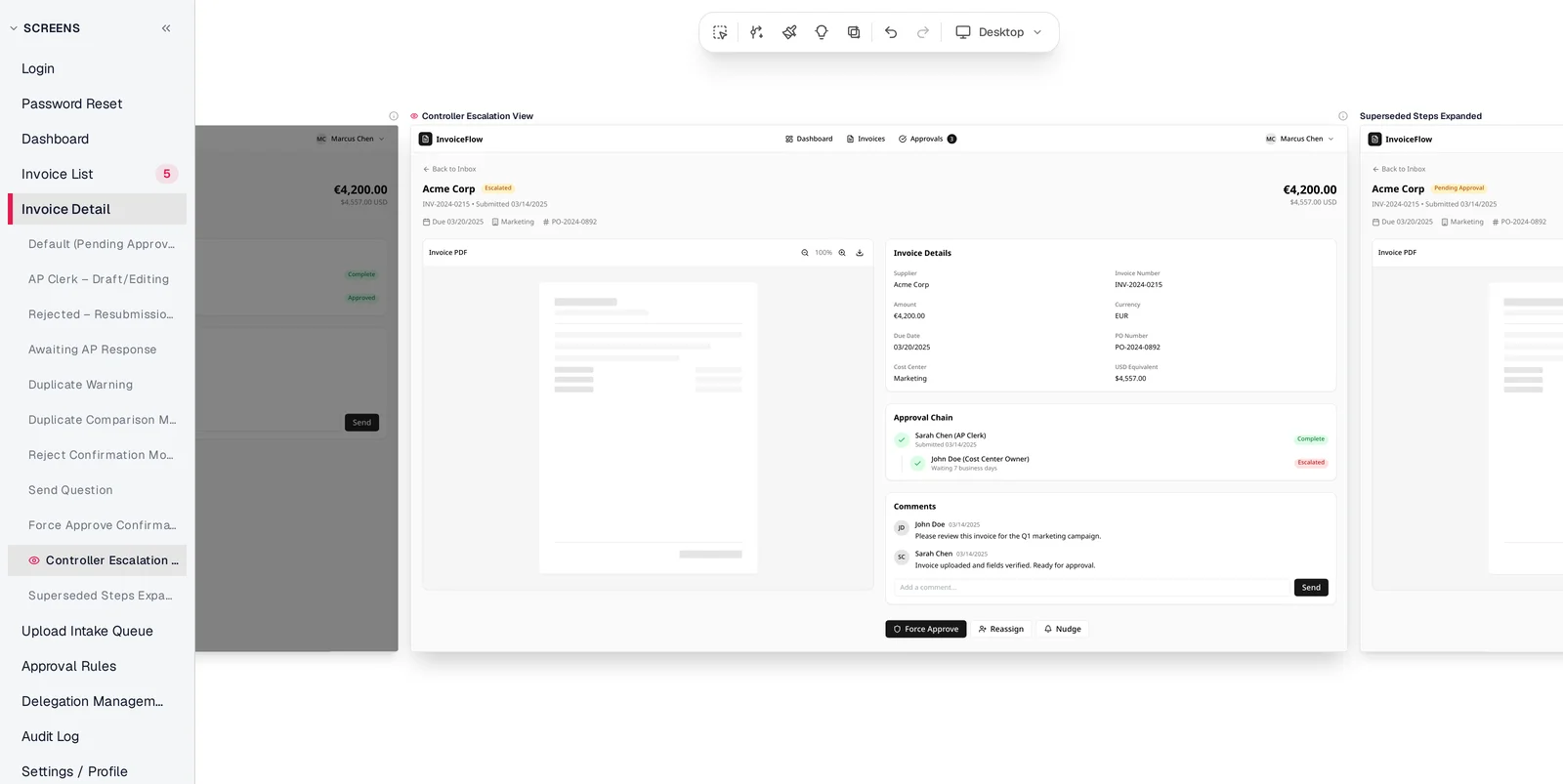
Caption: Controller escalation state with all 11 Invoice detail states visible in the sidebar.
Edit by chat while keeping the spec aligned
A chat request added a "Waiting" column to the inbox, showed business days with the current approver and highlighted rows beyond the 2-day reminder. The screen changed, and the matching user-journey step was rewritten.
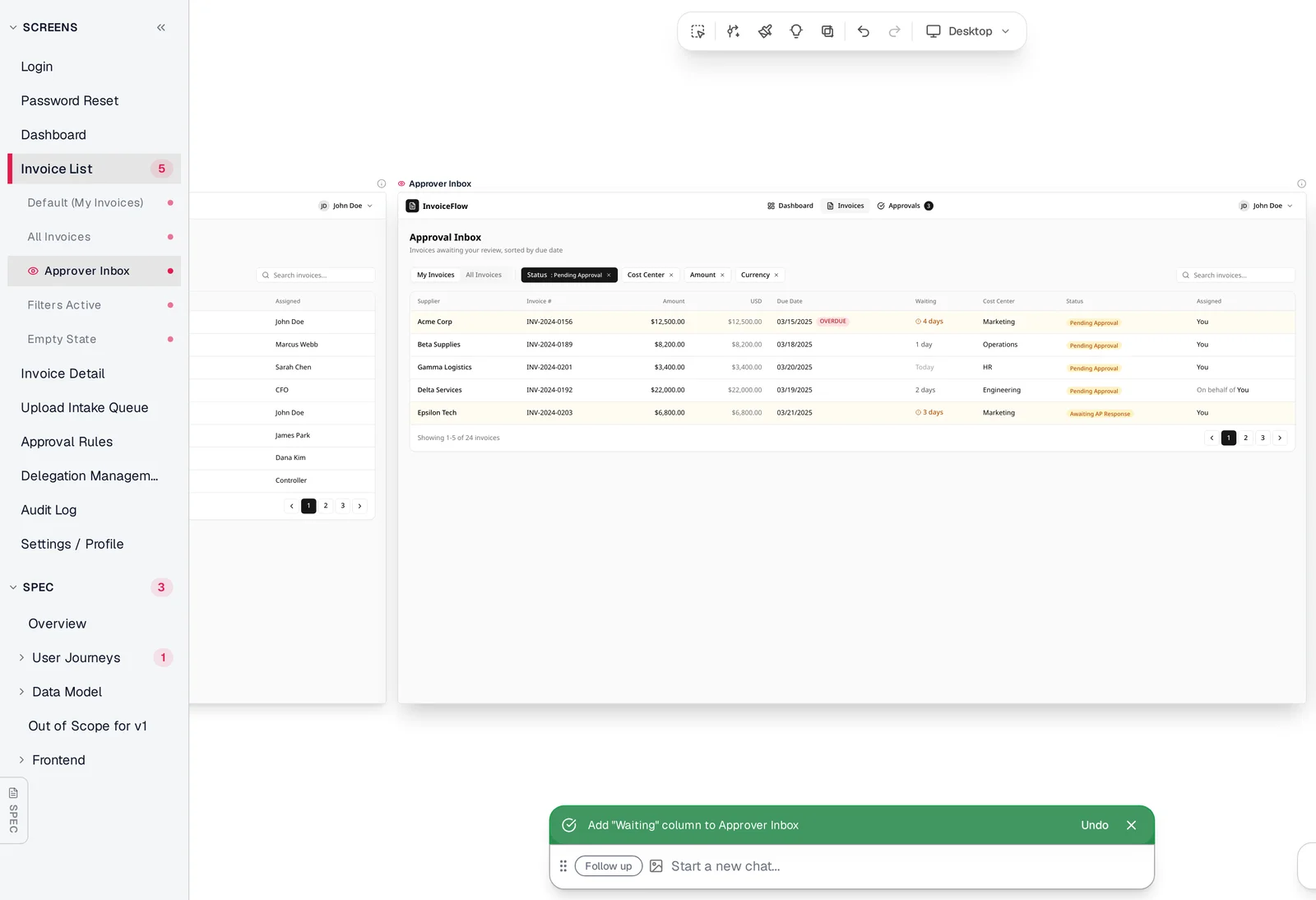
Caption: Approval inbox after adding the Waiting column by chat.
You can then create a clickable prototype, apply a visual direction or use each screen as a React + Tailwind component. Claude Code, Codex, Cursor or another coding agent can read the screens over MCP. See the PM's guide to Mowgli.
Mowgli designs and prototypes; to host and ship, you hand off to a builder or coding agent (Claude Code, Codex, Cursor, Lovable).
Free to start (300 credits); credit packs from $12; plans from $15/mo. Start with PRD to designs.
Other PRD-to-UI tools, ranked by job
These descriptions come from vendor pages. Prices are from each vendor's pricing page, October 2026.
Best for adding a flow to an existing product - figr
figr reads a requirement, studies existing-product context, asks missing UX questions, maps the flow and finds edge cases. It exports Figma-ready screens to Figma or React/TSX, making it a fit for feature work inside an established product and design system.
The free plan includes 10 credits a month. Its table prices a first-generation mobile screen at 4-5 credits. Starter includes 200 credits for $32/month billed yearly or $39 monthly.
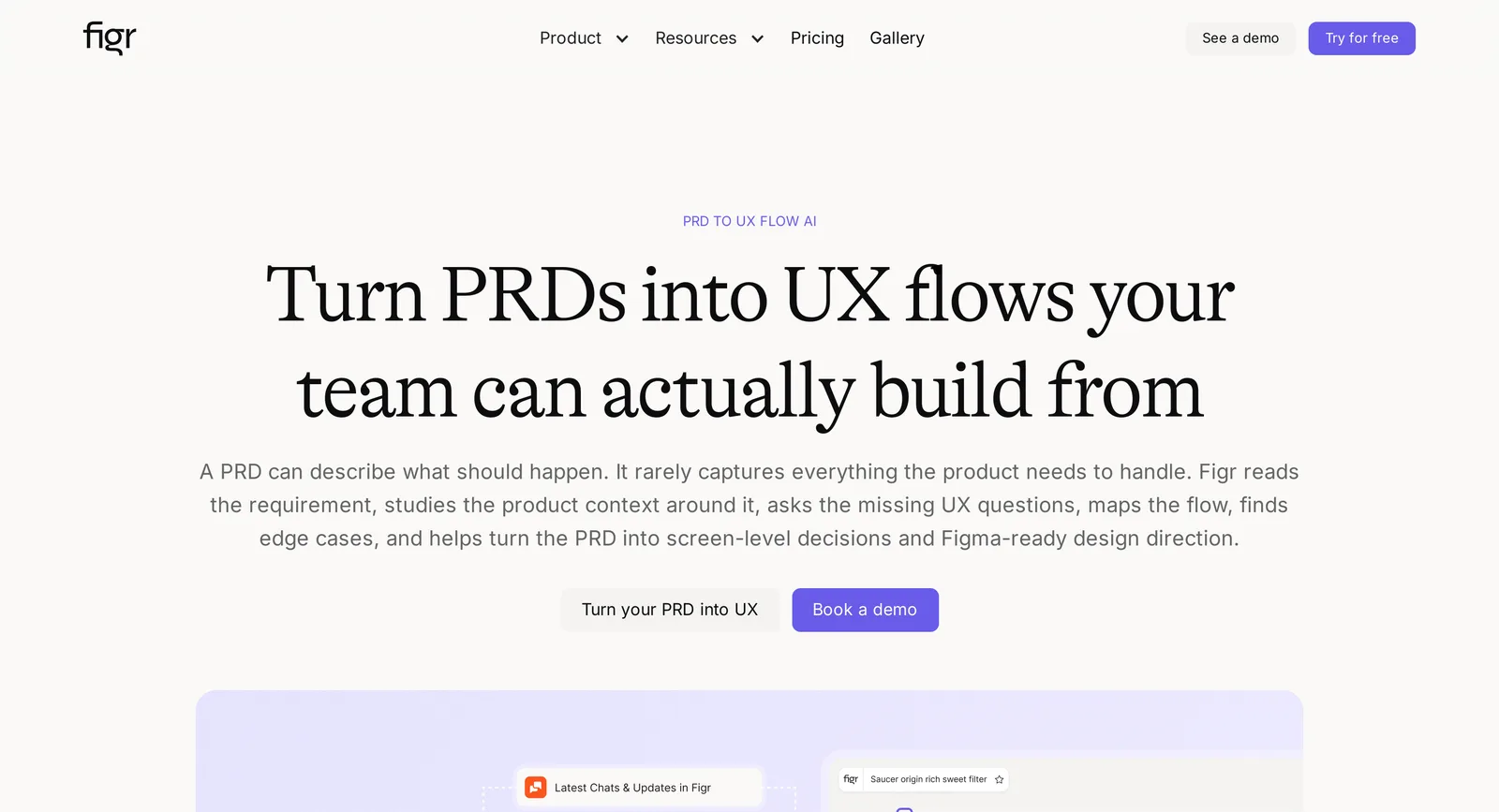
Caption: figr's PRD-to-UX-flow page; source: figr website, captured October 2026.
Best when the PRD still needs writing - ChatPRD
ChatPRD turns rough notes into goals, scope, user stories and open questions. Its integrations generate prototypes with v0, Lovable and bolt.new, but its direct output is a document rather than screens. Pro costs $15/month billed yearly.
Best for a coded, deployable prototype - v0
v0 builds a working React app from a prompt and accepts PDF or DOCX attachments, so you can attach a PRD directly. It outputs a working React app and connects to GitHub. It does not document clarifying questions or screen and state inventories by default.
Free includes 7 messages a day. Plus costs $30/user/month. Related options include Lovable, Bolt and this PRD-to-prototype guide.
Best for manually editable AI wireframes - Uizard
Uizard, now part of Miro, generates multi-screen editable prototypes from text. Its Wireframe Scanner converts paper sketches into editable screens. Free includes 3 AI generations a month; Pro costs $12/month billed annually. Read the Uizard guide.
Another editable-canvas option - Visily
Visily accepts text, screenshots and diagrams. Paste the PRD or completed inventory to create editable wireframes. Free Starter includes 300 AI credits a month. Pro costs $14/editor/month and adds Figma and code output.
PRD-to-wireframe comparison
| Tool | Input | Questions and planning | Output | Free | Paid |
|---|---|---|---|---|---|
| Mowgli | PRD, idea, Figma file or codebase | Clarifying questions; screen and state list in spec | Wireframes or designs, prototype; Figma, React + Tailwind, MCP | 300 credits | Packs from $12; plans $15/mo |
| figr | PRD plus product context | Questions, flows and edge cases | Figma-ready screens; Figma, React/TSX | 10 credits/mo | $32/mo yearly |
| ChatPRD + v0 | Notes or prompt | Open questions and planning in PRD text | PRD, then coded app | 3 chats; v0 7 msgs/day | $15/mo yearly; v0 $30/mo |
| v0 | Prompt plus PDF/DOCX | Not documented; no screen/state list by default | React app and GitHub | 7 messages/day | $30/user/mo |
| Uizard | Text, sketches, screenshots | Not documented; no screen/state list by default | Editable mockups; React/CSS on Pro | 3 generations/mo | $12/mo yearly |
| Visily | Text, screenshots, diagrams | Not documented; no screen/state list by default | Editable wireframes; Figma and code on Pro | 300 AI credits/mo | $14/editor/mo |
Which method or tool should you use?
Use the manual screen-inventory method when you want a transparent, tool-independent workflow. For a written PRD that needs every screen and state today, use the method directly or use Mowgli in wireframe mode for the questionnaire, spec and complete generated set.
Choose figr for a feature inside an existing product. Choose ChatPRD or the reusable prompt when the PRD still needs writing. Choose v0, Lovable or Bolt after the inventory when stakeholders need a coded prototype. Choose Visily or Uizard when direct canvas manipulation matters.
The verdict: use the method first to make requirements traceable. Use Mowgli for the same spec-first sequence across a complete multi-screen app, including states and synchronized chat edits.
FAQ
How do I turn a PRD into wireframes quickly?
Spend about 45 minutes on roles, objects, statuses, actions, open questions, the screen inventory, states and flows. Use the final 15 minutes for grayscale frames.
What should a screen inventory include?
A screen inventory should include one row per screen, with roles, requirement references, primary action, shown data and all states. Track emails, notifications and exports separately.
I have a product spec doc. Is there a tool that generates UI from it?
Yes. Mowgli accepts a pasted PRD, asks clarifying questions, writes a spec and generates the screens and states. figr uses PRDs within existing-product context. v0 accepts PDF or DOCX files and produces a working React prototype.
Can ChatGPT or Claude turn a PRD into wireframes?
Yes. Use the included prompt for the inventory, states, flows and coverage check, then request one grayscale HTML screen at a time. You must keep separate files synchronized manually when requirements change.
What should a PRD include before wireframing?
A PRD should include roles and jobs, objects and statuses, numbered action-oriented requirements, failure and rejection behavior, visibility, permissions, notifications, platform and an out-of-scope list.
Should stakeholders review wireframes or high-fidelity mockups first?
Stakeholders should review grayscale wireframes first. Settle flow, content, permissions and missing states before applying a visual direction.
Sources
- figr
- figr pricing
- figr PRD to UX flow
- ChatPRD
- ChatPRD pricing
- v0
- v0 pricing
- v0 images and files documentation
- Uizard Autodesigner
- Uizard pricing
- Visily
- Visily pricing
- Visily AI UI Design Generator
- Visily AI Chat Assistant
- Balsamiq
- Excalidraw
- Figma
- Lovable
- Bolt
- Mowgli pricing
- PRD to designs
- PRD to prototype
- App idea to user flows and screen list
- Empty, error and loading states
- Why wireframes work
- Why real copy matters
- PM's guide to Mowgli
- Uizard guide