Figma Make vs Stitch vs Claude Design vs v0 vs Lovable
Choose by output: Stitch for free concepts, Figma Make or Claude Design for prototypes, v0 or Lovable for apps, and Mowgli for whole-app design.
Quick answer: which tool should you choose?
Choose by the output you need. Pick Google Stitch for free UI concepts, Figma Make for a coded prototype inside a Figma workflow, Claude Design for prototypes tied to a coded design system, v0 for a Next.js application, and Lovable for a working web app with a built-in backend. Pick Mowgli when you need a synchronized product spec plus every screen and state before implementation.
The tools occupy four different categories:
- Google Stitch and Claude Design are design canvases first.
- v0 and Lovable are app builders that also design.
- Figma Make sits between design and building.
- Mowgli handles spec-driven whole-app design.
Figma Make fits teams already using Figma. It creates coded, clickable prototypes or web apps from prompts, Figma context and libraries.
Google Stitch fits free UI exploration. It creates mobile or web screens, clickable prototypes, Figma exports and HTML/CSS.
Claude Design fits Claude subscribers whose design system lives in code. It creates interactive prototypes and hands them directly to Claude Code.
v0 fits developers shipping Next.js applications on Vercel. It produces running code with GitHub and Vercel workflows.
Lovable fits non-developers who need a published web app with a built-in backend, Lovable Cloud and Git synchronization.
Mowgli fits teams designing a complete multi-screen app from a product spec. It produces a synchronized PRD, every screen and state, an interactive prototype, Figma files, React + Tailwind components and an agent handoff. See how spec-driven design works.
Mowgli designs and prototypes; to host and ship, you hand off to a builder or coding agent (Claude Code, Codex, Cursor, Lovable).
We make Mowgli.
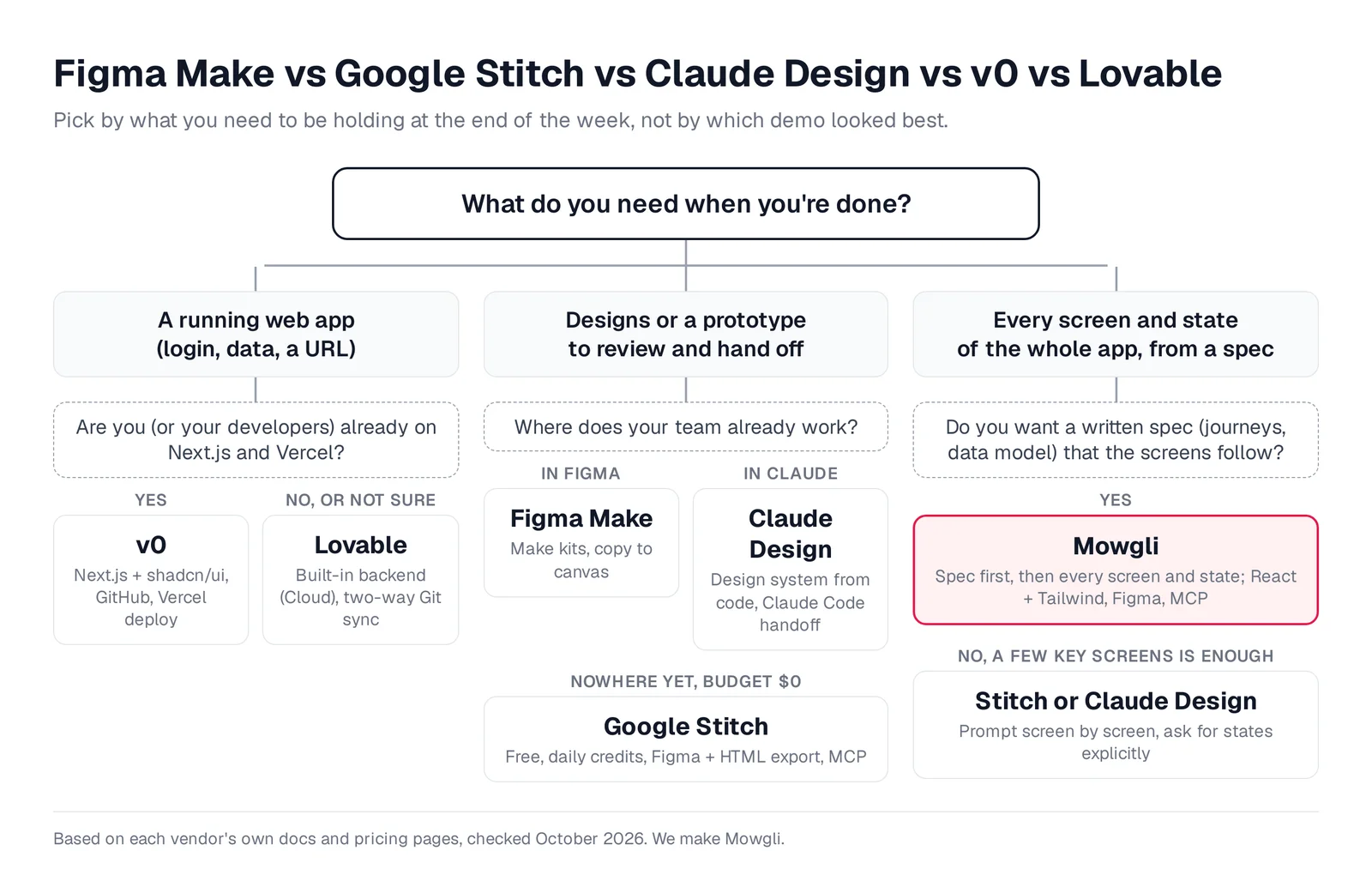
Caption: Pick by the deliverable, not the demo. Original graphic based on each vendor's docs, October 2026.
At-a-glance comparison by final deliverable
Prices are from each vendor's pricing page, October 2026.
| Tool | Best job | Final output | Free option | Paid entry point | Limitation or scope |
|---|---|---|---|---|---|
| Figma Make | Teams already in Figma | Coded prototype or web app; current preview state copied into Figma layers | Starter: 150 AI credits/day, up to 500/mo | Full seat: $16/mo yearly or $20 monthly | Paid-plan Make access requires a Full seat; credits do not roll over |
| Google Stitch | Free UI exploration | Infinite-canvas screens, Figma export and HTML/CSS | Free with a daily credit limit | Free | Google Labs Beta; exported code is static HTML/CSS |
| Claude Design | Prototypes based on a coded design system | Interactive prototype, PDF, PPTX, HTML and Claude Code handoff | Not included in Free | Claude Pro: $17/mo yearly or $20 monthly | Beta; no version history yet |
| v0 | Shipping Next.js applications | Running Next.js app, GitHub and Vercel deployment | $5 one-time credits and 7 messages/day | Plus: $30/user/mo | Figma import requires a paid plan |
| Lovable | Shipping a web app without setup | Running app, built-in backend and Git synchronization | 5 build credits/day, up to 30/mo | Pro: $25/mo for 100 credits | No documented Figma export |
| Mowgli | Every screen and state from a spec | Product spec, screens and states, React + Tailwind, Figma and MCP | Free to start with 300 credits | Credit packs from $12; plans from $15/mo | Designs and prototypes; implementation continues in a builder or coding agent |
See the full pricing and limits guide for more detail.
What each tool produces
The central distinction is a design canvas or prototype versus a deployable application.
Figma calls Make's output "Interactive apps." You start from prompts or Figma designs, then work with a live preview and editable code whose main file is App.tsx. You can publish the result to a URL.
Stitch produces mobile and web UI designs on an infinite canvas. Its design agent can create related screens, a clickable prototype, a Figma export and HTML/CSS.
Claude Design places a canvas beside the Claude conversation. It produces designs, interactive prototypes, one-pagers and other visual work.
v0 produces real code and full-stack applications. New chats begin with Next.js, shadcn/ui and Tailwind CSS.
Lovable builds websites and web apps. Lovable Cloud supplies the backend, and new projects use TanStack Start.
For a design review, start with Stitch. For a running app without developer setup, use Lovable. For a Next.js application intended for Vercel, use v0.
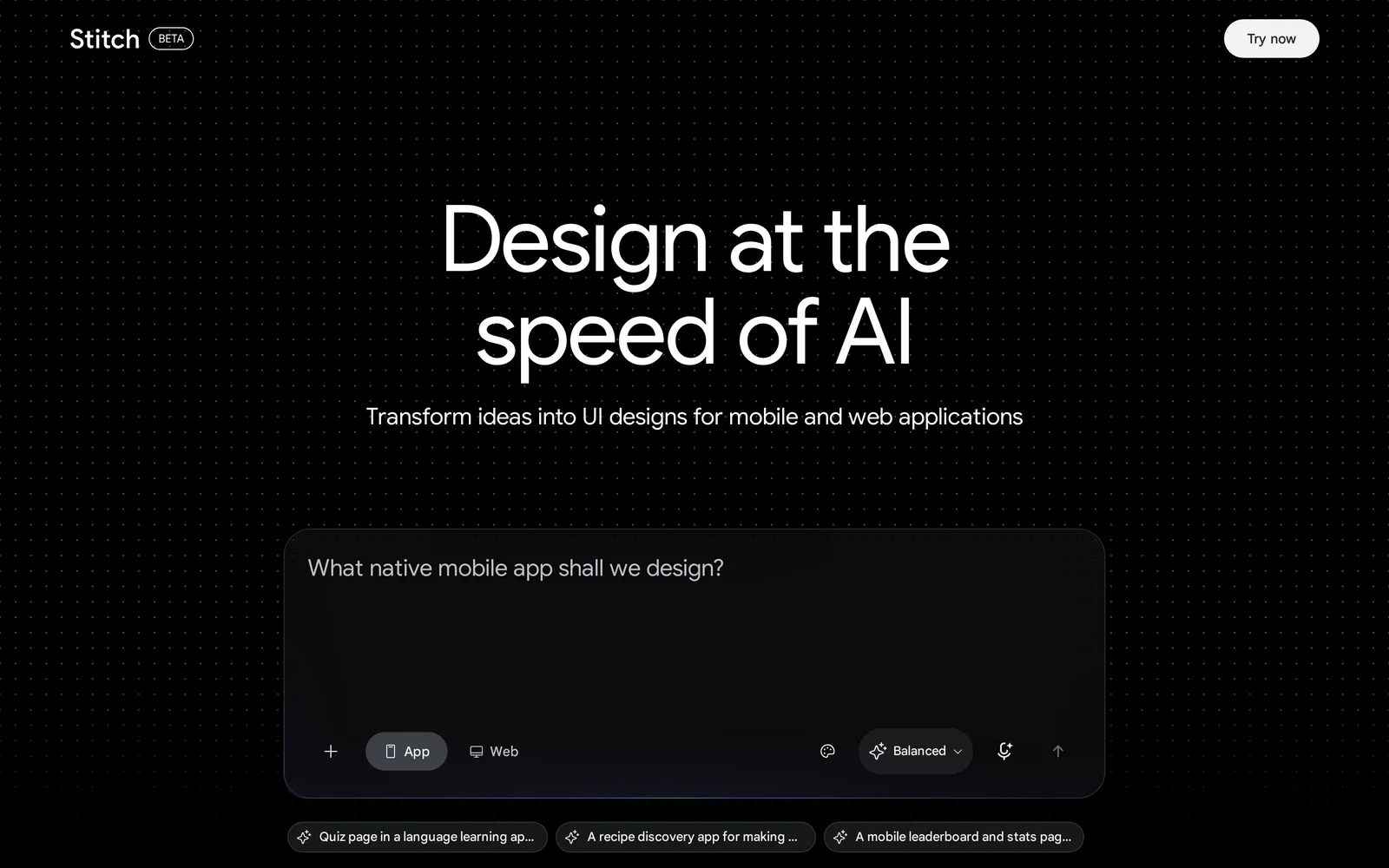
Caption: Stitch asks whether you're designing an app or a website before you prompt. Source: Google Stitch website, captured October 2026.
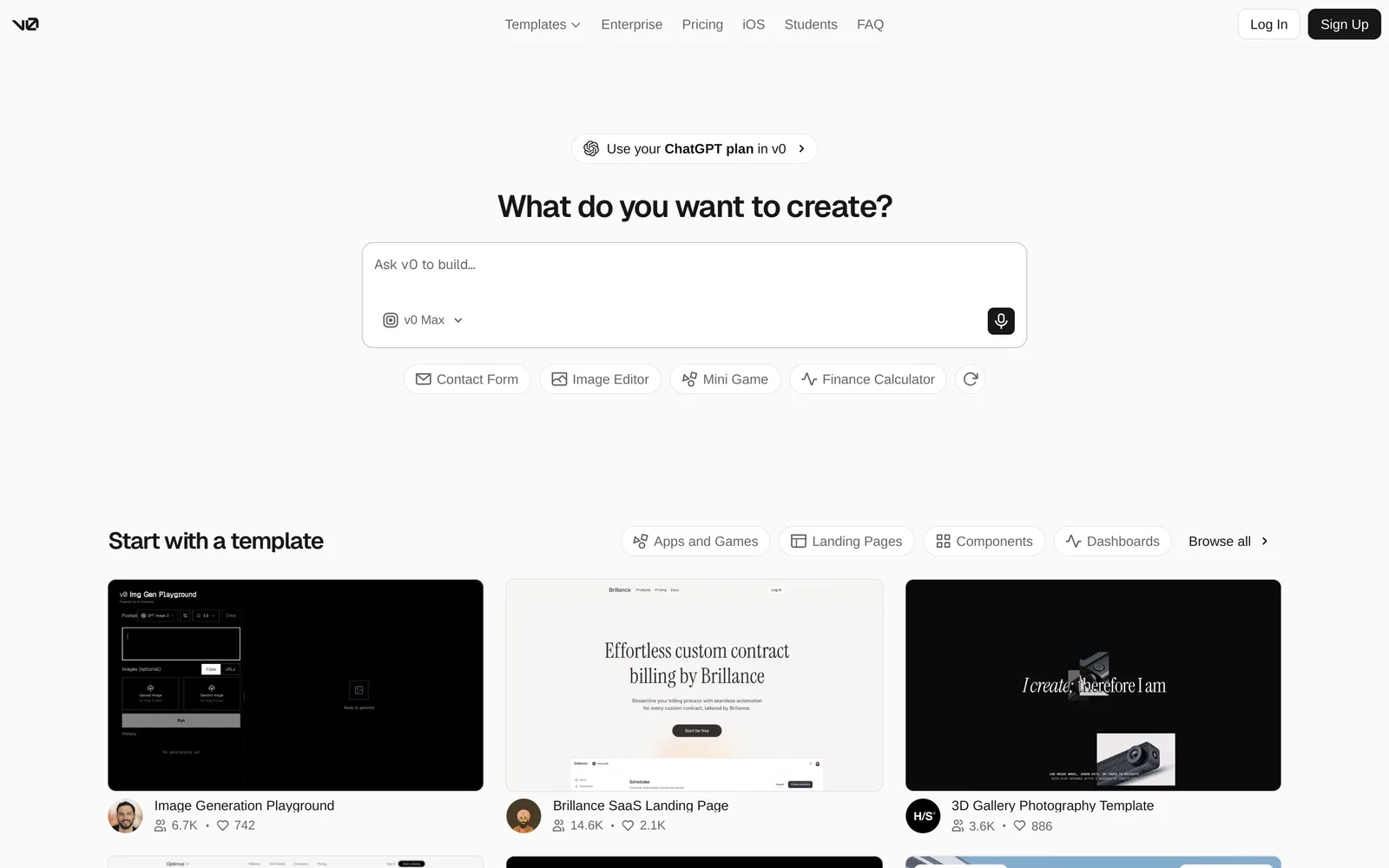
Caption: v0 starts from a prompt or a template and ends in deployable code. Source: v0 website, captured October 2026.
What can you start from?
Figma Make accepts prompts, Figma frames, images, videos, audio, text files and PDFs. It also supports voice-to-text and design context through Make kits and npm packages.
Stitch accepts natural-language prompts, voice, screenshots and hand-drawn wireframes. An update in May 2026 added existing codebases and design files.
Claude Design can use chat instructions, screenshots, images, a codebase, a GitHub repository, existing design files, web captures and DOCX, PPTX or XLSX files.
v0 starts from text, screenshots and files. It can import a GitHub repository, plus Figma file or frame links on paid plans.
Lovable accepts text, images and files. Figma inputs can arrive through its plugin, Figma MCP or a .fig upload.
Choose Figma Make for native Figma input plus broad attachment support. Choose Claude Design when the source material is a codebase, repository or Office document.
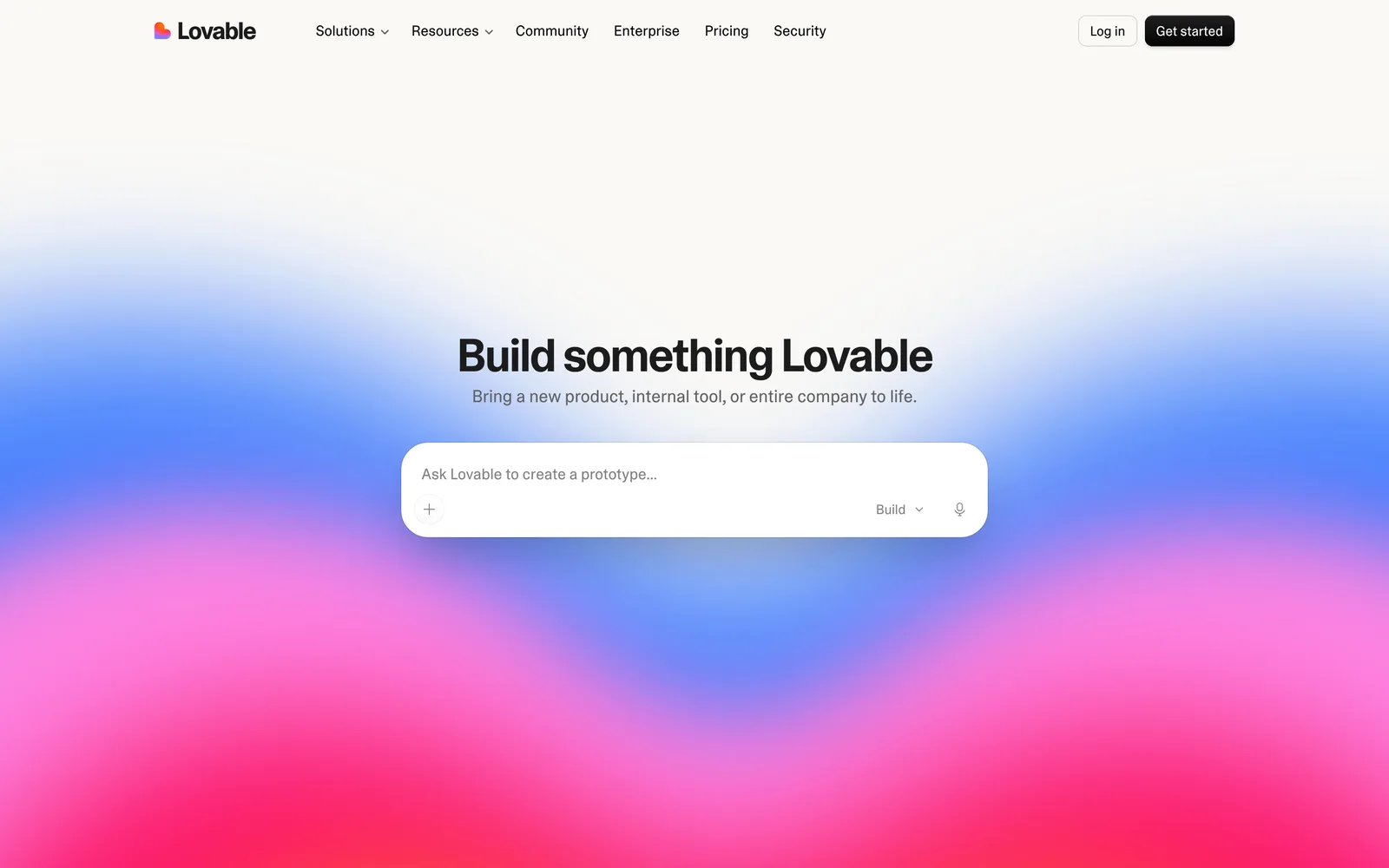
Caption: Lovable's starting point is a single prompt box with attachments. Source: Lovable website, captured October 2026.
Multi-screen flows and interface states
Every compared tool can create multiple screens. The practical difference is how you review them: side by side on a canvas or by navigating through a running preview.
Figma Make creates one running application with navigable screens. Copy design transfers only the preview's current state into unlinked Figma Design layers.
Stitch keeps related screens in one project. Interaction hotspots and Play mode turn them into a clickable prototype.
Claude Design supports multi-screen flows inside one prototype. Its documented example asks for a mobile onboarding flow with four screens.
v0 creates multi-route applications. Its Figma import identifies frames and builds them into one app. Lovable also creates full applications, while Design Guidance presents three previews before the build begins.
The five vendors' documentation does not present empty, error, loading or first-run states as default coverage. Create a screen-by-state matrix and request every missing state explicitly. Use the screen-state checklist, and apply the Stitch consistency workflow when working across related screens.
For side-by-side review and a clickable prototype, choose Stitch. For systematic whole-app state coverage, use the workflow described later in this guide.
Design-system and brand support
Figma Make uses Make kits to synchronize npm packages, library styles and guidelines. It also accepts Figma-frame attachments and custom fonts.
Stitch uses DESIGN.md to import or export design rules. Google open-sourced the format in April 2026. Stitch can import rules from a codebase, while its MCP tools can create and apply design systems.
Claude Design can load one or several systems from GitHub, design files or raw uploads. It checks output against the selected system, and administrators can specify an approved team system.
v0 Design Systems 2.0 imports GitHub repositories, npm packages and Figma frames. It generates a starter application for verification, then saves the system as a reusable skill. Team owners can set a default.
Lovable offers design systems on paid plans. You can provide a public Git repository or structured instructions. Wrapping an existing npm package requires Enterprise, while design templates require Business.
Use v0 for a coded design system, Claude Design for output validation against that system, and Figma Make when Figma libraries are the source of truth.
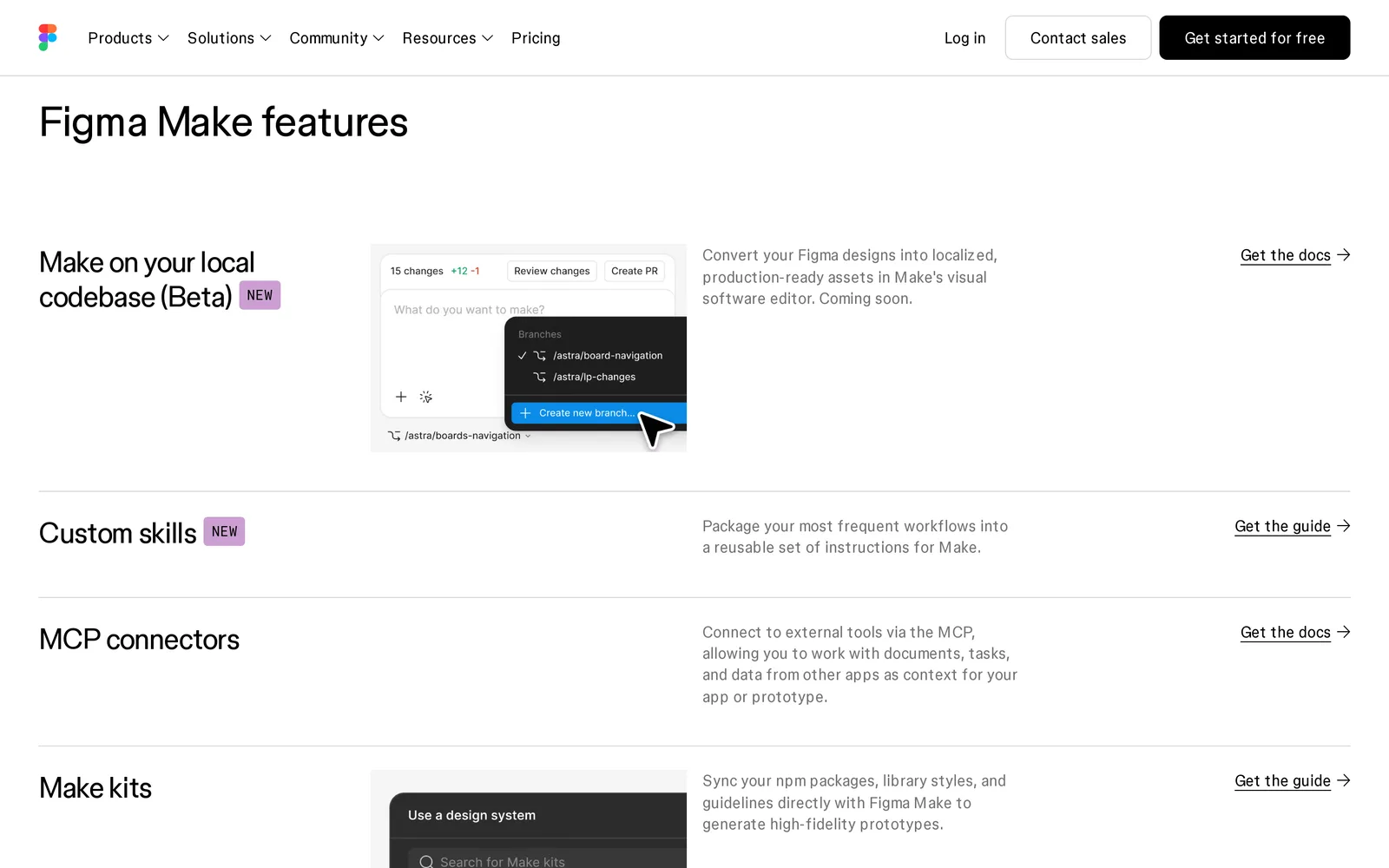
Caption: Make kits are how Figma Make picks up your design system. Source: Figma website, captured October 2026.
Editing: chat, canvas controls and code
Figma Make combines chat, point-and-edit selection, property panels, drawing tools and a code editor for Full seats. Copy design moves the current result into Figma Design for further editing.
Stitch supports chat and voice through its design agent, quick canvas edits and Figma export for manual refinement.
Claude Design combines chat for structural changes with inline comments, direct text edits, drag, resize, align and generated controls for properties such as spacing and color. It does not yet have version history, so save copies before substantial changes.
v0 provides chat plus Design Mode. You select an element, adjust it through Tailwind-aware visual controls, then use Apply to write the changes into source.
Lovable offers chat, inline text editing, element selection, drawn annotations and Plan mode for larger changes.
Choose Claude Design for combined conversational and direct canvas editing. Choose Figma Make when the final design must remain editable as Figma layers.
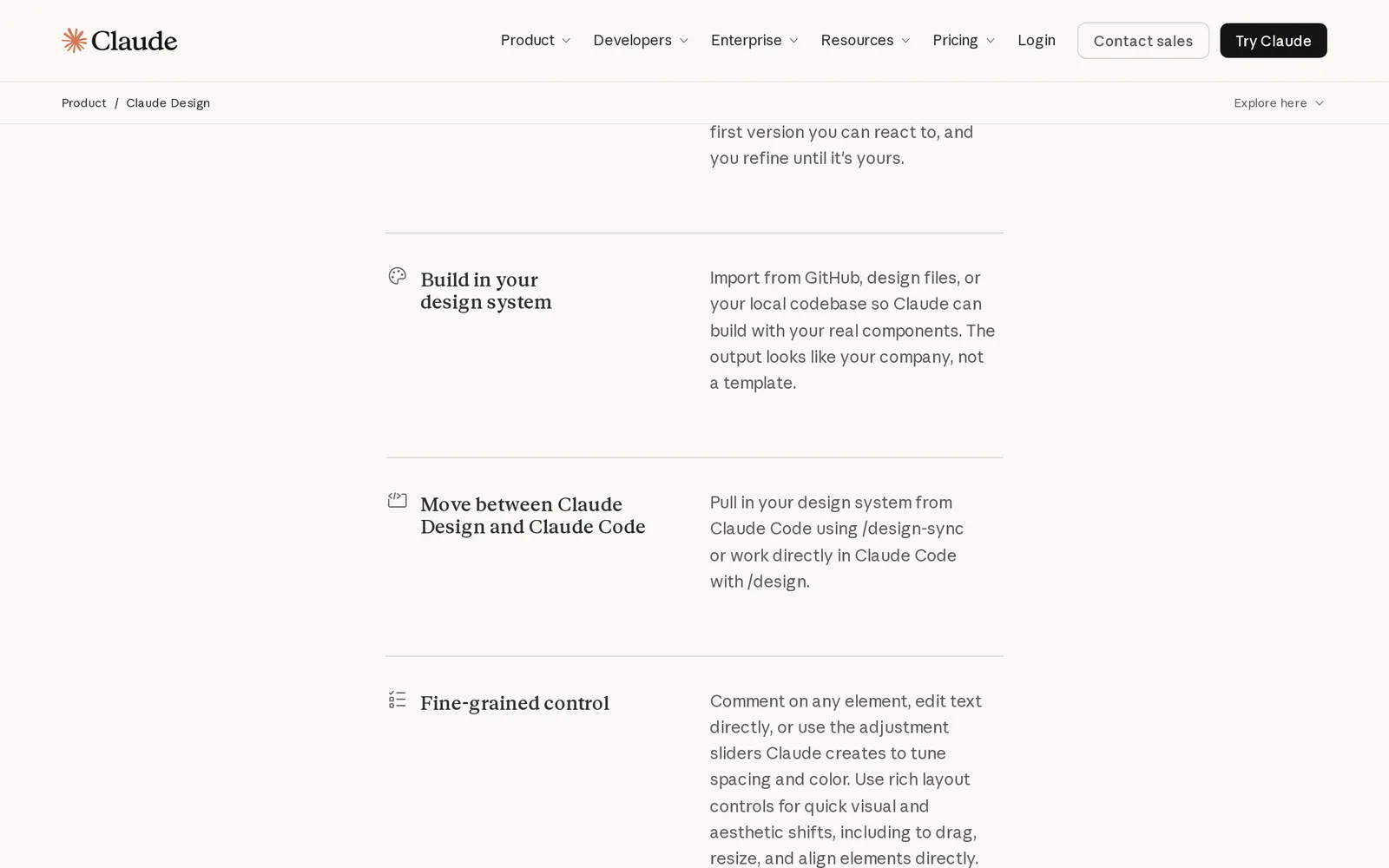
Caption: Claude Design mixes chat, comments and direct canvas edits. Source: Claude website, captured October 2026.
Export, source control and publishing
Figma Make supports URL publishing and .zip code downloads for Full or Dev seats. Paid plans can copy the result into Figma Design. "Make on your local codebase" is listed as coming soon.
Stitch exports Figma files with structured Auto Layouts, named component layers and editable text. It also provides HTML/CSS with Tailwind support, Google AI Studio share links, Antigravity integration and Netlify publishing.
Claude Design exports .zip, PDF, PPTX and standalone HTML. It hands work to Canva, Lovable, v0, Vercel, Replit, Miro, Wix and other tools. Google Slides export is available only from claude.ai/design. No Figma export is listed.
v0 supports GitHub branches, pull requests, one-click Vercel deployment and custom domains. Lovable provides two-way Git synchronization with GitHub, GitLab or Bitbucket, plus publishing and paid-plan custom domains.
Choose Lovable when development will continue across multiple Git hosts. Choose Stitch when the handoff must be an editable Figma file with Auto Layout.
Handoff to Claude Code, Codex, Cursor or another coding agent
Agent-accessible context matters when the prototype is not the production application.
Figma's MCP server can read an individual file or a whole project from a Make link. It requires an MCP client that supports resources. Starter, View and Collab seats receive up to 20 tool calls per month. Professional and Organization Dev or Full seats receive 200 per day; Enterprise Dev or Full seats receive 600 per day.
Stitch provides a remote MCP server, SDK and CLI. Its documentation covers Claude Code, Cursor, Antigravity, VS Code and Gemini CLI, with tools for projects, screens, generation and design systems.
Claude Design hands work to local Claude Code or Claude Code on the web through /design and /design-sync.
v0's MCP server works with Cursor, Claude Desktop and VS Code. It can create chats, read and edit source files, and deploy.
Lovable provides an MCP server with more than 40 tools on every plan. Agents can read project files and retrieve the current screenshot.
Choose Stitch for mixed agent environments and design-system tools. Choose Claude Design for a Claude Code-only workflow. For implementation details, read the design handoff guide and MCP server comparison.
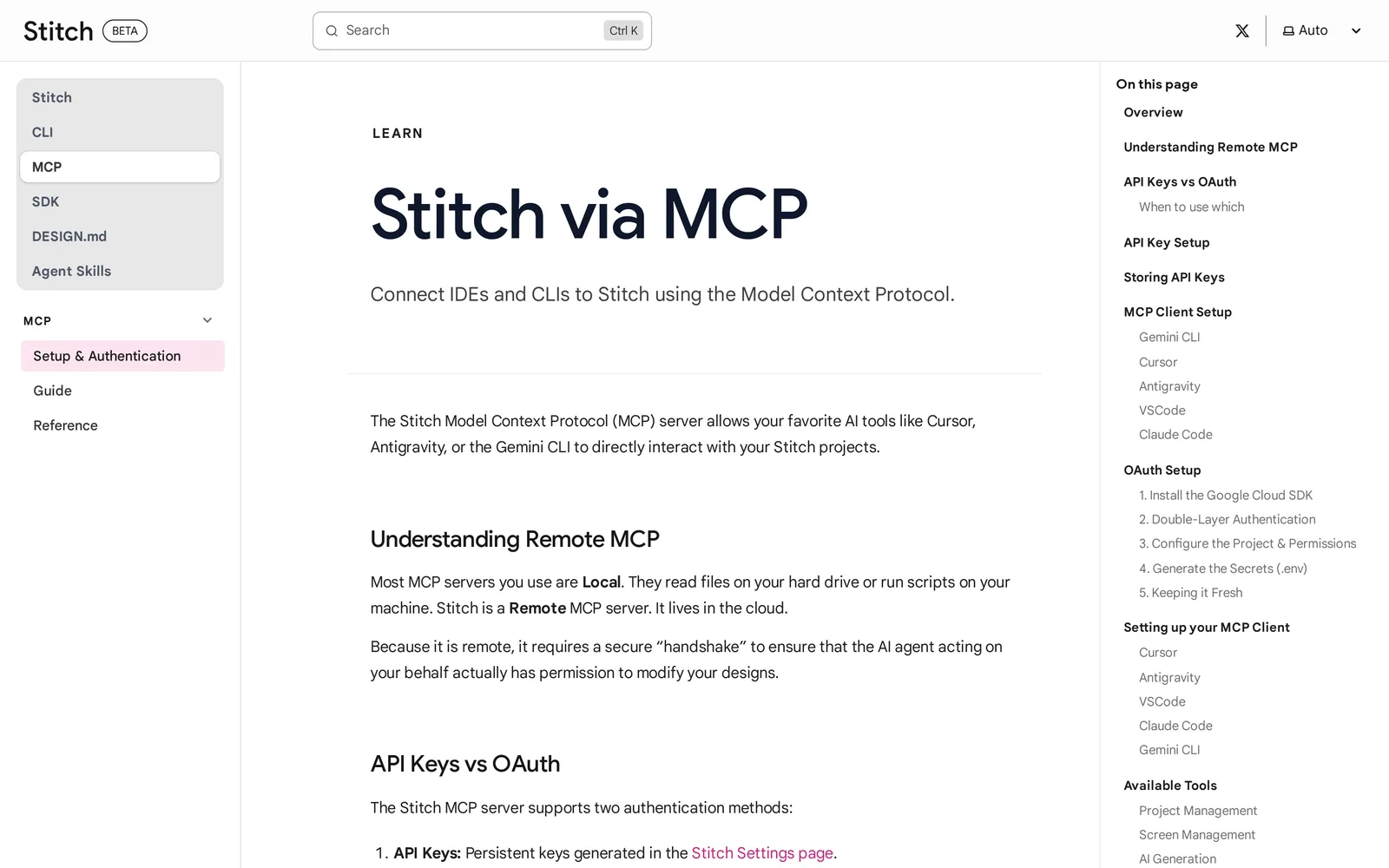
Caption: Stitch documents MCP setup for five agent clients. Source: Google Stitch docs, captured October 2026.
Collaboration
Figma Make offers shared conversations, comments, simultaneous changes to generated code and mobile review through Make mobile.
Stitch provides share links through Google AI Studio, but the cited vendor documentation does not describe team workspaces.
Claude Design supports view, comment and edit sharing. Anthropic describes multi-person editing as basic and potentially unreliable.
v0 provides shared chats. Plus, Business and Enterprise plans add team invitations and a shared credit pool.
Lovable offers real-time collaboration and unlimited members on every plan. Each person works in an individual draft that merges when accepted. Collaborators consume credits from the project owner's workspace.
Lovable has the broadest documented plan-level team access and protected individual drafts. Figma Make fits an organization that already gives collaborators Full seats.
Pricing and usage limits
Figma Starter includes 150 AI credits per day, capped at 500 per month. A Professional Full seat costs $16 per month yearly or $20 monthly and includes 3,000 credits per month. Figma estimates roughly 30 or more credits for a font change, 75 or more to make a design interactive, and 100 or more for an app from scratch. Credits reset monthly and do not roll over.
Stitch is free, with a daily limit that resets at midnight UTC.
Claude Design requires a paid Claude plan. Pro costs $17 per month yearly or $20 monthly; Max starts at $100 per month. Design shares the plan allowance with Claude chat and Claude Code. The previous separate weekly allowance no longer applies.
v0 gives new users $5 in one-time credits and seven messages per day. Plus costs $30 per user per month, including $30 in credits and $2 in daily login credits. Business costs $100 per user per month. Usage is token-based. Unused monthly credits roll over but expire after 65 days.
Lovable Free includes five build credits per day, up to 30 per month, plus 20 Cloud credits per month. Pro costs $25 per month for 100 credits; Business starts at $50 per month. Lovable prices examples at 0.50 credits to make a button gray and 1.20 credits to add authentication. Monthly credits expire two months after issue.
Stitch has the lowest price because it is free with daily limits. Paid entry starts at $16 per month yearly for Figma Professional, $17 for Claude Pro, $25 for Lovable Pro and $30 per user for v0 Plus.
When the job is designing every screen and state from a spec
Start with a manual coverage pass:
- Write the core user journeys and product constraints.
- List every screen required by each journey.
- Add empty, error, loading, first-run and populated states to a screen-by-state matrix.
- Review screens side by side for navigation, visual-system and data-model consistency.
- Attach the spec and matrix to the builder or coding-agent handoff.
The screen-state checklist and matrix gives you a reusable structure.
The five compared workflows accept prompts for screens, flows or applications. Their cited documentation does not make a synchronized product spec plus every screen and state the core deliverable. Figma Make and Lovable can plan the next build, while v0 can draft a PRD in chat. States still require explicit requests. Stitch MCP and Claude Design transmit screens or design rules, but not a synchronized product-logic specification.
For this job, use the AI design tool that designs every screen of your app. A short questionnaire becomes a PRD covering user journeys, product constraints and a data model. You choose from a moodboard with 16 or more styles, steer the direction, then generate 30 or more screens and states, including empty, error and loading states.
The infinite canvas supports side-by-side review. Each screen is a React + Tailwind component, and the project includes an interactive prototype plus native Figma and React + Tailwind exports.
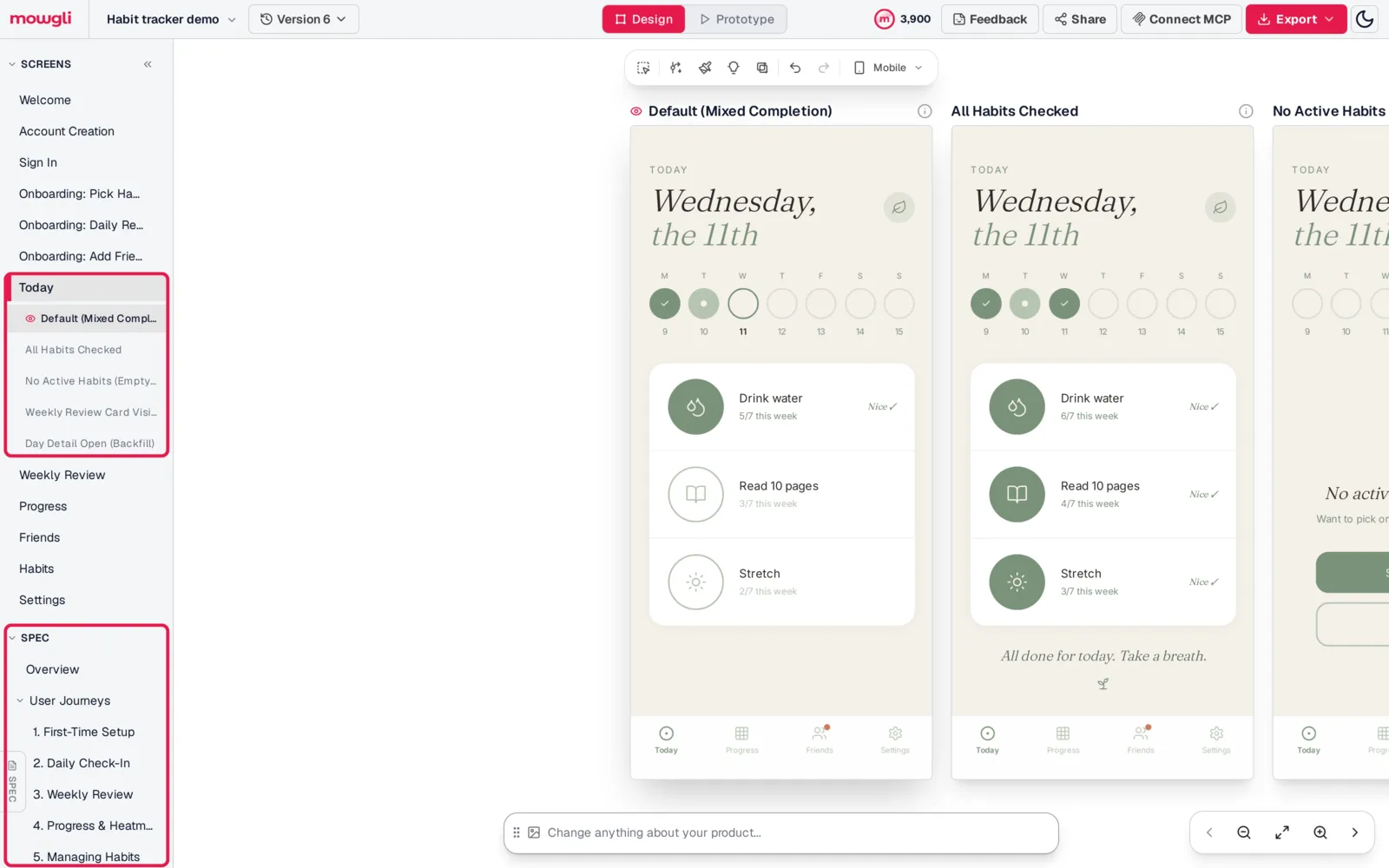
Caption: One screen, five states, with the spec in the same sidebar. Mowgli habit tracker demo.
Mowgli has an MCP server, CLI and agent skill, so Claude Code, Cursor and Codex can read every screen, its states and the product spec, and push code changes back into the design. Connect through the MCP workflow, install the agent skill with npx skills add mowgli-ai/skills, or use mowgli-cli.
Design the complete product first. Then continue in Lovable, v0 or a repository handled by Claude Code, Codex, Cursor or another coding agent. If you already have a PRD, use the PRD-to-design workflow.
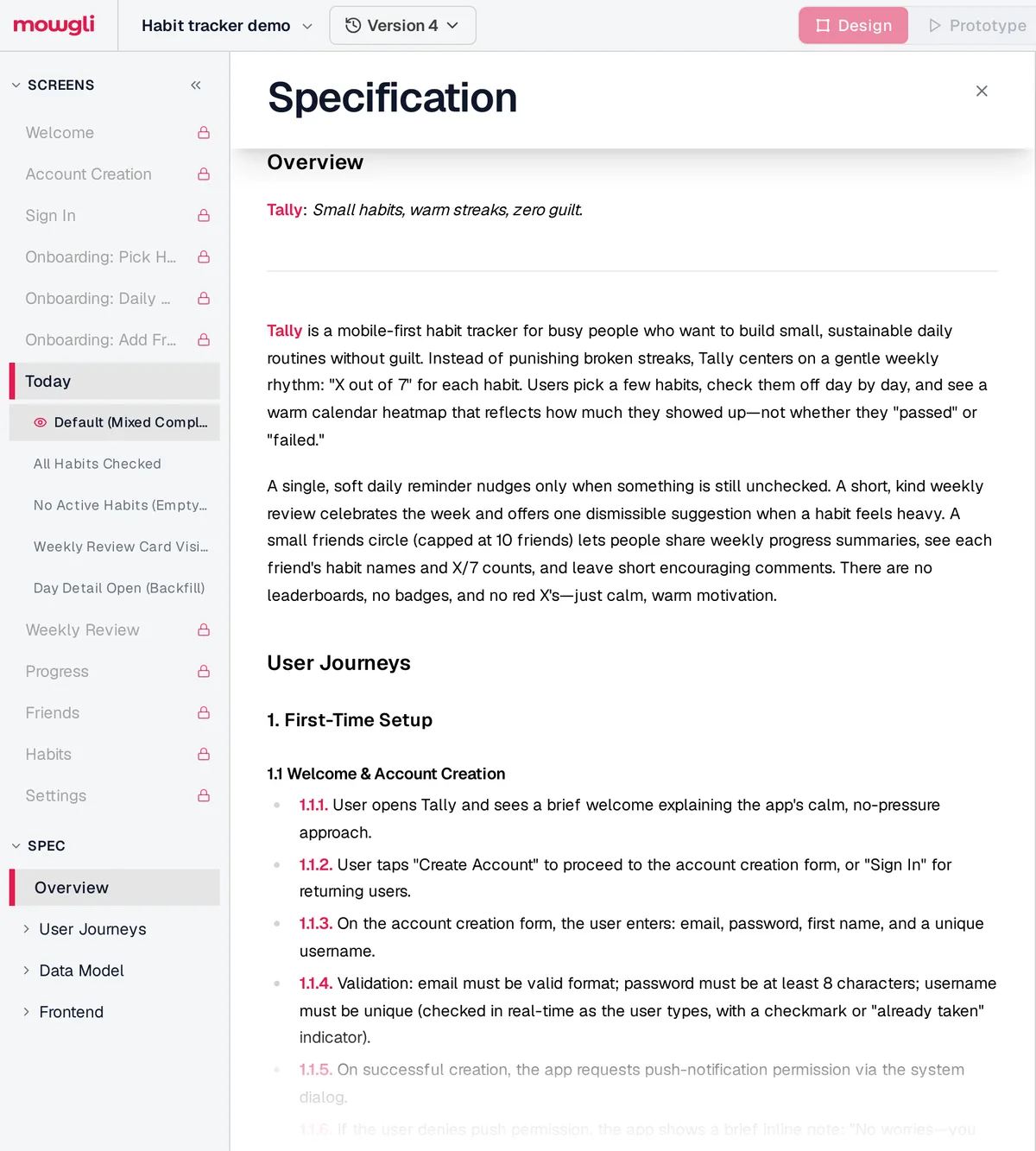
Caption: The generated spec that every screen is designed against. Mowgli habit tracker demo.
Final recommendations by job
Choose Figma Make when your team already uses Figma libraries and needs a clickable coded prototype plus editable Figma layers.
Choose Google Stitch for free UI exploration, side-by-side screens, Figma export or HTML/CSS.
Choose Claude Design when you already pay for Claude, your design system lives in code and Claude Code will implement the product. The Claude Design alternatives guide covers adjacent options.
Choose v0 when a developer will ship a Next.js application on Vercel.
Choose Lovable when a non-developer needs a working web application with login and a database. See the Lovable, Bolt and v0 comparison for a builder-focused decision.
Choose Mowgli when you need a synchronized spec plus every screen and state before building, followed by a handoff to Figma, React + Tailwind, Lovable, v0, Claude Code, Codex, Cursor or another coding agent.
There is no universal winner. Stitch wins for design concepts. Figma Make fits Figma-centered prototypes. Claude Design fits code-design-system prototypes. v0 fits Next.js and Vercel applications. Lovable fits backend-equipped web apps without setup. Mowgli fits whole-app, spec-driven design before implementation.
For a wider shortlist, read the best AI app design tools guide or the Claude Code UI design workflow.
FAQ
Is Figma Make better than Google Stitch?
Figma Make is better when you need Figma libraries, a coded prototype and editable Figma output. Google Stitch is better for free exploration, side-by-side related screens and Figma export with Auto Layout.
Is Claude Design better than Figma Make for app design?
Claude Design is better for coded design systems, GitHub inputs and Claude Code handoff. Figma Make is better for Figma-library workflows and editable Figma layers. Claude Design does not list Figma export and does not yet provide version history.
Can Figma Make, Google Stitch or Claude Design build a working app?
Figma Make can create an interactive application and publish it to a URL. Stitch exports static HTML/CSS or hands work to Antigravity. Claude Design creates a prototype for handoff to Claude Code. For a web application with a backend and login, use Lovable or v0.
Which is cheapest: Figma Make, Stitch, Claude Design, v0 or Lovable?
Google Stitch is cheapest because it is free, with a daily limit that resets at midnight UTC. Paid entry starts at $16 per month yearly for Figma Professional, $17 for Claude Pro, $25 for Lovable Pro and $30 per user for v0 Plus.
Does Claude Design have usage limits?
Yes. Claude Design shares your Claude-plan allowance with chat and Claude Code. The previous separate weekly allowance is gone.
Which AI tool designs every screen of an app from a description?
Mowgli turns a questionnaire into a PRD, then produces every screen and state. Coverage includes 30 or more screens and states, including empty, error and loading states. The other compared tools support multi-screen work, but additional screens and states require explicit requests.
Sources
- Figma Make
- Figma pricing
- Figma AI credits
- Figma Make guide
- Figma Make export and publishing
- Figma Make on the canvas
- Figma MCP server for Make
- Google Stitch
- Google Stitch MCP setup
- Google Stitch AI UI design
- Google Stitch DESIGN.md
- Google Stitch updates
- Claude Design
- Claude Design help
- Claude pricing
- v0 pricing
- v0 documentation
- Lovable pricing
- Lovable design systems
- Lovable Figma integration
- Lovable Design Guidance
- Lovable collaboration
- Lovable MCP server
- Mowgli MCP server
- Mowgli agent skill
- Mowgli pricing
- Mowgli spec-driven design
- Mowgli MCP integration