Habit Tracker App Screens: Every Screen and State You Need
A habit tracker app needs about 12 screens: onboarding, Today check-in, day detail, weekly review, heatmap, habits, friends and settings, plus 40+ states.
A habit tracker needs about 12 core screens and 40 or more states. A practical social version has roughly 46 states across default, empty, success, missed-day, paused, permission-denied, error and limit conditions. Remove social features and the MVP drops to about 10 screens and 35 states.
Define the inventory before you draw the interface. Then settle seven decisions covering habit types, frequency, missed days, backfilling, reminders, social features and week boundaries.
Habit tracker app screens: the complete list
Use these 12 screens as your baseline, with supporting views nested inside them:
- Welcome: Set the tone and route new or returning users. Include the app name, a short promise, Create account and Sign in.
- Create account: Collect email, password, first name and a unique username. Require at least 8 characters for the password and check username availability live. Cover empty or disabled, username-taken and validation-error states.
- Sign in: Show email, password and a help link. Design default and wrong-credentials states.
- Onboarding: Let users pick habits, set a reminder and optionally add friends. Habit selection needs curated choices, a custom field and a selection counter. Reminder setup needs a time picker, toggle, explanation, Skip action and permission-denied state.
- Today: Make this the primary check-in surface, with completion possible in under five seconds. Show the date, Monday-Sunday strip, habit rows, check controls, weekly count and review card. Cover mixed completion, all done, no active habits and weekly-review-available states.
- Weekly review: Summarize the week with dots, per-habit X/Y totals and an optional suggestion. Include suggestion, no-suggestion and habit-paused states.
- Progress: Display a monthly heatmap, month navigation and a legend. Define how pre-signup dates and future days appear.
- Habits: Separate active, paused and archived habits. Allow reordering and provide an Add habit action.
- Add or edit habit: Support new, active, paused and archived habits, plus Pause, Resume, Restore and Archive actions. Archive needs confirmation.
- Friends: Show the user's weekly card, friend cards, comments and notifications. Cover the feed, unread notifications and expanded comments.
- Find a friend and requests: Provide username search, an invite link, incoming requests and sent requests. Add result-found, circle-full and remove-confirmation states.
- Settings: Include reminders, habit management, profile, password, logout and deletion. Design the time picker, inline editing, password change and confirmation states.
Day detail is a supporting view for inspecting or backfilling a date. Keep the current week editable and make earlier weeks read-only. Friend management and habit editing can also appear as nested screens rather than primary navigation destinations.
For more planning guidance, see App idea to user flows and screen list or start from the AI app screens tool.
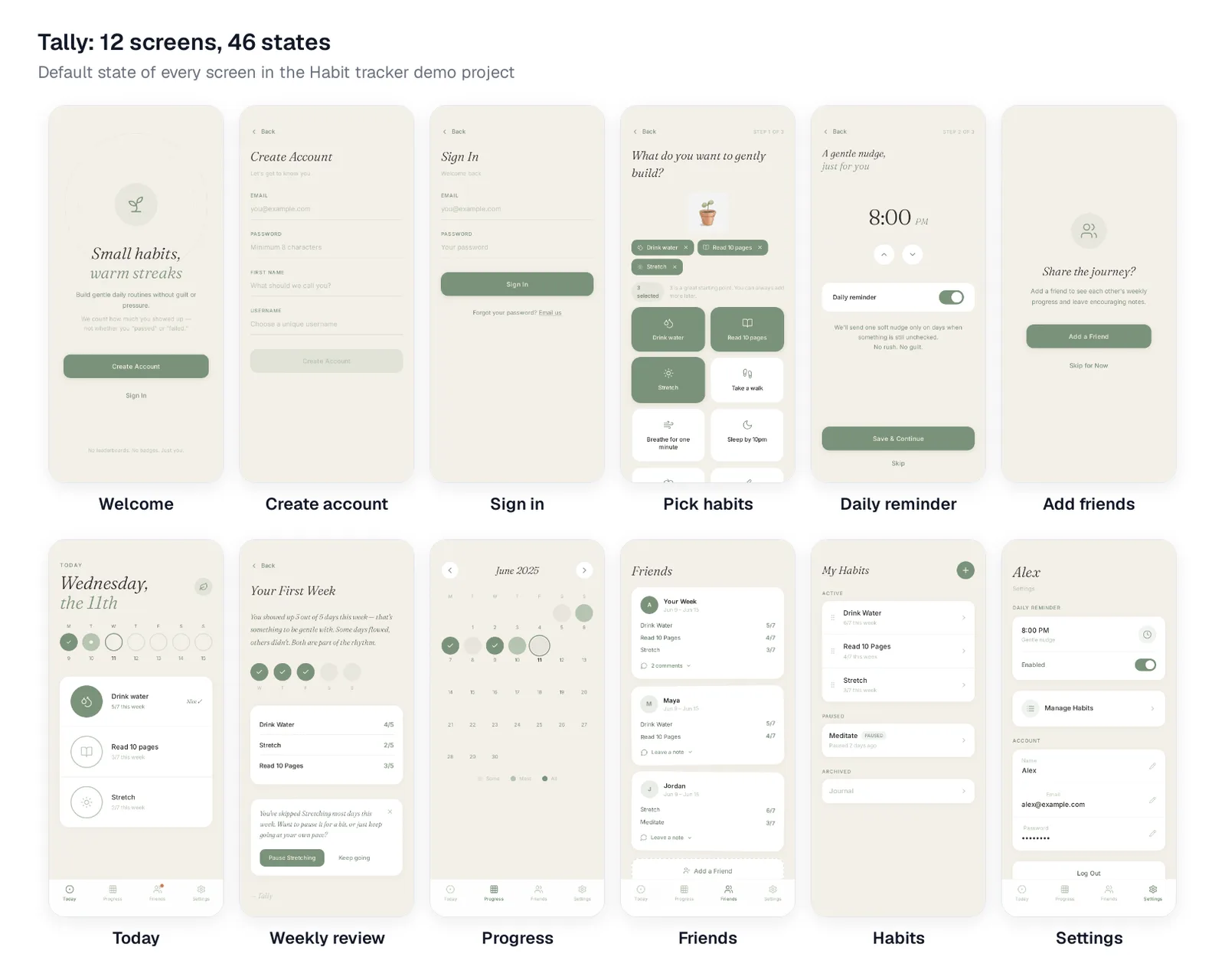
Caption: Tally, a calm habit tracker: the default state of all 12 screens. Rendered from the "Habit tracker demo" project in Mowgli, October 2026.
For an MVP, remove the two social screens. That leaves about 10 screens and 35 states. The friends layer adds 2 screens and about 11 states.
Screens to add for a larger habit tracker
Add habit detail and statistics when users need deeper trends. Loop Habit Tracker combines statistics with editing past days. Streaks shows current and best streaks.
Quantity habits need a target field during creation and a stepper with partial completion on Today. Timer habits need idle and running states. Streaks supports timed and negative tasks, while Habitify includes a timer.
Monetization adds upgrade, trial and restore-purchase surfaces. Habitify offers Plus, Pro and a 7-day Pro trial. Device extensions add more work: Streaks supports Apple Watch complications, while Loop supports home-screen widgets and CSV export. A forgot-password flow adds another three screens.
Seven decisions that change the screen list
Resolve these choices before visual styling. Each one changes screens, states, records and interface copy.
| Decision | Main options | Tally choice |
|---|---|---|
| Habit type | Yes/no, count, timer, quit | Yes/no |
| Frequency | Daily, chosen weekdays, X per week, every N days | Daily activity summarized weekly |
| Missed-day rule | Hard chain, grace or skip, weekly count, strength score | "X out of 7 this week" |
| Backfill | None, yesterday, current week, unlimited | Current week |
| Reminders | Per habit, one daily, conditional | One daily reminder when items remain unchecked |
| Social scope | None, sharing, small circle, competition | Up to 10 friends, weekly cards and private comments |
| Week boundary | Monday, Sunday, rolling seven days, partial first week | Monday-Sunday, beginning at signup |
Habit type and frequency
A yes/no habit needs one control per Today row. Counts need a stepper and partial completion. Timers need a running state. Quit habits reverse the completion logic; Loop uses positive framing for avoided behaviors.
Frequency affects Today visibility, schedule selection and streak calculations. Streaks supports chosen weekdays or targets such as "3 days per week." Loop supports schedules such as three times per week or every other day.
Streak rules and missed days
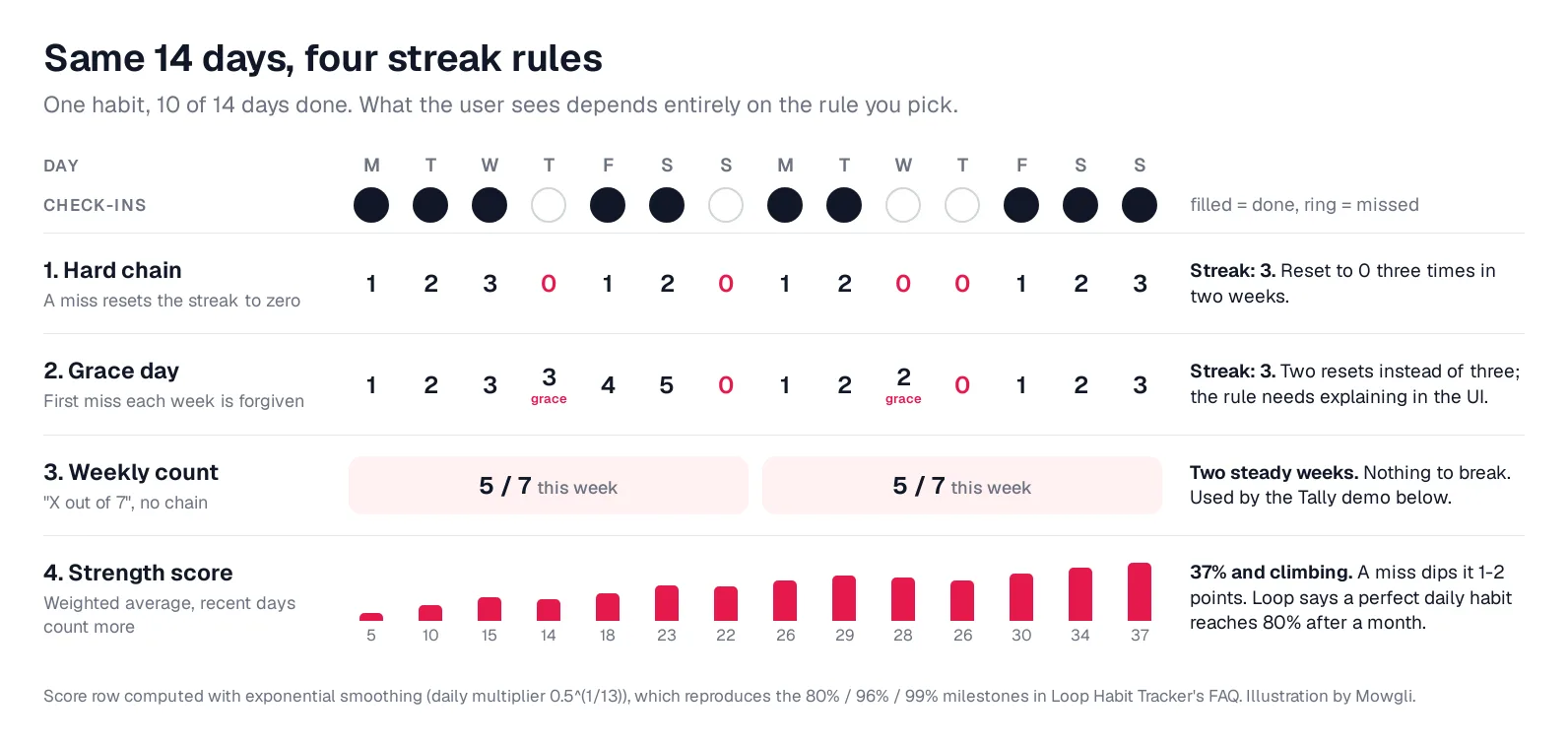
Caption: One habit, 10 of 14 days done, four rules. Original illustration by Mowgli.
A hard chain follows the Streaks rule: "Don't break the chain, or your streak will reset to zero days." One miss resets the total.
Grace, skip or vacation rules preserve more visible continuity but need explanation. Loop says a skip "leaves the score unchanged and doesn't break the streak." Do Habits provides Skip Days and Vacation Mode.
A weekly count avoids a continuous chain. Tally uses "5 out of 7 this week." Loop instead calculates an exponentially smoothed strength score. Perfect daily completion reaches 80% after one month, and a short break after a long run has limited effect.
A 12-week study of 96 volunteers found that missing one opportunity "did not materially affect the habit formation process." That finding supports progress models that do not treat one missed day as total failure.
Backfilling
Choose no backfill, yesterday only, the current week or any historical date. Tally permits current-week edits and locks older weeks.
That rule requires editable and read-only day-detail states. Store an isBackfill flag on the completion record so the product can distinguish a live check-in from a later edit.
Reminders and permission denial
Choose per-habit reminders, one daily reminder or a conditional reminder for unchecked habits. Loop can record habit completion from a notification. Tally sends one conditional daily reminder.
Ask for notification permission during reminder setup, when its purpose is visible. Apple's notification permission guidance recommends asking in context. Android 13, API level 33, requires the runtime POST_NOTIFICATIONS permission.
Cover denial in onboarding and settings. Suggested copy is: "Push notifications are off on your phone. Open Settings".
Social scope
Social features range from none in Loop to encouragement sharing in Streaks, a private circle in Tally, challenges and leaderboards in Habitify, and RPG parties in Habitica.
Tally allows up to 10 friends. Each friend has one weekly card, and comments have a 140-character limit. Comments are visible only to the two participants.
That scope still requires search, incoming and sent requests, a circle-full state, remove-friend confirmation and in-app notifications.
Day and week boundaries
Tally uses fixed Monday-Sunday weeks. The first week begins on the signup date, so a Wednesday signup produces a five-day week and "3/5," not "3/7."
Mute pre-signup days in the week strip and leave them blank in the heatmap. If a habit is paused mid-week, count only active days.
Represent each period with a Week record containing startDate, endDate, isPartial and dayCount.
Map the core user flows before drawing screens
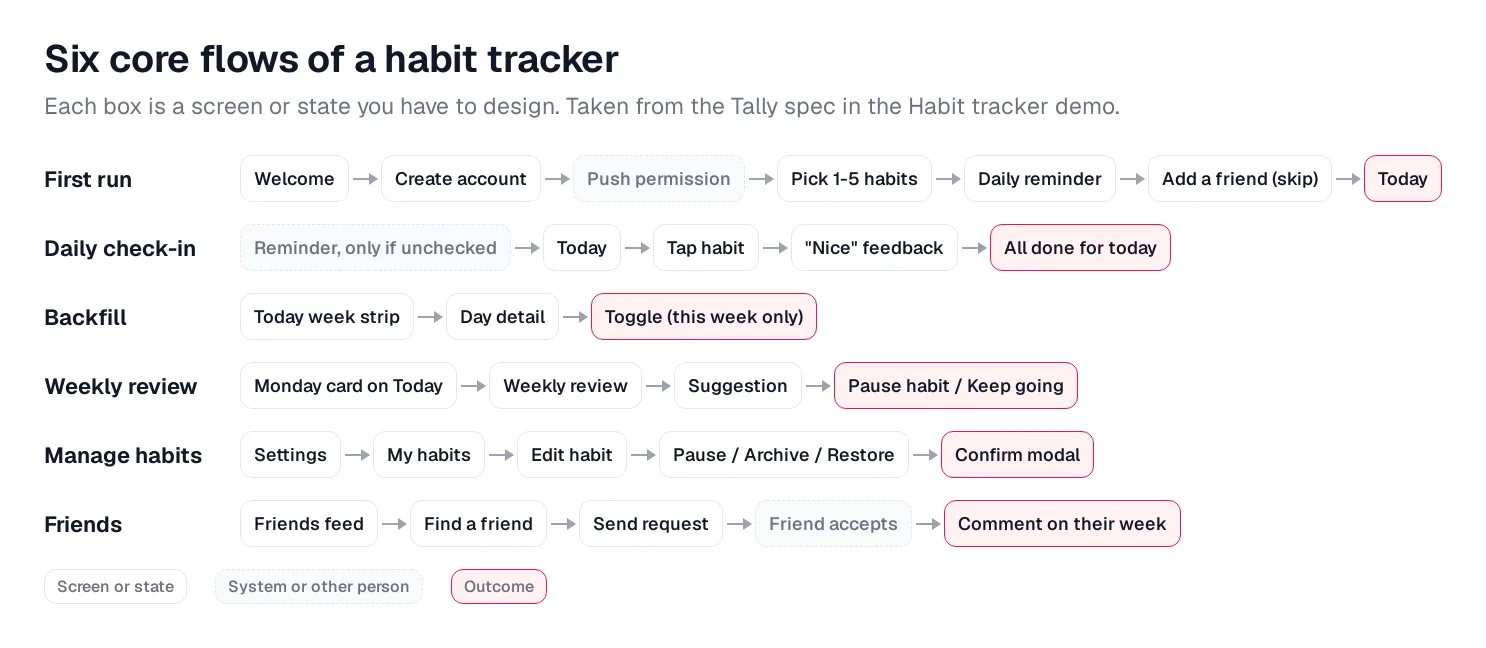
Caption: Six flows, each box a screen or state. Taken from the Tally spec. Original illustration by Mowgli.
Map six flows: first run, daily check-in, backfill, weekly review, habit management and friends.
Daily check-in is the most frequently repeated path: open -> tap -> complete. Remove unnecessary decisions from it. The weekly review can enter through a Monday card on Today; Tally does not send a separate review notification.
For every flow, document the entry point, happy path, empty state, error or denial, limit state, and exit and return path. This exposes missing states before they become implementation gaps.
Design the important screens and states
Onboarding
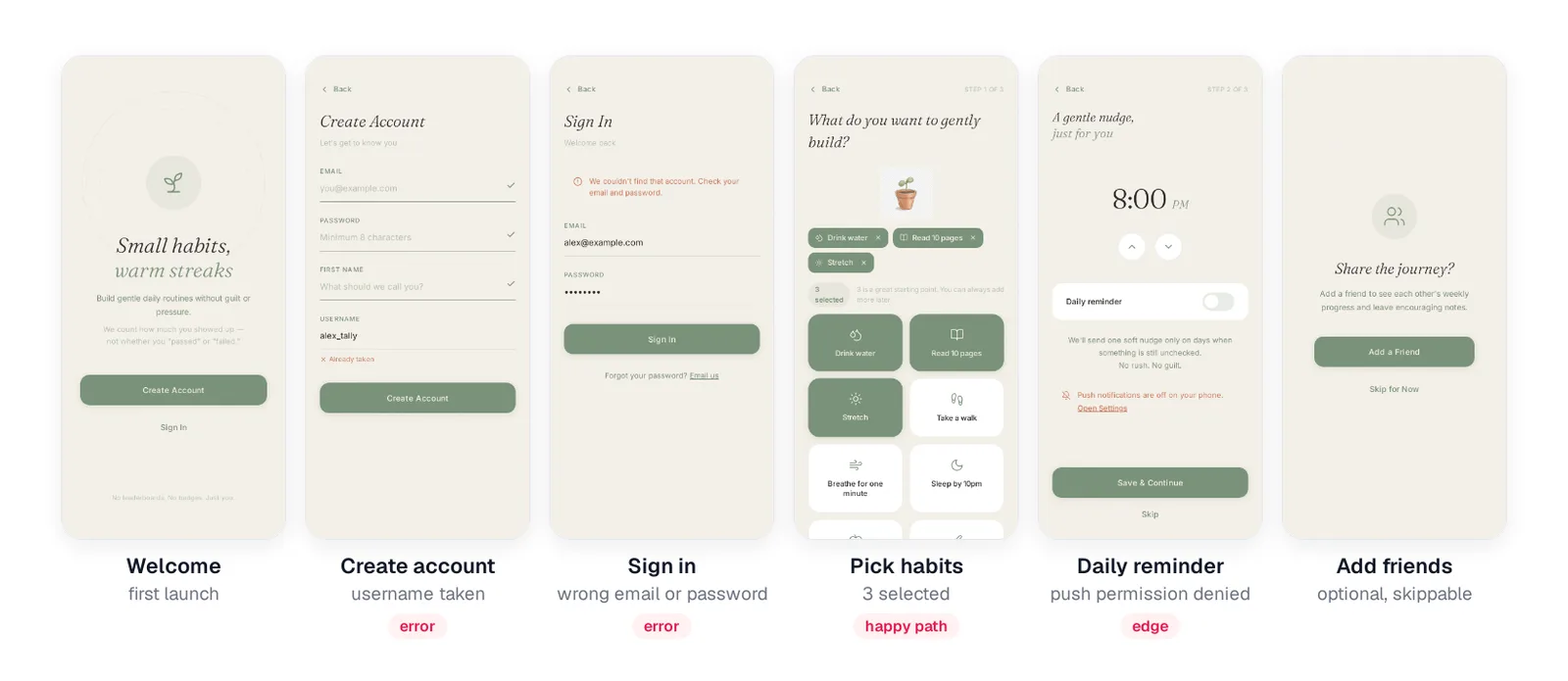
Caption: Onboarding, including the error and permission-denied states. Mowgli, October 2026.
The destination is the first usable Today screen. Skip a standalone feature tour. Tally recommends beginning with three habits, then offers reminder setup and an optional friend step.
Design username-taken, wrong-password, three-selected and notification-denied states alongside the default flow. See Designing onboarding flows for a broader process.
Today and day detail
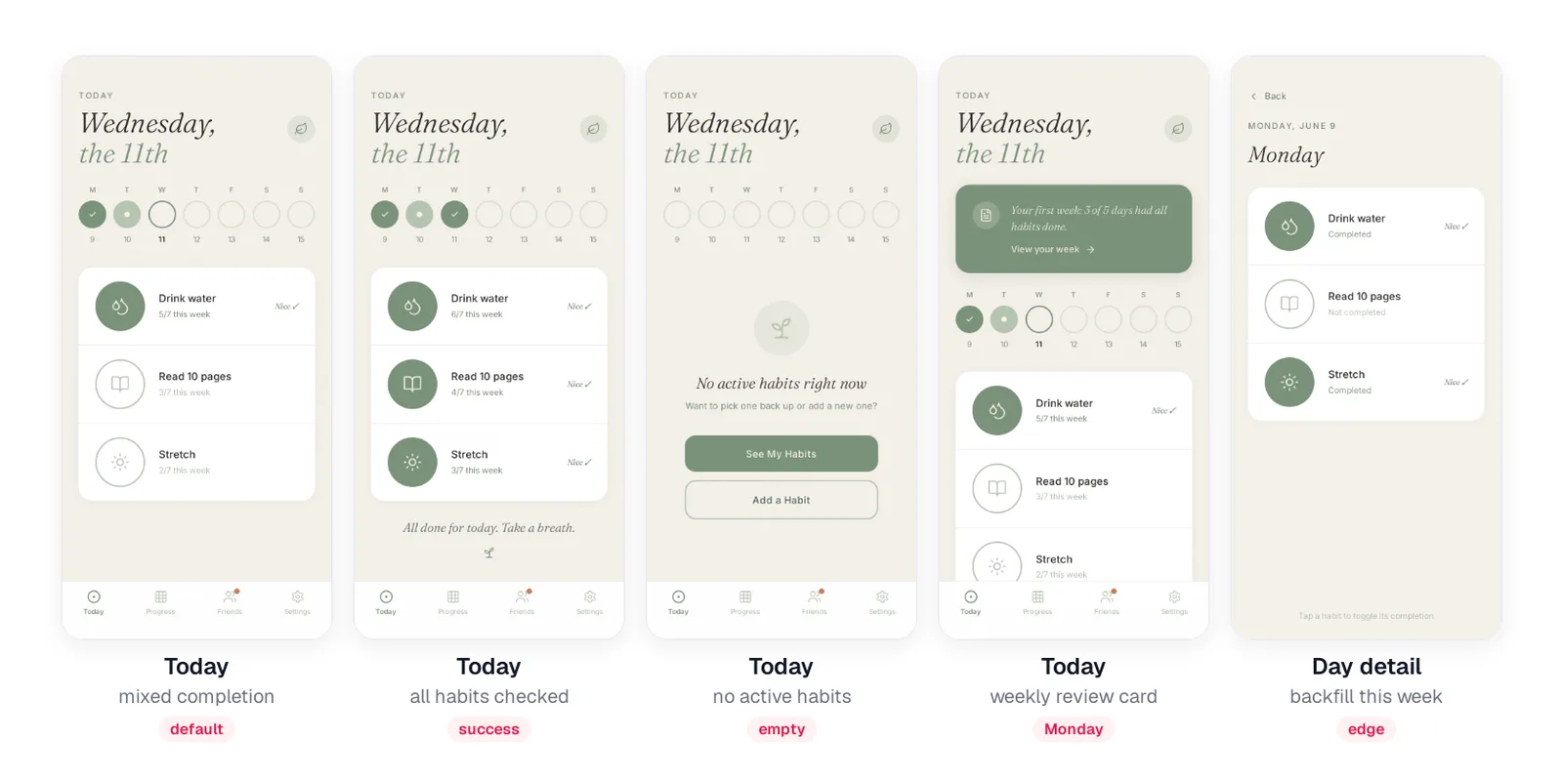
Caption: Today in five states: default, success, empty, Monday review card, and backfill. Mowgli, October 2026.
Use distinct week-strip indicators for all done, partial and none. A completed check-in fills the circle and shows "Nice". Tally does not use confetti.
When there are no active habits, offer "See my habits" and "Add a habit." Selecting a past date opens day detail, which remains editable only during the current week.
Weekly review and progress
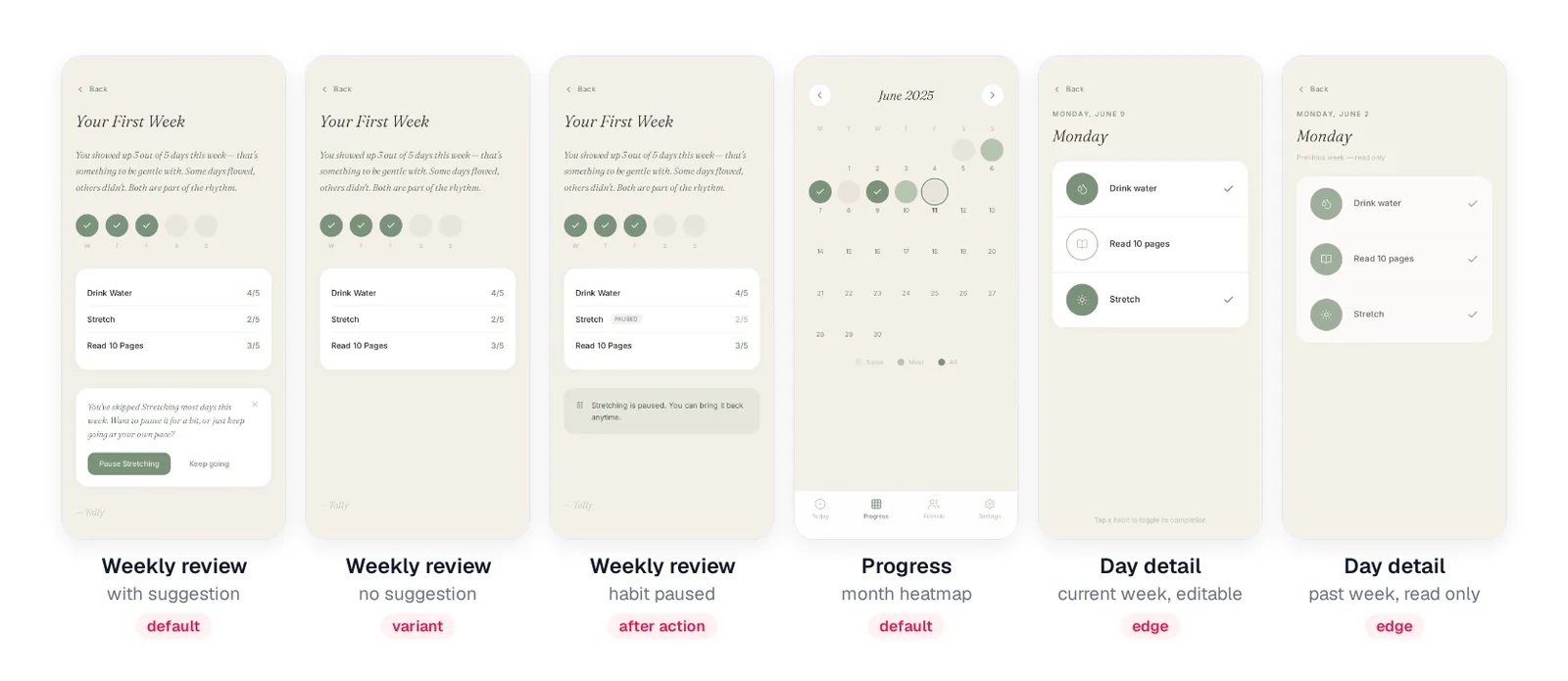
Caption: The weekly review reads like a short note; the heatmap never marks a day as failed. Mowgli, October 2026.
Show a suggestion only when completed days are fewer than skipped days. Remove the suggestion card otherwise.
Use pale grey for nothing completed, then two warm tones for partial and complete days. Avoid labeling a day as failed.
Friends
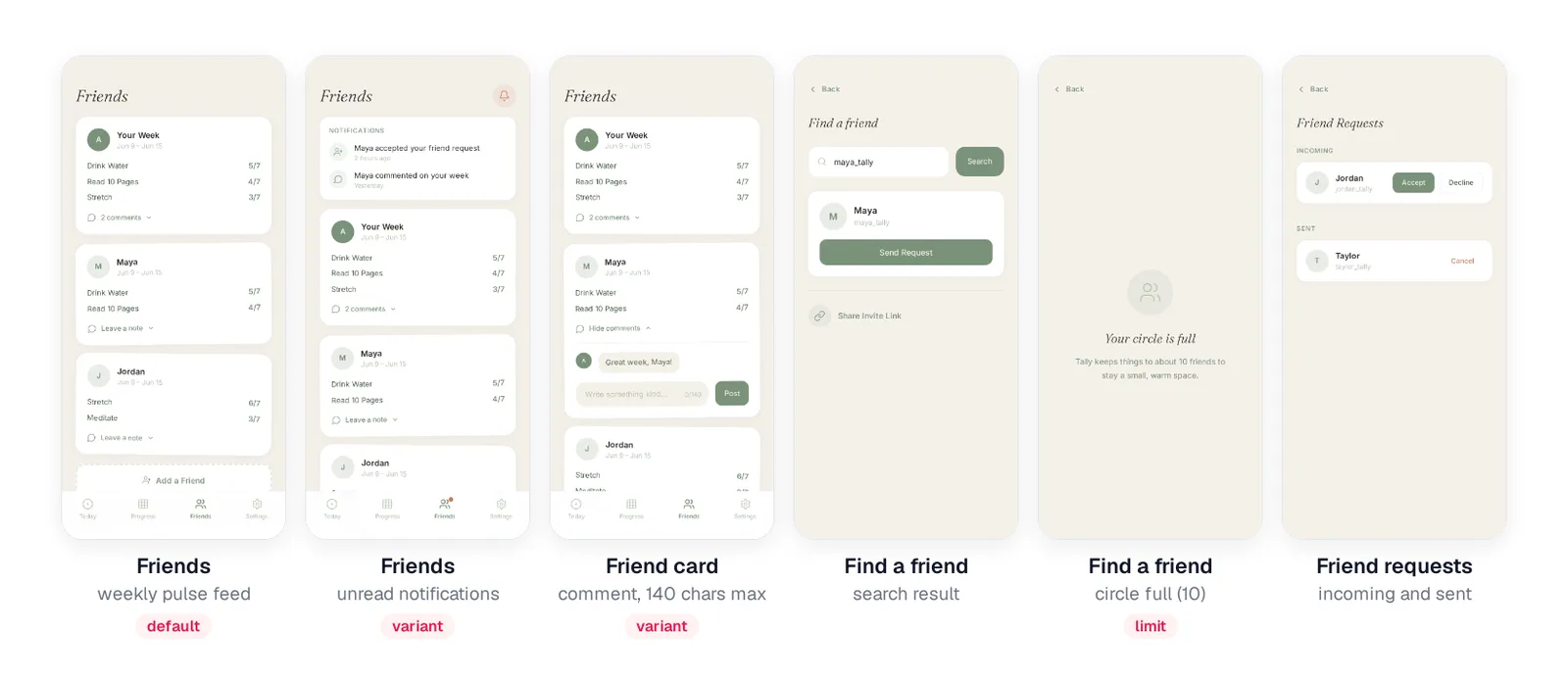
Caption: A small, capped circle still needs nine states on the Friends screen; six are shown here. Mowgli, October 2026.
Friends can see habit names and weekly counts, but not individual check-ins. When the user reaches 10 friends, replace search with "Your circle is full!" Explain the same cap when accepting a request fails.
Habits and settings
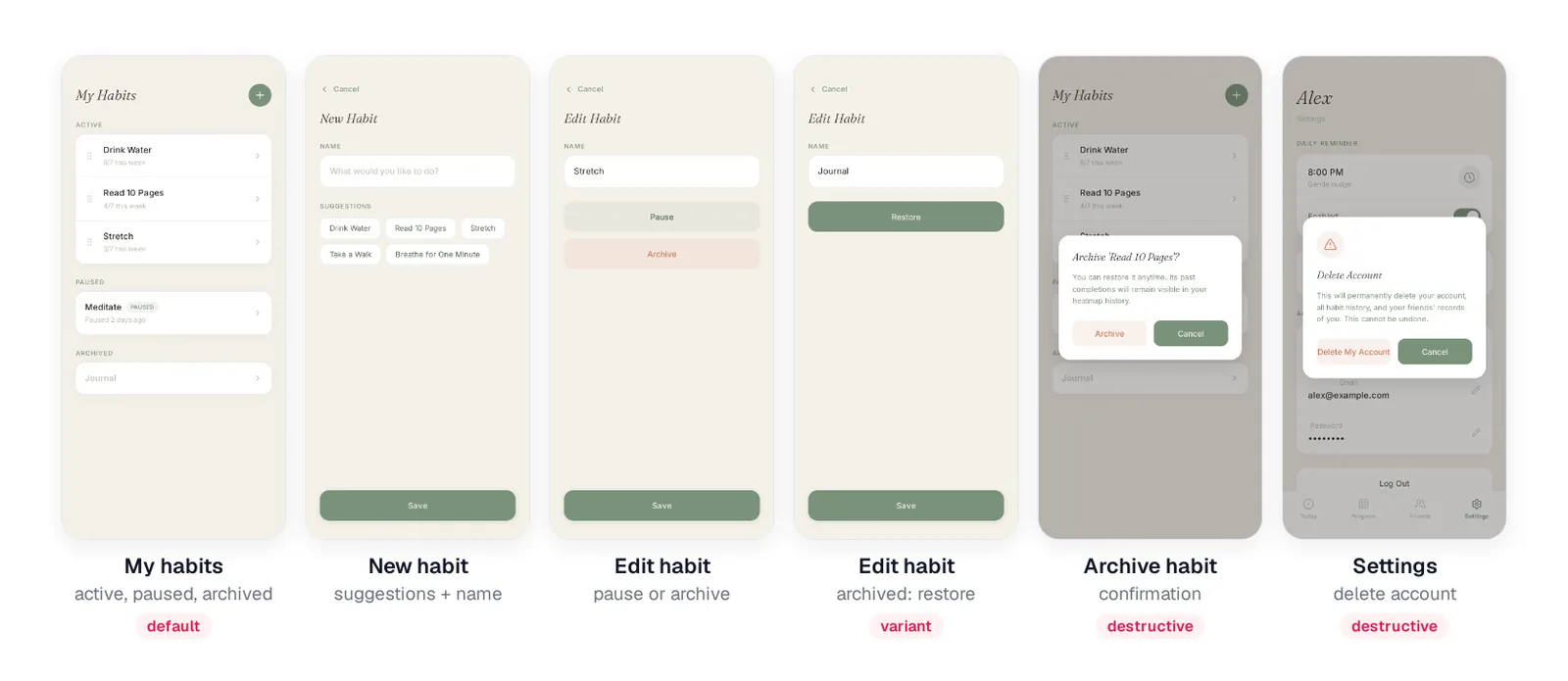
Caption: Pause, archive and restore keep history intact; destructive actions get a confirmation. Mowgli, October 2026.
Pausing removes a habit from Today but retains its history. Archiving also preserves past completions and requires confirmation:
"Archive 'Read 10 Pages'? You can restore it anytime. Its past completions will remain visible in your heatmap history."
Require explicit confirmation for both archive and account deletion.
Habit tracker screens checklist
Copy this into the project document before building.
Decisions
- Habit types: yes/no, counts, timers, quit habits.
- Frequency: daily, weekdays, X per week, every N days.
- Missed-day rule: chain, grace/skip, weekly count, score.
- Backfill window and locking rule.
- Reminder model and permission denial.
- Social scope, friend cap and privacy.
- Week start, partial first week and time-zone travel.
Screens
- Welcome, account creation, sign in, forgot password.
- Habit selection, reminder and optional friend onboarding.
- Today and week strip.
- Editable and read-only day detail.
- Weekly review and progress heatmap.
- Habits list and add/edit habit.
- Friends feed, search and requests.
- Settings, password change and deletion.
- Optional statistics, paywall, widgets and export.
States
- Empty: no habits, no active habits, no friends, no history.
- Success: check-in complete, all done.
- Partial week and partial first week.
- Paused and archived items.
- Notification permission denied.
- Wrong password, username taken, save failure and offline.
- Habit and friend limits.
- Archive, remove-friend, logout and deletion confirmations.
Use the empty, error and loading states checklist to expand the matrix.
How to design the habit tracker manually
First, record the seven product decisions. Convert each decision into user journeys, then list every state those journeys can reach.
Next, review shipped flows on Mobbin. Use Streaks, Loop or Habitify for a day so you can observe the repeated check-in flow rather than judging isolated screenshots.
Wireframe in Figma, beginning with Today. Use Apple's Design Resources for platform components. The PRD to wireframes guide covers the transition from requirements to structure.
Prototype first run and daily check-in. Observe three people using both flows. Your final package should contain a decision record, screen inventory, state matrix, core-flow prototype, and build-ready copy and rules.
Generate every screen and state with Mowgli
We make Mowgli.
Mowgli is an AI design tool that designs every screen of an app. A short questionnaire turns your description into a product specification and full multi-screen design, including empty, error and edge states.
For Tally, an 84-word prompt produced 12 screens and 46 states in about 25 minutes:
A habit tracker mobile app for busy people who want to build small daily habits
without the guilt. You pick a few habits (drink water, read 10 pages, stretch),
check them off each day, and see your streaks and a calendar heatmap of your
progress. Gentle reminders, a weekly review, and a small friends circle where you
can share streaks and cheer each other on. Onboarding should help you pick your
first 3 habits. It should feel calm, warm and motivating, not overly gamified.
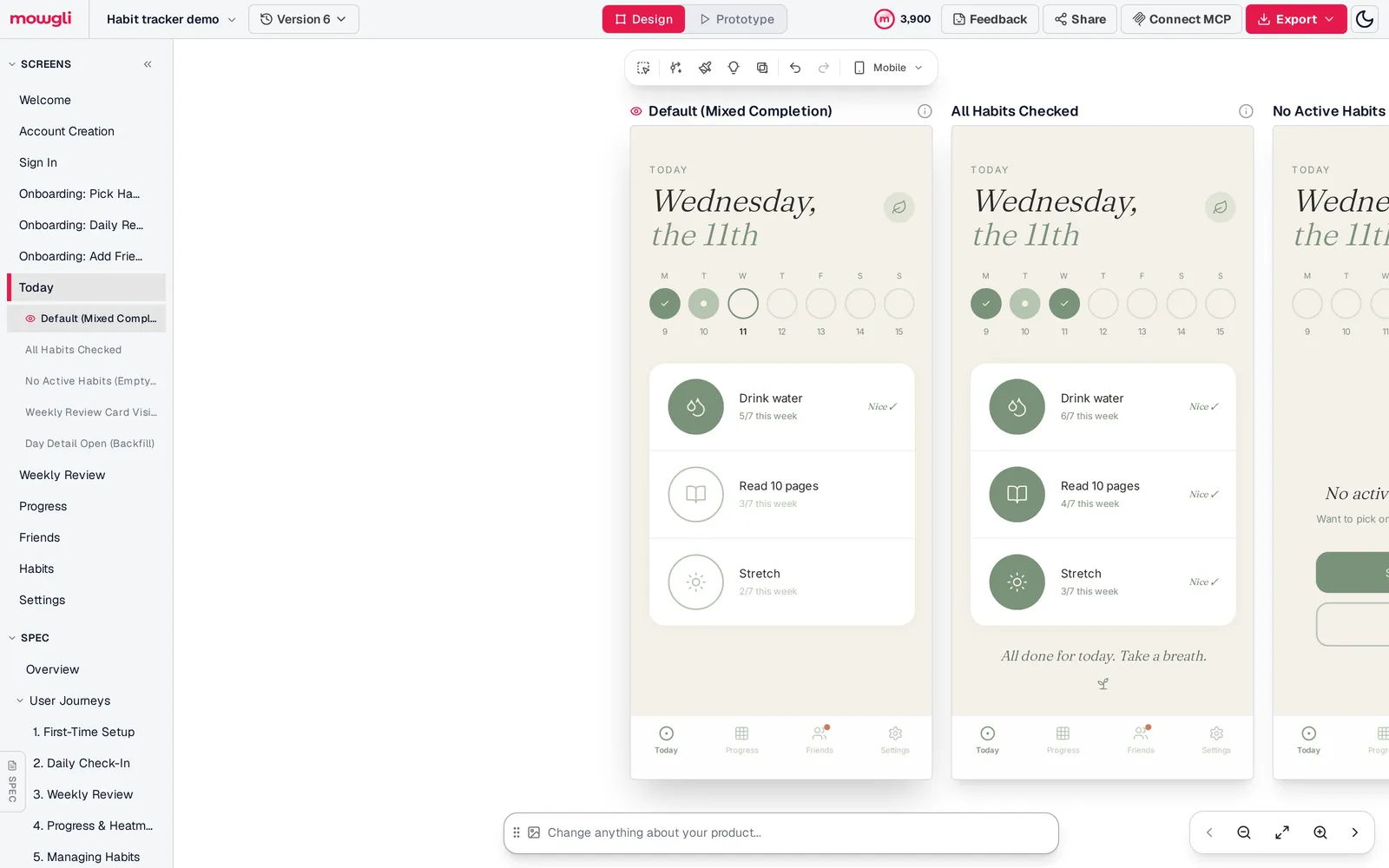
Caption: The Habit tracker demo in Mowgli: every screen and state in the sidebar, the spec below it, the designs on the canvas. Captured October 2026.
Paste the prompt, select "Mobile app" and answer 12 guided-questionnaire questions. The questions cover missed days, backfill, week boundaries, reminders, social scope, review format and the app name.
Choose a moodboard direction from 16 generated styles. Tally used "Soft Linen Sage." Generate the full app, then edit it through chat. For example: "Add a count habit type with a stepper on Today."
The project history records the prompt at 01:12 UTC, the specification at 01:23 and all 12 screens at 01:37. The total was about 25 minutes, including the questionnaire and theme selection.
Each screen is a React + Tailwind component with a single state prop, making all 46 states available for handoff. Export to Figma or code, or connect Mowgli over MCP to Claude Code, Codex, Cursor or another coding agent.
Mowgli designs and prototypes; to host and ship, you hand off to a builder or coding agent (Claude Code, Codex, Cursor, Lovable).
Mowgli is free to start (300 credits); credit packs from $12; plans from $15/mo. You can also begin with AI app screens, app mockups or PRD to designs.
Verdict: inventory first, then choose the design route
Start with the 12-screen baseline, settle the seven product decisions and build the full state matrix.
The manual route fits a team that wants direct control in Figma and plans to test flows incrementally. Mowgli fits the job of turning one product description into the specification, every screen and state, a clickable prototype and a code or Figma handoff.
For an MVP without social features, plan about 10 screens and 35 states. For the social version, plan about 12 screens and 46 states.
FAQ
What screens does a habit tracker app need?
A habit tracker needs about 12 core screens. Cover authentication, three onboarding steps, Today, weekly review, progress, habits, friends and settings, plus nested day-detail, habit-editing and friend-management views. Plan roughly 46 states rather than only 12 default layouts.
How many screens does a habit tracker MVP have?
A habit tracker MVP has about 10 screens and 35 states without social features. Friends add 2 screens and about 11 states. Keep day detail and habit editing in the MVP.
Should a habit tracker use streaks?
A habit tracker can use a hard chain, grace or skip days, weekly totals, or a strength score. Hard chains reset after a miss, while the other models retain more visible progress. Lally et al. found that one missed opportunity "did not materially affect the habit formation process."
Should users be able to log past habit days?
Yes, users should be able to log past days within an explicit limit. Current-week backfill covers forgotten check-ins while locking earlier weeks. Store whether each completion was backfilled.
When should a habit tracker ask for notification permission?
Ask during reminder setup, when the value is clear. Cover denial in onboarding and settings. Android 13, API level 33, requires the runtime POST_NOTIFICATIONS permission.
Where can I find habit tracker app UI design examples?
Use Mobbin for screenshots from shipped products. The Streaks, Habitify and Habitica App Store pages provide product-specific examples. Tally in this post is a complete 12-screen, 46-state example that can be remixed in Mowgli.
Sources
- Streaks
- Streaks on the App Store
- Loop Habit Tracker
- Loop Habit Tracker on GitHub
- Loop Habit Tracker discussion
- Habitify
- Habitify on the App Store
- Habitica
- Habitica on the App Store
- Do Habits on the App Store
- Lally et al., 2010
- Apple notification permission documentation
- Android notification permission documentation
- Mobbin
- Apple Design Resources
- Mowgli
- App idea to user flows and screen list
- Empty, error and loading states
- Designing onboarding flows
- PRD to wireframes
- Guided design
- Moodboard
- Chat with your design
- Export to code
- Mowgli MCP
- AI app screens
- App mockups
- PRD to designs
- Mowgli pricing